Welcome to the GloBIAS community chat space! If you are new, here are a few things to get you started:
You can write about what you do, where you are based, your favourite image analysis tools, your scientific background, your hobbies and anything else you would like others to know.
If you’re unsure about what to write, find some inspiration in the previous posts and reuse them as a template 😊
We also recommend adding a profile picture!
GloBIAS activities are organised around Task Groups, Work Groups and Teams (WG/TG), allowing members to participate at different levels engagement and time commitments.

Find out more about what each WG/TG does on the GloBIAS Teams and Groups page. You are welcome to join any WG/TG that interests you by joining the respective Zulip channel, or contacting the team lead.
Still undecided? Check out the Groups Looking for Help database to see where you can start to contribute.
The GloBIAS Cafe is a regular informal virtual event for all GloBIAS members. Join us for the video call with a cup of coffee or tea to chat about image analysis, data management, software, or whatever you are currently working on or struggling with.
Find the next event date in the GloBIAS Calendar or in #general>Announcements
GloBIAS uses Zulip as a platform for quick, informal communcation between members.
Zulip is a team chat app, with conversations organised into channels and topics.
https://zulip.com/help/_astro/channels-and-topics.q25zXrY7_1B49P2.webp
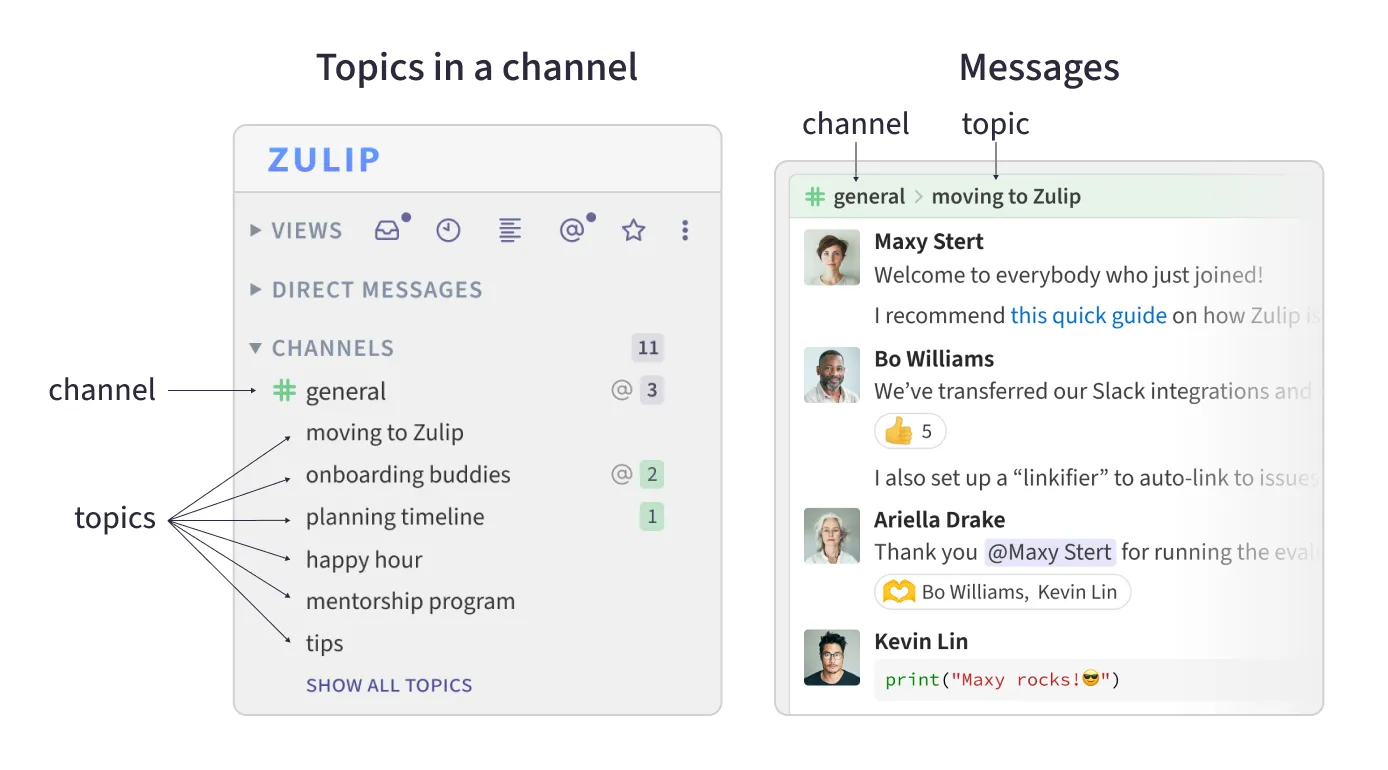
Learn how to use Zulip with the Getting Started with Zulip page. On the page, you can learn how to start a conversation, and also how to set up Zulip to your preference.
The channels in this space are organised into a few folders.
- WELCOME TO GLOBIAS: Orientation channels for new members to introduce themselves, or find information and resources.
- TEAM/WORK_GROUP/TASK_GROUP: Channels for each WG/TG to coordinate activities.
- GENERAL: For GloBIAS-wide messages.
Click on "browse ... more channels" in the left sidebar to find all the channels you can subscribe to.
GloBIAS uses Google Workspace as a platform for sustained collboration.
Therefore, you will need an email address associated with a Google account. This can either be a Gmail, a private email associated with Google account, or your work email if you are using Google Workspace as work. For a work mail within a Google Workspace, access can depend on the administrator settings in your workspace.
We use Google Groups to create
- a straightforward way of contacting everyone interested in the association
- our GloBIAS newsletter emailing list for members
- WG/TGs for specific topics
without making emails visible. Linked to each WG/TG's Google Groups, are shared drives ('shared with me'), which contain all relevant materials created by the group. Every member of the Google Group can create, edit, and comment on the content of a shared drive.
A GloBIAS Calendar was created to list all GloBIAS related meetings and events. This calendar is shared with all association members for them to be continously updated on planned events. All GloBIAS WG/TG Meetings should be created in the common GloBIAS calendar using Google meet by the TG/WG leads.
As the GloBIAS calendar is shared, you should be able to see all events related to GloBIAS. You will also receive an email with the link when we add you to the GloBIAS member association group to enable sharing. If you have problems integrating the calendar into your standard calendar software, please email info@globias.org and we will aim to help you.
Please bear in mind that GloBIAS is a global society, with members working across timezones.
When organising meetings, using an alternating schedule can help a large group of people across different time zones to work together. The "add global time" button can also help to communicate event times conveniently.
When making major decisions, soliciting opinions with written, asynchronous discussion or polls can ensure more equitable access across time zones.
Members are expected to abide by the GloBIAS code of conduct.
- Youtube: Recordings of seminars and past events
- Zenodo GloBIAS community: Slides from previous presentations and events
- GitHub