Bad pixelation after mask is set a dimension. #16

Description

@PrimaryFeather I've been playing with this one as you suggested and found this:
I run this inside an extended ImageLoader, that is used inside a feathers List as background. Project is running at a scale factor of 2.
Mask is an Image with scale9grid. The size and general shape of mask it kept but not the
var image:Image = new Image(IMAGE_TEXTURE);
image.width = 200;
image.height = 100;

var mask:Image = new Image(MASK_TEXTURE); // 67x51
mask.scale9Grid = new Rectangle(25, 25, 1, 1);

mask.width = 200; // Problem here
mask.height = 100;

var pixelMask:PixelMaskDisplayObject = new PixelMaskDisplayObject();
pixelMask.addChild(image);
pixelMask.pixelMask = mask;

this.addChild(pixelMask);
Result without mask width (left) and with mask width (right):
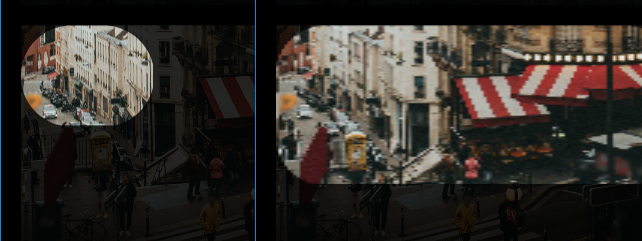
You can see the original Image element faded out. I wasn't able to use the original Image, probably needs more overrides. My code actually takes all dimensions from this.actualWidth and this.actualHeight, but I still think the example above should show the problem.
One extra fact:
Pixelation is not based on scale factor, but rather the scale of the mask. With mask.width = 1200, the image looks like it has horizontal motion blur. Probably scaled down drawn to texture and scaled up.