This file contains the full process of DSR integration with pose estimation and grasping components.
Refer to dsr-graph for dependencies and installation.
Refer to dsr-graph for minimal running components.
In order to perform grasping on a specific object in autonomy_lab.ttt scene :
-
Add the required object to the scene. Objects can be found here.
-
Update
grasp_objectparameter in graspDSR config file with the required object name. Objects names can be found here. -
Run
rcnodein a separate terminal. -
The following components must be running on separate terminals :
- idserver : responsible for initalizing G and providing nodes ids.
- viriatoDSR : an interface between G and environment adapter.
- viriatoPyrep : environment adapter, interacts with CoppeliaSim simulator.
- graspDSR : an interface between G and
objectPoseEstimationcomponent. - objectPoseEstimation : a component that performs DNN pose estimation using RGBD images.
-
In certain cases, where the robot isn't near the objects to be grasped, the following components are needed for robot navigation :
- social_navigation : responsible for robot navigation through the scene.
- yolo-tracker : a component that performs object detection and tracking using YOLO DNN.
Refer to the main README for full description of pose estimation and grasping DSR workflow.
The process of integrating pose estimation and grasping with DSR goes as follows :
-
First, I had to finish a complete component of pose estimation, which is
objectPoseEstimation. This component doesn't operate directly on the shared graph, however it's a separate component that is used to estimate objects' poses from RGBD to guide the grasping procedure. -
Consequently, a component has to be developed to act as an interface between the shared graph and
objectPoseEstimationcomponent. That isgraspDSRcomponent, which is a DSR component responsible for reading the RGBD data from the shared graph, passing it toobjectPoseEstimationcomponent and injecting the estimated poses in the shared graph. -
Since the final object pose can, sometimes, be hard to reach by the robot arm,
graspDSRcomponent has to progressively plan a set of dummy targets for the arm to follow, in order to reach the final target object. In other words,graspDSRcomponent plans some keypoints on the path from current arm pose to the estimated object pose. -
Doing so,
viriatoDSRcomponent passes the dummy targets toviriatoPyrepcomponent, which moves the arm, using these targets, by calling the embedded Lua scripts in the arm, until the arm reaches the final target object. -
Also, we need many DNN Python components that acts like services to the C++ agents interacting with DSR. Consequently, we created a new Github repository named DNN-Services, which contains all the DNN components that serve DSR agents, including object detection and pose estimation.
-
In conclusion, our DSR system consists of :
- An interface component that interacts with the external environment, which is real or simulated environment.
- The shared memory (G), which holds the deep state representation (DSR) of the environment.
- Agents, which are C++ components that interact with the graph through RTPS.
- DNN services, which are Python components that perform learning tasks, like perception and others.
-
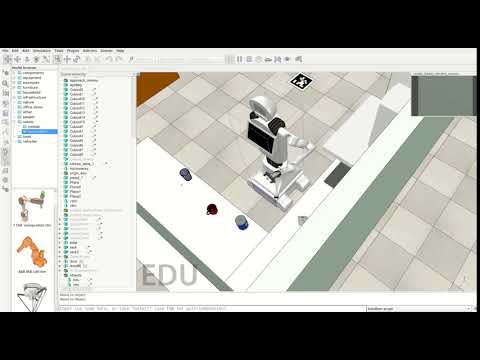
Next, I tried the arm grasping in DSR system on simulator poses and a simple setting, in order to check the validity of the embedded Lua scripts in DSR settings. Here is a quick example :
-
At the same time, I started developing
graspDSRthrough the following steps :- Connect
graspDSRtoobjectPoseEstimation, wheregraspDSRreads all RGBD data from the shared graph and then callsobjectPoseEstimationto get the estimated poses of the objects in the scene. - Convert quaternions into euler angles and project the estimated poses from camera coordinates to world coordinates using
Innermodel sub-API. - Insert a graph node of the required object to be grasped and inject its DNN-estimated poses with respect to the world.
- Read the arm target graph node and check whether the required object is within the arm's reach.
- If so, plan a dummy target to get the arm closer to the object and insert that dummy target pose as the arm target pose in the graph.
- Repeat the previous steps, until the arm reaches the required target.
- Connect
-
Finally,
viriatoDSRreads the arm target poses and passes them toviriatoPyrep, which uses these poses to move the robot arm, progressively, towards the required object. -
Thus, the pose estimation and grasping pipeline is completely integrated with DSR.
Refer to robocomp/dsr-graph issues and robocomp/robocomp issues for problems during integration.
-
DSR compilation requires GCC 9+, while objectPoseEstimation requires GCC 8 or older :
- Install multiple C and C++ compiler versions :
sudo apt install build-essential
sudo apt -y install gcc-7 g++-7 gcc-8 g++-8 gcc-9 g++-9
- Use the
update-alternativestool to create list of multiple GCC and G++ compiler alternatives :sudo update-alternatives --install /usr/bin/gcc gcc /usr/bin/gcc-7 7 sudo update-alternatives --install /usr/bin/g++ g++ /usr/bin/g++-7 7 sudo update-alternatives --install /usr/bin/gcc gcc /usr/bin/gcc-8 8 sudo update-alternatives --install /usr/bin/g++ g++ /usr/bin/g++-8 8 sudo update-alternatives --install /usr/bin/gcc gcc /usr/bin/gcc-9 9 sudo update-alternatives --install /usr/bin/g++ g++ /usr/bin/g++-9 9
- Check the available C and C++ compilers list on your system and select desired version by entering relevant selection number :
sudo update-alternatives --config gcc
sudo update-alternatives --config g++
- Install multiple C and C++ compiler versions :
-
"NotImplementedError: Must be overridden" exception in pyrep/objects/object.py, when running viriatoPyrep :
- Comment out the following lines in
/home/xxxyour-userxxx/.local/lib/python3.6/site-packages/pyrep/objects/object.py:assert_type = self._get_requested_type() actual = ObjectType(sim.simGetObjectType(self._handle)) if actual != assert_type: raise WrongObjectTypeError( 'You requested object of type %s, but the actual type was ' '%s' % (assert_type.name, actual.name))
- Comment out the following lines in
-
DSR agents compilation requires OpenCV3 :
- Install OS dependencies :
sudo apt-get install build-essential cmake pkg-config unzip

sudo apt-get install libopencv-dev libgtk-3-dev libdc1394-22 libdc1394-22-dev libjpeg-dev

sudo apt-get install libavcodec-dev libavformat-dev libswscale-dev libxine2-dev

sudo apt-get install libv4l-dev libtbb-dev libfaac-dev libmp3lame-dev libtheora-dev

sudo apt-get install libvorbis-dev libxvidcore-dev v4l-utils libopencore-amrnb-dev libopencore-amrwb-dev

sudo apt-get install libjpeg8-dev libx264-dev libatlas-base-dev gfortran
- Pull
opencvandopencv_contribrepositories :cd ~ git clone https://github.com/opencv/opencv.git git clone https://github.com/opencv/opencv_contrib.git
- Switch to version
3.4:cd opencv_contrib git checkout 3.4 cd ../opencv git checkout 3.4
- Build OpenCV3 without extra modules :
mkdir build
cd build
cmake -D CMAKE_BUILD_TYPE=Release -D CMAKE_INSTALL_PREFIX=/usr/local ..
make -j$(nproc)
sudo make install
- Build OpenCV3 with extra modules :
make clean
cmake -DOPENCV_EXTRA_MODULES_PATH=../../opencv_contrib/modules -DBUILD_opencv_legacy=OFF -DCMAKE_CXX_FLAGS=-std=c++11 ..
make -j$(nproc)
sudo make install
- Install OS dependencies :
-
This application failed to start because no Qt platform plugin could be initialized :
-
This problem can appear when trying to start
viriatoPyrep, due to compatibility issues with Qt version in OpenCV and VREP. -
This problem is solved by installing
opencv-python-headless:pip install opencv-python-headless
-