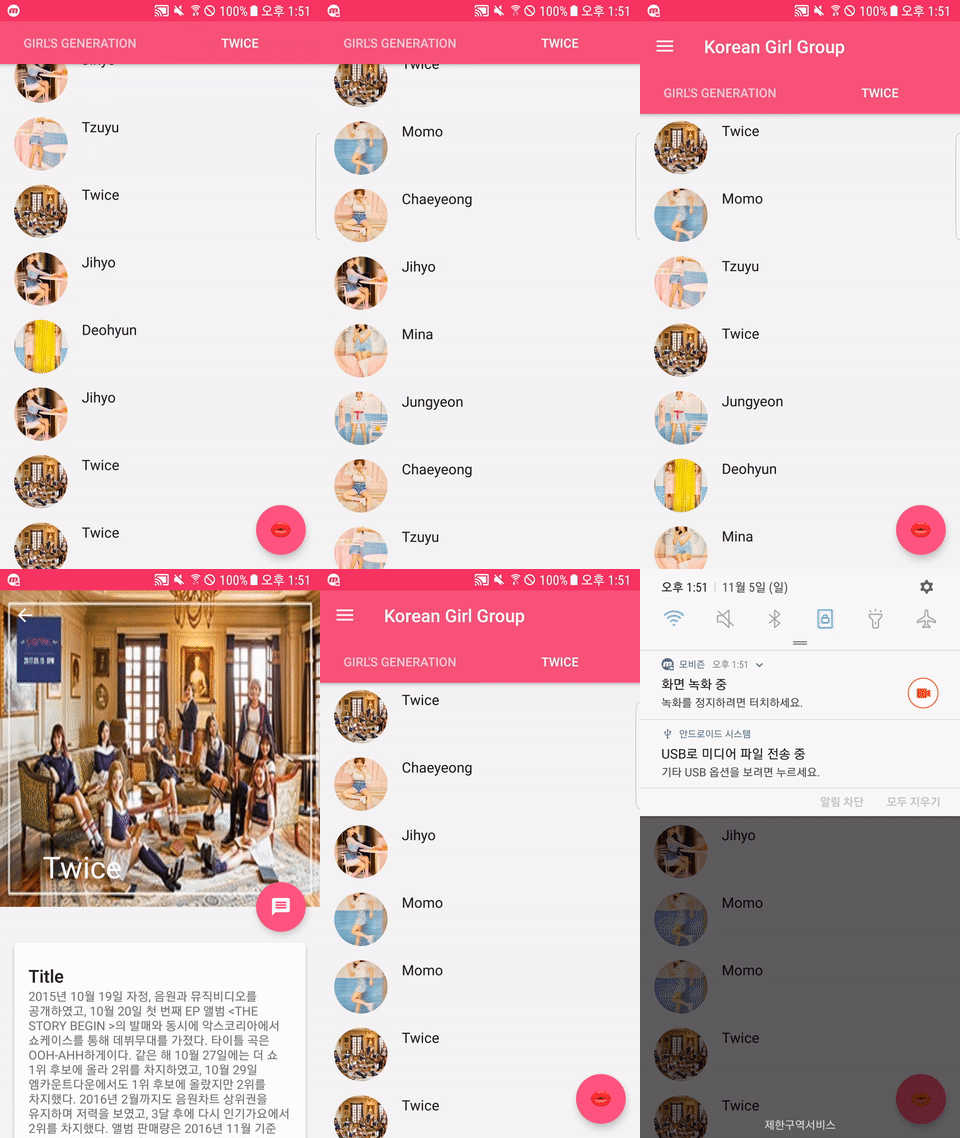
- Kotlin Girls Group version[소녀시대,트와이스]
- DrawerLayout
- NavigationView
- FloatActionButton hide/show
- FABHideWhenScrollingBehavior(app:layout_behavior)
- Glide 4.4.0
- TabLayout
- RecyclerView with SwipeRefreshLayout
- ViewPager
- Collapsing Toolbar
- Circle Image
- Android Transition
- build.gradle[Project]
    ext.kotlin_version = '1.2.10'
    repositories {
        google()
        jcenter()
    }
    dependencies {
        classpath 'com.android.tools.build:gradle:3.0.1'
        classpath "org.jetbrains.kotlin:kotlin-gradle- plugin:$kotlin_version"
        classpath "org.jetbrains.kotlin:kotlin-android-extensions:$kotlin_version"
    }
apply plugin: 'com.android.application'
apply plugin: 'kotlin-android'
apply plugin: 'kotlin-android-extensions'
apply plugin: 'kotlin-kapt'
, , ,  ,
dependencies {
    compile 'com.android.support:design:27.+'
    compile 'com.android.support:cardview-v7:27.+'

    //Kotlin Glide Setting
    compile 'com.github.bumptech.glide:glide:4.4.0'
    kapt 'com.github.bumptech.glide:compiler:4.4.0'
    compile 'com.github.bumptech.glide:annotations:4.4.0'

    //Circle ImageView
    compile 'de.hdodenhof:circleimageview:2.2.0'
}- apply plugin: 'kotlin-kapt' 를 app 레벨에서 추가해 주세요
- Glide Annotation 처리를 위해 [위와 같이 kapt 로 추가해 주세요]
- AndroidManifest.xml에 meta-data Tag를 설정하지 마세요
- 다음을 코딩 후 스튜디오에서 Build/Rebuild Project를 한번 해주세요
@GlideModule
class GirlGroupGlideModule: AppGlideModule(){

   override fun applyOptions(context: Context?, builder: GlideBuilder?){
       super.applyOptions(context, builder)

       val cacheCalculator = MemorySizeCalculator.Builder(context).build()
       val defaultMemoryCacheSize = cacheCalculator.memoryCacheSize
       val defaultBitmapPoolSize = cacheCalculator.bitmapPoolSize

       //Memory 20% 더 사용
       val girlRAMCacheSize = (1.2 * defaultMemoryCacheSize).toLong()
       val girlBitmapPoolSize = (1.2 * defaultBitmapPoolSize).toLong()

       builder?.setMemoryCache(LruResourceCache(girlRAMCacheSize))
       builder?.setBitmapPool(LruBitmapPool(girlBitmapPoolSize))

       /*val diskCacheSize = 1024 * 1024 * 100
       builder?.setDiskCache(InternalCacheDiskCacheFactory(context,
                                                          diskCacheSize))

       val downloadDirectoryPath =
                    Environment.getDownloadCacheDirectory().getPath()
       builder?.setDiskCache(DiskLruCacheFactory(downloadDirectoryPath,                                                              "girlCache", diskCacheSize))*/
   }
}/*
* Created by pyoinsoo on 2018-01-07
* [email protected]
* RecyclerView Scrolling FAB hide/show Behavior
* Float Action Button layout속성에 다음을 추가
* app:layout_behavior="com.pyoinsoo.kotlin.design.support.FABHideWhenScrollingBehavior"
*/
class FABHideWhenScrollingBehavior: FloatingActionButton.Behavior {
//constructor() : super()
constructor(context: Context?, attrs: AttributeSet?) : super(context, attrs)
/*
* FloatActionButton의 Dependency View(Current RecyclerView)
*/
override fun layoutDependsOn(parent: CoordinatorLayout?, child:FloatingActionButton?, dependency: View?)
= dependency is RecyclerView
/*
* FloatActionButton Behavior[스크롤시 보이기/안보이기]
*/
override fun onNestedScroll(coordinatorLayout: CoordinatorLayout,
child: FloatingActionButton,
target: View,
dxConsumed: Int, dyConsumed: Int,
dxUnconsumed: Int, dyUnconsumed: Int, type: Int) {
//Down Scroll
if (child.visibility == View.VISIBLE && dyConsumed > 0) {
//FloatingActionButton.OnVisibilityChangedListener은 SAM이 아니므로
//object 객체로 만든다
child.hide(object: FloatingActionButton.OnVisibilityChangedListener(){
override fun onHidden(fab: FloatingActionButton?) {
super.onHidden(fab)
fab?.visibility = View.INVISIBLE
}
})
//Up Scrolling
} else if (child.visibility == View.INVISIBLE && dyConsumed < 0) {
child.show()
}
}
override fun onStartNestedScroll(coordinatorLayout: CoordinatorLayout,
child: FloatingActionButton,
directTargetChild: View,
target: View, axes: Int, type: Int): Boolean {
/*
* Vertical Scrolling Check(수직인지)
*/
return type == ViewCompat.TYPE_TOUCH && axes == ViewCompat.SCROLL_AXIS_VERTICAL
}
}