


Download Spotify tracks, albums & playlists in FLAC or AAC
via Tidal, Qobuz & Amazon Music
# Install dependencies
poetry install

# Download album
poetry run sexify download "https://open.spotify.com/album/4uLU6hMCjMI75M1A2tKUQC"

# Download playlist (using short alias)
poetry run sexify dl "https://open.spotify.com/playlist/37i9dQZF1DXcBWIGoYBM5M"

# Analyze audio quality
poetry run sexify analyze ~/Music/downloaded_song.flac| Feature | Description |
|---|---|
| 🎧 Lossless FLAC | 16/24-bit, up to 192kHz |
| 🎵 Lossy AAC | 96/160/320 kbps for smaller files |
| 🔗 Spotify URLs | Tracks, albums, playlists |
| 🎯 Multi-Source | Tidal, Qobuz, Amazon Music with automatic fallback |
| 📊 Audio Analysis | Check sample rate, bit depth, and duration |
| 🏷️ Rich Metadata | ID3 tags + embedded synced lyrics |
| 🖼️ Hi-Res Artwork | Apple Music artwork (1000x1000) embedded |
| 🔄 Service Fallback | Auto-tries other services if primary fails |
| ⚙️ Configurable | YAML config + CLI flags |
- Python 3.9+
- Poetry (Python package manager)
- FFmpeg (for Tidal DASH streams)
# Install Homebrew (if not installed)
/bin/bash -c "$(curl -fsSL https://raw.githubusercontent.com/Homebrew/install/HEAD/install.sh)"

# Install Python & Poetry
brew install python poetry ffmpeg

# Clone and setup
git clone https://github.com/ManOfInfinity/sexify.git
cd sexify
poetry config virtualenvs.in-project true
poetry install# Install Chocolatey (Run PowerShell as Admin)
Set-ExecutionPolicy Bypass -Scope Process -Force
[System.Net.ServicePointManager]::SecurityProtocol = [System.Net.ServicePointManager]::SecurityProtocol -bor 3072
iex ((New-Object System.Net.WebClient).DownloadString('https://community.chocolatey.org/install.ps1'))
# Install dependencies
choco install python poetry ffmpeg -y
# Clone and setup
git clone https://github.com/ManOfInfinity/sexify.git
cd sexify
poetry config virtualenvs.in-project true
poetry install# Install dependencies
sudo apt update
sudo apt install python3 python3-pip ffmpeg curl -y
# Install Poetry
curl -sSL https://install.python-poetry.org | python3 -
# Add Poetry to PATH (add to ~/.bashrc for persistence)
export PATH="$HOME/.local/bin:$PATH"
# Clone and setup
git clone https://github.com/ManOfInfinity/sexify.git
cd sexify
poetry config virtualenvs.in-project true
poetry install💡 Tip:
poetry config virtualenvs.in-project truecreates the.venvfolder inside the project directory, making it easier to manage.
sexify [URL] [flags]
sexify [command]| Command | Description |
|---|---|
download / dl |
Download track, album, or playlist from Spotify URL |
analyze |
Analyze FLAC audio quality |
| Flag | Description | Default |
|---|---|---|
-o, --output |
Output directory | Config output_dir |
-s, --service |
Source: tidal, qobuz, amazon |
Config service |
-q, --quality |
Quality: LOSSLESS, HI_RES_LOSSLESS, 27, etc. |
Config per-service |
--lyrics/--no-lyrics |
Embed synced lyrics | true |
--cover-max/--no-cover-max |
Use max quality cover art | true |
# Custom output directory
poetry run sexify dl -o ~/Music "https://open.spotify.com/album/xxx"

# Use Qobuz instead of default service
poetry run sexify dl -s qobuz "https://open.spotify.com/playlist/xxx"

# Use Amazon Music
poetry run sexify dl -s amazon "https://open.spotify.com/track/xxx"The tool checks for config.yaml in the current directory or ~/.sexify/config.yaml.
output_dir: "~/Music/Downloads"

# Folder structure supports: {artist}, {album}, {year}, {service}, {source}
folder_template: "{album} - {album_artist} - {year} {source}"
filename_template: "{track}. {title} - {artist}"

# Default service (with automatic fallback to others)
service: "tidal"

# Per-platform settings
tidal:
  quality: "HI_RES_LOSSLESS"  # See quality options below

qobuz:
  quality: "27"  # 5=MP3, 6=CD, 7=Hi-Res, 27=Hi-Res Max

amazon:
  region: "US"  # US or EU (quality auto-max)

# Spotify (for URL resolution)
spotify:
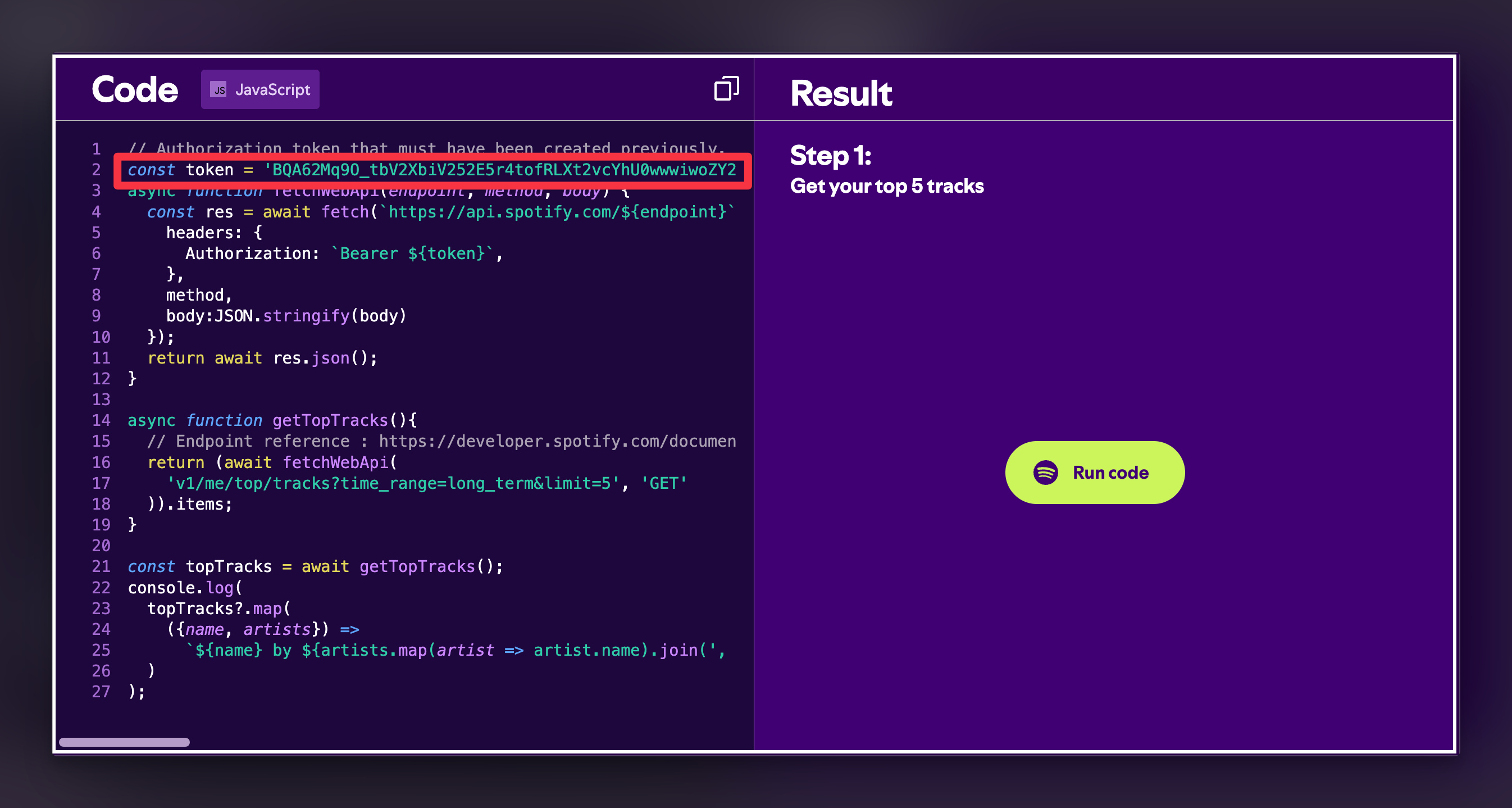
token: "" # See below for how to get thisSpotify is currently not allowing new app creation on their developer dashboard. As a workaround, you can extract a token directly:
-
Go to developer.spotify.com and Log in
-
Scroll down to the "Web API" section (or any example with "Run code")
-
You'll see an interactive console like this:
-
Open your browser's Developer Tools (F12) → Console
-
Look for the
tokenvariable in the JavaScript code -
Copy the token value and paste it in your
config.yaml:
spotify:
  token: "BQA...your_token_here..."
⚠️ Note: These tokens expire after ~1 hour. You'll need to refresh it periodically.
| Service | Option | Quality | Bitrate / Specs | Format | Ext |
|---|---|---|---|---|---|
| 🌊 TIDAL | HI_RES_LOSSLESS |
⭐ Hi-Res | 24-bit / 192kHz | FLAC | .flac |
LOSSLESS |
💿 CD | 16-bit / 44.1kHz | FLAC | .flac |
|
HIGH |
🎵 High | 320 kbps | AAC | .m4a |
|
NORMAL |
📉 Normal | 160 kbps | AAC | .m4a |
|
LOW |
📉 Low | 96 kbps | AAC | .m4a |
|
| 🎧 QOBUZ | 27 |
⭐ Max | 24-bit / 192kHz | FLAC | .flac |
7 |
🎵 Hi-Res | 24-bit / 96kHz | FLAC | .flac |
|
6 |
💿 CD | 16-bit / 44.1kHz | FLAC | .flac |
|
5 |
📉 MP3 | 320 kbps | MP3 | .mp3 |
|
| 🛒 AMAZON | Auto |
⭐ UHD | 24-bit / 192kHz | FLAC | .flac |
If your primary service doesn't have a track, Sexify automatically tries others:
tidal  → qobuz  → amazon
qobuz  → tidal  → amazon
amazon → tidal  → qobuz
This project wouldn't be possible without these amazing services:
| Service | Usage |
|---|---|
| DoubleDouble.top | Amazon Music downloads |
| Squid.wtf | Qobuz & Tidal API services |
| Song.link | Cross-platform music linking |
| LRCLIB | Synced lyrics database |
Special thanks to the developers and maintainers of these services for making lossless music accessible.
Educational Purpose Only
- This tool is provided for educational and personal use only.
- The developer does not own, host, or distribute any copyrighted content.
- All music is sourced from third-party APIs and publicly available services on the internet.
- The developer is not responsible for any copyright infringement, misuse, or legal issues arising from the use of this software.
- Please support artists by purchasing their music or subscribing to official streaming services.
- By using this software, you agree that you are solely responsible for ensuring compliance with your local laws.
If you find Sexify useful, consider supporting development:
| Crypto | Network | Address |
|---|---|---|
| LTC | BSC | 0xe1c5c84d35802210c211f61c7c890b5d3ac44dc2 |
| LTC | Litecoin | LeS8yVN6X4Dp8EqPiFXCZGVy8dshMy3s2g |
| USDC | BSC | 0xe1c5c84d35802210c211f61c7c890b5d3ac44dc2 |
| BTC | BSC | 0xe1c5c84d35802210c211f61c7c890b5d3ac44dc2 |
| SOL | Solana | DZKShaYA5dVCT5TAhDc73nX6KoiWQUtGzF3t2A3vuddV |
| SOL | BSC | 0xe1c5c84d35802210c211f61c7c890b5d3ac44dc2 |
MIT License - see LICENSE
Built with ❤️ by ManOfInfinity