
tigertag.io · Public API · Ecosystem · Press kit





TigerTag is the open RFID protocol used to identify raw materials in manufacturing — primarily 3D-printing filament spools and resin bottles. One small NFC chip on the spool tells any compatible reader the material, the brand, the print settings, the remaining quantity, and proves the spool is genuine with a cryptographic signature — all fully offline and free for users.
TigerTag Corp grants an irrevocable, worldwide, royalty-free right to implement this specification in any product or software, open source or proprietary, without restriction and without further permission.
You do not need a licence to implement TigerTag. You do not need to register, ask, or pay — at any volume, in any product. The specification is CC-BY-4.0, the reference database is CC0, and the sample code is Apache-2.0 with an express patent grant.
The TigerTag™ name, the logo, the TigerTag+ signature service, and official product-ID allocation are separate, and are not required to implement the protocol.
Putting the TigerTag logo on a product, a chip or its packaging is a statement about authenticity, not compatibility. That requires certification — an audit of your product and your process, and a paid service, on the model the Connectivity Standards Alliance uses for Zigbee and Matter.
See LICENSING.md, TRADEMARK.md and
CERTIFICATION.md.
Most RFID material identification in 3D printing today is shipped by printer manufacturers, for their own filament, inside their own ecosystem. The chip is a lock: it identifies the vendor's spool to the vendor's machine, and it exists to keep you buying the vendor's material. A third-party filament brand cannot use it, and a user's independent spool remains invisible to the printer.
TigerTag exists to give independent filament and resin brands a better answer. It is deliberately:
- Neutral — owned by no printer manufacturer, favouring no machine.
- Agnostic — the chip describes the material, not the device that reads it. Nothing in the format is tied to a brand of printer.
- Cross-platform — one spool is understood by every compatible printer, slicer, app, dryer, and scale, on any operating system.
- Turnkey and low-cost — because TigerTag produces media for the whole ecosystem at once and buys at scale, an independent brand gets a more capable chip than a printer vendor's proprietary one, at a fraction of what developing its own would cost.
The result is a straightforward proposition: a third-party filament brand should not have a worse chip than the machine manufacturer that locks its own filament into its own ecosystem. With TigerTag it has a stronger one — offline cryptographic authenticity, a reusable chip, and remote updates — and it works everywhere.
This is not a fight with other open-source efforts, and TigerTag does not ask anyone to pick a side. A spool can carry more than one tag, and a reader can support more than one format. If you maintain another open material-identification protocol and want to interoperate, open an issue — we would rather converge than compete.
What TigerTag opposes is not other standards. It is vendor lock-in. That is why the protocol is free to implement, irrevocably, why the reference database is public domain, and why nothing in this repository requires anyone's permission.
Adopting TigerTag makes a brand compatible with every other TigerTag
adopter, automatically. That network effect is the whole point, and it
is also why forking the specification helps no one — see
CONTRIBUTING.md.
TigerTag is the #1 RFID material-identification protocol worldwide. It is the most deployed open protocol in its category, with native support across multiple printer and slicer ecosystems and across the largest independent filament and resin brands.
| Metric | TigerTag (2026) |
|---|---|
| Chips deployed in production | 2,000,000+ worldwide |
| Filament & resin brands shipping it | eSun, Rosa3D, Sunlu, R3D, Landu — and others |
| Printers / slicers with integration | Snapmaker, Bambu Lab, FlashForge, Elegoo, Creality — more coming |
| Native HueForge integration | ✅ Transmission Distance stored on the chip (only RFID protocol that does this) |
| Native TD1s by Ajax support | ✅ Only RFID material protocol read & written by TD1s |
| Offline cryptographic authenticity | ✅ ECDSA-P256, verified without any server |
| Chip reusable after end of spool | ✅ Never locked in write — re-use for any NFC/NDEF purpose |
| Remote update by the manufacturer | ✅ TigerTag+ cloud push (no product recall needed) |
| Cost for end users & app developers | Free — protocol, SDK, desktop app, mobile apps, public API |
| Official open-source desktop manager | TigerTag Studio Manager (Windows / macOS / Linux) |
| Official mobile apps | TigerTag RFID Connect — free on iOS and Android |
| DIY hardware | Tiger Scale (open-source ESP32 scale, ~30 € BoM) |
| Plug-and-play hardware | TigerTag Pod (NFC reader / writer) |

Tiger Scale — open-source ESP32 smart scale, ~30 € BoM, identifies and weighs a TigerTag spool in real time.
Three capabilities are EXCLUSIVE to TigerTag — no other RFID material-identification protocol offers them.
Every TigerTag+ chip written by a partner brand is signed with the
brand's private key using ECDSA-P256 over SHA-256(UID + block 4 + block 5). The public key is shipped inside the protocol (see
database/id_version.json), so any reader
— a phone, a slicer, a custom firmware, an air-gapped workshop PC —
can verify authenticity without any network connection, without any
cloud round-trip, without any vendor server.
No other RFID material protocol ships offline authenticity verification as a standard feature. TigerTag is the only one.
When a TigerTag spool is empty, the physical chip is not locked in write. The same chip can be re-written as a new TigerTag, as a generic NFC / NDEF tag, or repurposed for any other use. Zero electronic waste — the chip outlives the spool. Every other major RFID material protocol locks the chip permanently at end of life.
A chip is burned (written) once at the filament factory. It does not stay frozen there.
When a brand later discovers that a batch needs corrected temperatures,
an updated HueForge TD, or new metadata, it publishes the fix on the
TigerTag cloud API. A compatible reader encountering a chip already in
the field compares the chip against the API (diff_api()) and applies
the corrections to the chip itself (patch_from_api()). No product
recall, no chip replacement, no truck rolls.
This works because of two properties that reinforce each other:
- The chip is never write-locked (§2), so it can be corrected in place, in the user's hands, by any authorised reader.
- The TigerTag+ signature covers
SHA-256(uid ‖ id_tigertag ‖ id_product)— the chip's identity. It does not cover the mutable settings fields. Correcting a print temperature therefore leaves the signature valid; the spool remains provably genuine.
Authenticity is bound to identity; identity does not change. Settings are allowed to. No other RFID material protocol supports manufacturer-pushed remote updates.
Two more EXCLUSIVE integrations are worth calling out:
- HueForge reads Transmission Distance straight from the chip (no manual entry).
- TD1s by Ajax, the open-source filament manager, natively reads and writes TigerTag.
Everything in the TigerTag stack is free to use. "Open source" is stated per component below, because it is not true of all of them:
- Protocol specification — open, CC-BY-4.0, free to implement in any product, open source or proprietary.
- Reference database (
database/*.json) — public domain, CC0-1.0. - Sample code — open source, Apache-2.0.
- TigerTag SDK for Python — open source, Apache-2.0.
- TigerTag SDK for JavaScript — open source, Apache-2.0.
- Tiger Studio / TigerTag Studio Manager (desktop) — open source, MIT.
- Tiger Scale firmware — open source, MIT, ~30 € BoM.
- TigerTag RFID Connect (iOS + Android) — free to use, but proprietary. Not open source.
- Public API at https://api.tigertag.io/api:tigertag — free, no key required for read access.
No subscription. No lock-in. No paywalled features.
The paid path is optional and separate from the protocol: officially
supplied TigerTag media, the TigerTag™ mark on commercial packaging,
TigerTag+ signature issuance, and official product-ID allocation. None
of it is required to implement the protocol, and it never will be. See
LICENSE_COMMERCIAL.md.
This document defines the data structure and binary format used by TigerTag-compatible RFID chips. Unlike closed formats, TigerTag is 100% offline, open-source, and brand-neutral, ensuring long-term stability and compatibility across ecosystems.
TigerTag uses a 144-byte payload laid out across pages 0x04–0x27. The chip is ISO 14443-3 compatible (NTAG21x family). The binary layout is sized so it fits within the smallest variant — all larger variants remain compatible because the extra pages are simply unused.
| Type | ID TigerTag | Written by | Purpose |
|---|---|---|---|
| TigerTag | 0x5BF59264 |
Maker / end user | Standard offline tag. Everything needed to print is on the chip. |
| TigerTag+ | 0xBC0FCB97 |
Partner brand | Same offline data, plus ECDSA signature and a cloud product ID for updates. |
| TigerTag Init | 0x6C41A2E1 |
Factory / blank tag | Initialization marker — chip is ready to receive a real TigerTag write. |
The canonical names are TigerTag, TigerTag+, and TigerTag Init.
Offlineis an operating mode of standard TigerTag tags, not a protocol name — do not use it as a substitute label.

🔒 Pages 0x18–0x27 are reserved for an optional ECDSA-P256 digital signature that verifies the origin of TigerTag+ chips written by filament / resin manufacturers.
All multi-byte values are encoded in big-endian format. The chip is ISO 14443-3 compatible (NTAG21x family).
| Page | Byte(s) | Size | Field | Type | Description |
|---|---|---|---|---|---|
0x00 |
0-2 |
3 bytes | UID0-UID2 | bytes | First part of the 7-byte UID, assigned by the chip manufacturer at production |
0x00 |
3 |
1 byte | BCC0 | u8 | UID block check character |
0x01 |
0-3 |
4 bytes | UID3-UID6 | bytes | Second part of the 7-byte UID, assigned by the chip manufacturer at production |
0x02 |
0 |
1 byte | BCC1 | u8 | UID block check character |
0x02 |
1 |
1 byte | Internal | u8 | Manufacturer internal byte |
0x02 |
2-3 |
2 bytes | Lock bytes | bytes | Static lock bytes |
0x03 |
0-3 |
4 bytes | Capability Container | bytes | NFC Type 2 Tag capability container |
UID note : the 7-byte UID is stored in system pages
0x00-0x01. It is read-only, unique per chip, and assigned by the chip manufacturer at production. It is not part of the 144-byte user memory capacity, but it is required for TigerTag signature verification.UID in practice : the UID is exposed directly by NFC SDKs as a separate property — it does not need to be extracted from the page dump. All major NFC SDKs (Android NFC, iOS CoreNFC, flutter_nfc_kit, nfcpy, MFRC522, ACR122U) provide it natively alongside the page read. Used as raw bytes in signature verification — not as a hex string or decimal integer. The TigerTag payload always occupies pages 0x04–0x27. Extra pages on larger NTAG21x variants are unused.
| Page | Byte(s) | Offset | Size | Field | Type | Description |
|---|---|---|---|---|---|---|
0x04 |
0-3 |
+0 |
4 bytes | ID TigerTag | u32 BE | Format identifier (TigerTag / TigerTag+ / TigerTag Init) |
0x05 |
0-3 |
+4 |
4 bytes | ID Product | u32 BE | 0xFFFFFFFF for standard TigerTag, else TigerTag+ product ID |
0x06 |
0-1 |
+8 |
2 bytes | ID Material | u16 BE | Material type ID (see section 2.3) |
0x06 |
2 |
+10 |
1 byte | ID Aspect 1 | u8 | Primary visual aspect (see section 2.5) |
0x06 |
3 |
+11 |
1 byte | ID Aspect 2 | u8 | Secondary visual aspect (see section 2.5) |
0x07 |
0 |
+12 |
1 byte | ID Type | u8 | 0x8E=Filament, 0xAD=Resin (see section 2.6) |
0x07 |
1 |
+13 |
1 byte | ID Diameter | u8 | 0x38=1.75mm, 0xDD=2.85mm (see section 2.4) |
0x07 |
2-3 |
+14 |
2 bytes | ID Brand | u16 BE | Manufacturer/Brand ID (see section 2.7) |
0x08 |
0-3 |
+16 |
4 bytes | Color 1 (RGBA) | bytes | Primary color R/G/B/A |
0x09 |
0-2 |
+20 |
3 bytes | Measure | u24 BE | Quantity at manufacturing (see ID Unit) |
0x09 |
3 |
+23 |
1 byte | ID Unit | u8 | Measurement unit (see section 2.8) |
0x0A |
0-1 |
+24 |
2 bytes | Nozzle Temp Min | u16 BE | Minimum nozzle temperature (°C) |
0x0A |
2-3 |
+26 |
2 bytes | Nozzle Temp Max | u16 BE | Maximum nozzle temperature (°C) |
0x0B |
0 |
+28 |
1 byte | Dry Temp | u8 | Drying temperature (°C) |
0x0B |
1 |
+29 |
1 byte | Dry Time | u8 | Drying duration (hours) |
0x0B |
2 |
+30 |
1 byte | Bed Temp Min | u8 | Minimum bed temperature (°C) |
0x0B |
3 |
+31 |
1 byte | Bed Temp Max | u8 | Maximum bed temperature (°C) |
0x0C |
0-3 |
+32 |
4 bytes | Twin Tag ID & Timestamp | u32 BE | Seconds since 2000-01-01 GMT + twin tag pairing ID (see section 2.9) |
0x0D |
0-2 |
+36 |
3 bytes | Color 2 (RGB) | bytes | Secondary color R/G/B |
0x0D |
3 |
+39 |
1 byte | Reserved | u8 | Must be 0x00 |
0x0E |
0-2 |
+40 |
3 bytes | Color 3 (RGB) | bytes | Tertiary color R/G/B |
0x0E |
3 |
+43 |
1 byte | Reserved | u8 | Must be 0x00 |
0x0F |
0-1 |
+44 |
2 bytes | TD (HueForge) | u16 BE | HueForge Transmission Distance × 10 (see section 2.10) |
0x0F |
2-3 |
+46 |
2 bytes | Reserved | u16 | Must be 0x0000 |
0x10-0x16 |
all | +48 |
28 bytes | Custom Message | UTF-8 | Free text up to 28 bytes (emoji allowed) |
0x17 |
0-2 |
+76 |
3 bytes | Measure Available | u24 BE | Remaining quantity (updated by Tiger Scale) |
0x17 |
3 |
+79 |
1 byte | Reserved | u8 | Must be 0x00 |
0x18-0x1F |
all | +80 |
32 bytes | Signature R (ECDSA) | bytes | ECDSA signature part r (optional, see section 3) |
0x20-0x27 |
all | +112 |
32 bytes | Signature S (ECDSA) | bytes | ECDSA signature part s (optional, see section 3) |
Capacity check : 80 bytes user data (pages
0x04-0x17) + 64 bytes signature (pages0x18-0x27) = 144 bytes = full NTAG21x payload capacity.Implementer's note : the page/byte/offset columns above are normative. Any parser MUST use these exact offsets. The visual mapping in
assets/chip_layout.svgis provided for human reference and matches this table.
Sidecar metadata file that exposes the server-side last-modification timestamp of every reference dataset listed below (sections 2.1, 2.3–2.8). Useful for cache invalidation: clients can fetch this small file first and only re-download the JSON references whose timestamp has changed since their last sync.
GitHub JSON: View JSON reference on GitHub
🔗 Raw JSON link: https://raw.githubusercontent.com/TigerTag-Project/TigerTag-RFID-Guide/main/database/last_update.json
API Link: https://api.tigertag.io/api:tigertag/all/last_update
Format: JSON object — one entry per dataset, value is a Unix epoch in milliseconds (UTC).
Example response (comments shown for clarity — the real API returns plain JSON):
Decoding a timestamp:
- JavaScript:
new Date(1763073059935).toISOString()→"2025-11-13T22:30:59.935Z" - Python:
datetime.fromtimestamp(1763073059935 / 1000, tz=timezone.utc)
Key mapping:
versions→id_version.jsontypes→id_type.jsonbrands→id_brand.jsonfilament_diameters→id_diameter.jsonfilament_materials→id_material.jsonaspects→id_aspect.jsonmeasure_units→id_measure_unit.json
Reference implementations: ready-to-run Python scripts implementing the smart-diff sync described above are available in Sample code/:
sync_id_database_api.py— live TigerTag API (real-time freshness).sync_id_database_github.py— GitHub mirror (auto-synced every 6 h, ~6 h stale, no API traffic).sync_id_database_api_or_github.py— API primary with automatic GitHub fallback when the API is unreachable.
Drop one of these next to where you want the JSON files and run it — first run downloads everything, subsequent runs are no-ops when nothing has changed server-side.
The ID TigerTag field acts as a magic number / protocol identifier used to detect the TigerTag protocol variant stored on the chip.
GitHub JSON: View JSON reference on GitHub
🔗 Raw JSON link: https://raw.githubusercontent.com/TigerTag-Project/TigerTag-RFID-Guide/main/database/id_version.json
API Link: https://api.tigertag.io/api:tigertag/version/get/all
Examples:
0x6C41A2E1=1816240865→ TigerTag Init (Initialized)0x5BF59264=1542820452→ TigerTag0xBC0FCB97=3155151767→ TigerTag+ (standard TigerTag plus optional cloud-side metadata, written only by partner filament / resin manufacturers)
Naming note: TigerTag, TigerTag+, and TigerTag Init are the canonical protocol names. Offline describes the operating mode of standard TigerTag tags, but it is not the protocol name and MUST NOT be used as a replacement label for TigerTag.
API Link: https://api.tigertag.io/api:tigertag/product/get?uid=$UID_chip&product_id=$Id_Products
Example: https://api.tigertag.io/api:tigertag/product/get?uid=123456789&product_id=10
0x00000000=0→ Reserved (Init / blank product)0xFFFFFFFF=4294967295→ Reserved for all standard TigerTag (offline mode)0x00000001–0xFFFFFFFE=1–4294967294→ TigerTag+ product IDs (offline + cloud)
GitHub JSON: View JSON reference on GitHub
🔗 Raw JSON link: https://raw.githubusercontent.com/TigerTag-Project/TigerTag-RFID-Guide/main/database/id_material.json
API Link: https://api.tigertag.io/api:tigertag/material/get/all
Examples:
0x954B=38219→ PLA0x6025=24613→ PLA High Speed0x5042=20562→ ABS0xBF92=49074→ ABS-GF- etc.
GitHub JSON: View JSON reference on GitHub
🔗 Raw JSON link: https://raw.githubusercontent.com/TigerTag-Project/TigerTag-RFID-Guide/main/database/id_diameter.json
API Link: https://api.tigertag.io/api:tigertag/diameter/filament/get/all
Examples:
0x38=56→ 1.75mm0xDD=221→ 2.85mm
GitHub JSON:
View JSON reference on GitHub
🔗 Raw JSON link: https://raw.githubusercontent.com/TigerTag-Project/TigerTag-RFID-Guide/main/database/id_aspect.json
API Link: https://api.tigertag.io/api:tigertag/aspect/get/all
Examples:
0x15=21→ Clear0x5C=92→ Silk0x68=104→ Basix0x7B=123→ Wood- etc.
Aspect combination and multi-color handling:
ID Aspect 1 SHOULD describe the main visual finish or material effect of the filament, such as Basic, Silk, Matt, Wood, Glitter, Carbon, Marble, Pearl, Neon, Pastel, and similar visual properties.
ID Aspect 2 MAY be used either for an additional visual/material aspect or for the color composition mode. For example, a mono-color filament may use Aspect 1 = Matt and Aspect 2 = Carbon.
Multi-color behavior is determined by the color_count value of the selected aspects. Implementations SHOULD check ID Aspect 2 first for multi-color modes such as Bicolor, Tricolor, or Rainbow, then fallback to ID Aspect 1 only if needed.
The color_count value from the aspect reference dataset indicates how many colors are expected:
| Aspect label | color_count |
Recommended display |
|---|---|---|
| Bicolor | 2 |  two-color pie chart / split circle two-color pie chart / split circle |
| Tricolor | 3 |  three-color pie chart / split circle three-color pie chart / split circle |
| Rainbow | 3 |  circular left-to-right gradient circular left-to-right gradient |
To avoid contradictory metadata, aspects that define the number or distribution of colors SHOULD NOT be placed in both ID Aspect 1 and ID Aspect 2 at the same time.
Recommended usage:
ID Aspect 1= primary finish / material appearanceID Aspect 2= secondary finish / material appearance OR multi-color composition mode
Example:
- Basic red filament:
Aspect 1 = Basic,Aspect 2 = None - Matt carbon filament:
Aspect 1 = Matt,Aspect 2 = Carbon - Silk bicolor filament:
Aspect 1 = Silk,Aspect 2 = Bicolor - Matt tricolor filament:
Aspect 1 = Matt,Aspect 2 = Tricolor - Rainbow filament:
Aspect 1 = Basicor another finish,Aspect 2 = Rainbow
GitHub JSON: View JSON reference on GitHub
🔗 Raw JSON link: https://raw.githubusercontent.com/TigerTag-Project/TigerTag-RFID-Guide/main/database/id_type.json
API Link: https://api.tigertag.io/api:tigertag/type/get/all
Examples:
0x8E=142→ Filament0xAD=173→ Resin
GitHub JSON: View JSON reference on GitHub
🔗 Raw JSON link: https://raw.githubusercontent.com/TigerTag-Project/TigerTag-RFID-Guide/main/database/id_brand.json
API Link: https://api.tigertag.io/api:tigertag/brand/get/all
Examples:
0xC5DC=50652→ Polymaker0x8933=35123→ Bambu Lab0x694C=26956→ Creality0x4E19=19961→ Rosa3D0xBBFA=48058→ 3DXtech0xBBDA=48026→ eSun0xBE94=48788→ R3D0xCA91=51857→ Sunlu- etc.
GitHub JSON: View JSON reference on GitHub
🔗 Raw JSON link: https://raw.githubusercontent.com/TigerTag-Project/TigerTag-RFID-Guide/main/database/id_measure_unit.json
API Link: https://api.tigertag.io/api:tigertag/measure_unit/get/all
Examples:
0x15=21→ g0x23=35→ Kg0x4F=79→ L0x3E=62→ cl- etc.
The Time Stamp field in the TigerTag format serves a dual purpose that adds both traceability and pairing functionality.
This 4-byte field stores the number of seconds elapsed since 01/01/2000 GMT, providing a reliable, encoded date of fabrication for the spool. This information can be decoded by any compliant reader or software to determine when the filament was produced or packaged.
In addition to tracking production time, the Time Stamp acts as a spool pairing identifier. When two TigerTag RFID chips are written simultaneously for the left and right sides of the same spool, they receive the exact same timestamp value.
This shared value enables:
- Identifying both tags as part of the same spool.
- Supporting redundancy: if one tag fails or is unreadable, the twin can still provide valid metadata.
- Visual matching in user interfaces or spool management systems (e.g. "Left/Right tag matched" indicators).
🧠 Think of the Time Stamp as a "twin tag ID" in addition to being a clock — a clever way to bind two tags using time as the key.
In the TigerTag format, the field TD is reserved to store the
HueForge Transmission Distance Value. TigerTag is the only RFID
material-identification protocol that stores this value natively on
the chip — HueForge reads it without any manual entry.
Purpose:
- Defines how light passes through or is attenuated by the material in HueForge's simulation.
- Enables more realistic previews of prints, especially for lithophanes or color-sensitive layers.
Encoding:
- Length: 2 bytes (unsigned, big-endian)
- TD : value / 10
- Valid range: 0.1–100.0 (encoded 10–1000); values outside this range are invalid
Examples:
0x0000→ Undefined (no HueForge TD specified)0x0001= 1 → 0.1 (minimum allowed) = Opaque0x00E6= 230 → 23.00x03E8= 1000 → 100.0 (maximum allowed) = Translucent
Identification / measurement tools:
- Users can determine a material's HueForge TD using a TD1s device. TigerTag is the only RFID protocol supported natively by TD1s by Ajax.
- TD1s hardware (AJAX TD1S V1.0) available:
- Atome3D.com — https://www.atome3d.com/products/biqu-ajax-td1s-v1-0
- Tigertag.io — https://tigertag.io/fr/products/biqu-ajax-td1s-v1-0
TigerTag is a smart RFID-based tagging system used for identifying and authenticating raw materials. To ensure the authenticity of a TigerTag+, each chip stores a digital signature that proves it was created by a trusted source — and that signature can be verified without any network connection.
This document explains the verification process in a simple way.
A digital signature is like a unique stamp made using a private key. Only the original tag maker knows this key, so if the stamp is valid, you can be sure the tag is genuine.
To check if the tag is authentic, implementations MUST build the signed message from exactly three binary parts:
- UID — 7 raw bytes from system pages:
page0[0:3] + page1[0:4]. Used as binary bytes — NOT as a hex string, NOT as a decimal integer. - block4 — page
0x04, bytes 0–3: ID TigerTag (u32 BE, 4 bytes). - block5 — page
0x05, bytes 0–3: ID Product (u32 BE, 4 bytes).
Signed message: SHA-256( UID_bytes + block4 + block5 ) → 15 bytes total.
The public key is stored in database/id_version.json under the
public_key field of the entry matching the tag's ID TigerTag
value. Because the key ships with the protocol, no internet
connection is required to verify a signature.
- The UID (read-only and unique per tag).
- Block 4 and Block 5 (standard data for identification).
- A 64-byte signature (split into two parts: r and s), stored in memory pages starting from page 0x18.
- The tag is scanned.
- The UID, block 4, and block 5 are read.
- The 64-byte signature (r + s) is read.
- The software recreates the message: UID + block4 + block5.
- The ECDSA-P256 algorithm signs and verifies using SHA-256 internally.
- The public key is used to verify the signature against the message.
✅ If everything matches, the tag is declared authentic — and this check works 100% offline.
Without signature verification, anyone could clone a tag. This process protects your supply chain and ensures you're using trusted materials. Because verification is offline, it works in air-gapped factories, on slicers without internet, and on cheap embedded firmware.
- The private key is never shared and is only used to sign tags.
- The public key is embedded in the software to verify signatures.
- The ECDSA-P256 (Elliptic Curve Digital Signature Algorithm with the P-256 curve) is the method used here.
🔐 With this system, you get security, authenticity, and peace of mind for every TigerTag spool.
| Field | Hex | Decimal | Notes |
|---|---|---|---|
| UID | 04 A1 B2 C3 D4 E5 F6 | — | 7-byte chip UID (pages 0x00-0x01, read-only) |
| ID TigerTag | 0x5BF59264 | 1542820452 | TigerTag V1.0 |
| Product ID | 0xFFFFFFFF | 4294967295 | Maker version, (Always 0xFFFFFFFF) |
| Material ID | 0x954B | 38219 | PLA |
| Aspect1 | 0x68 | 104 | Basic |
| Aspect2 | 0x00 | 0 | (none) |
| Type ID | 0x8E | 142 | Filament |
| Diameter ID | 0x38 | 56 | 1.75 mm |
| Brand ID | 0x4E19 | 19961 | Rosa3D |
| Color RGBA | 0xFF0000FF | 4278190335 | Red |
| Measure | 0x0003E8 | 1000 | weight value |
| Unit ID | 0x15 | 21 | grams |
| Temp Min | 0x00C3 | 195 | °C nozzle minimum |
| Temp Max | 0x00E6 | 230 | °C nozzle maximum |
| Dry Temp | 0x32 | 50 | °C |
| Dry Time | 0x05 | 5 | Time in hours |
| Bed Temp Min | 0x32 | 50 | °C bed minimum |
| Bed Temp Max | 0x3C | 60 | °C bed maximum |
| Timestamp | 0x2F7A0A5C | 796527196 | Encoded as seconds since 01/01/2000 GMT (~2025-03-29 01:33:16 UTC) & twin tag ID |
| Color2 RGB | 0x00000000 | 0 | Default |
| Color3 RGB | 0x00000000 | 0 | Default |
| TD | 0x00E6 | 230 | HueForge TD = 23.0 |
| Message | Starter Red | Starter Red | custom user message (28 bytes max, may include emoji) |
| Measure Available | 0x0003E8 | 1000 | remaining quantity |
⚠️ The UID is unique per chip and assigned by the chip manufacturer at production. Values shown above are illustrative only.
| Field | Hex Value | Decimal Value | Notes |
|---|---|---|---|
| UID | 04 11 22 33 44 55 66 | — | 7-byte chip UID (pages 0x00-0x01, read-only) |
| ID TigerTag | 0xBC0FCB97 | 3155151767 | TigerTag+ V1.0 |
| Product ID | 0x0000000A | 10 | Online sync enabled product |
| Material ID | 0x954B | 38219 | PLA |
| Aspect1 | 0x86 | 134 | Matt |
| Aspect2 | 0x00 | 0 | (none) |
| Type ID | 0x8E | 142 | Filament |
| Diameter ID | 0x38 | 56 | 1.75 mm |
| Brand ID | 0xC5DC | 50652 | Polymaker |
| Color RGBA | 0x89D9D9FF | 2310590719 | Arctic Teal (hex color code to RGBA) |
| Measure | 0x0003E8 | 1000 | grams |
| Unit ID | 0x23 | 35 | Kilograms |
| Temp Min | 0x00BE | 190 | °C nozzle minimum |
| Temp Max | 0x00F0 | 240 | °C nozzle maximum |
| Dry Temp | 0x37 | 55 | °C |
| Dry Time | 0x06 | 6 | Time in hours |
| Bed Temp Min | 0x23 | 35 | °C bed minimum |
| Bed Temp Max | 0x41 | 65 | °C bed maximum |
| Timestamp | 0x2F7A0E90 | 796528272 | Encoded as seconds since 01/01/2000 GMT (~2025-03-29 01:51:12 UTC) |
| Color2 RGB | 0x00000000 | 0 | Default |
| Color3 RGB | 0x00000000 | 0 | Default |
| TD | 0x00FA | 250 | HueForge TD = 25.0 |
| Message | Private msg | Private msg | custom user message (28 bytes max, may include emoji) |
| Measure Available | 0x0003E8 | 1000 | remaining quantity |
| Signature R | A6B3...D7DA1AA | A6B3...D7DA1AA | 32-byte ECDSA signature part 1 (r), p0x18–0x1F |
| Signature S | 91F4...F8AE29CE | 91F4...F8AE29CE | 32-byte ECDSA signature part 2 (s), p0x20–0x27 |
⚠️ The UID is unique per chip and assigned by the chip manufacturer at production. Values shown above are illustrative only.
Use the public_key together with the UID, block 4, and block 5 to verify the authenticity of a TigerTag. For details, see Section 3: Verify signature and the sample code in verify_signature.py.
📡 Online data: to retrieve the full product metadata, send a GET request with both the RFID tag UID and the Product ID.
Example: https://api.tigertag.io/api:tigertag/product/get?uid=123456789&product_id=10
| Field | Hex Value | Decimal Value | Notes |
|---|---|---|---|
| UID | 04 A0 B1 C2 D3 E4 F5 | — | 7-byte chip UID (pages 0x00-0x01, read-only) |
| ID TigerTag | 0x6C41A2E1 | 1816240865 | TigerTag Init |
| Product ID | 0x00000000 | 0 | Default offline value |
| Material ID | 0x0000 | 0 | Not defined |
| Aspect1 | 0x00 | 0 | Not defined |
| Aspect2 | 0x00 | 0 | Not defined |
| Type ID | 0x00 | 0 | Not defined |
| Diameter ID | 0x00 | 0 | Not defined |
| Brand ID | 0x0000 | 0 | Not defined |
| Color1 RGBA | 0x00000000 | 0 | Default |
| Measure | 0x000000 | 0 | 0 grams |
| Unit ID | 0x00 | 0 | Not defined |
| Temp Min | 0x0000 | 0 | °C nozzle minimum |
| Temp Max | 0x0000 | 0 | °C nozzle maximum |
| Dry Temp | 0x00 | 0 | °C |
| Dry Time | 0x00 | 0 | Time in hours |
| Bed Temp Min | 0x00 | 0 | °C bed minimum |
| Bed Temp Max | 0x00 | 0 | °C bed maximum |
| Timestamp | 0x00000000 | 0 | No timestamp |
| Color2 RGB | 0x00000000 | 0 | Default |
| Color3 RGB | 0x00000000 | 0 | Default |
| TD | 0x0000 | 0 | Default |
| Message | Unprogrammed | Unprogrammed | Placeholder message (28 bytes max) |
| Measure Available | 0x000000 | 0 | remaining quantity |
⚠️ The UID is unique per chip and assigned by the chip manufacturer at production. Values shown above are illustrative only.
TigerTag is built around an open protocol and a free public API. Below are the official TigerTag-Project apps and tools — all open-source where indicated — that consume that API. For developer references, the protocol specification is the rest of this document; the API is documented at https://api.tigertag.io/api:tigertag, and the project website is https://tigertag.io.
| Tool | Type | License / cost | Repository / link |
|---|---|---|---|
| TigerTag RFID Guide (this repo) | Protocol specification | CC-BY-4.0 / CC0 / Apache-2.0, free | https://github.com/TigerTag-Project/TigerTag-RFID-Guide |
| TigerTag SDK for Python | SDK | Apache-2.0, free | https://github.com/TigerTag-Project/TigerTag-SDK-Python |
| TigerTag SDK for JavaScript | SDK | Apache-2.0, free | https://github.com/TigerTag-Project/TigerTag-SDK-JS |
| TigerTag Studio Manager | Desktop app (Win / macOS / Linux) | MIT, free | https://github.com/TigerTag-Project/TigerTag-Studio-Manager |
| Tiger Scale | DIY smart scale (ESP32, ~30 € BoM) | MIT, free | https://github.com/TigerTag-Project/Tiger-Scale |
| TigerTag Firebase Integration | Cloud backend integration | CC-BY-4.0 docs / Apache-2.0 code, free | https://github.com/TigerTag-Project/TigerTag_Firebase_Integration |
| TigerTag RFID Connect (iOS) | Mobile app | Free to use, proprietary | https://apps.apple.com/fr/app/tigertag-rfid-connect/id6745437963 |
| TigerTag RFID Connect (Android) | Mobile app | Free to use, proprietary | https://play.google.com/store/apps/details?id=com.tigertag.connect |
| Public API | REST API | Free read access | https://api.tigertag.io/api:tigertag |
| TigerTag Pod | Plug-and-play NFC reader / writer | Hardware | https://tigertag.io |
| Interactive SDK playground (Python) | Local web playground | Apache-2.0, free | python3 tools/server.py 7432 from the Python SDK |
| Interactive SDK playground (JS) | Local web playground | Apache-2.0, free | node tools/server.js 7432 from the JS SDK |
The official Python SDK for the TigerTag protocol. Covers the full protocol lifecycle — reading, writing, signing, verifying, cloud sync, and LLM-ready output — with zero required dependencies. A bundled offline reference database is included so it works immediately after install, without any network call.
Install:
pip install tigertag # offline core — zero dependencies
pip install tigertag[full] # + ECDSA verification + database syncQuick start:
from tigertag import TigerTag
# From an NFC SDK (nfcpy, Android NFC, iOS CoreNFC, flutter_nfc_kit…)
tag = TigerTag.from_pages(uid, payload)
# Or from a binary dump file (.bin)
tag = TigerTag.from_file("dump.bin")
print(tag.pretty()) # formatted human-readable summary (box-drawing)
print(tag.verify()) # ✅ VALID / ⬜ NOT SIGNED / ❌ INVALID (offline)
print(tag.to_dict()) # fully resolved dict — IDs replaced by labels
print(tag.describe()) # one-paragraph natural-language descriptionCore capabilities:
| Capability | API | Notes |
|---|---|---|
| Parse from NFC SDK | TigerTag.from_pages(uid, payload) |
80 or 144 bytes + 7-byte UID |
| Parse from binary dump | TigerTag.from_dump(data) |
80, 144, or 180 bytes |
| Parse from file | TigerTag.from_file(path) |
Reads .bin, then calls from_dump |
| Create a new tag | TigerTag.create(**kwargs) |
Builds TigerTag or TigerTag+ from fields |
| Initialize a blank chip | TigerTag.as_init(uid) |
Returns TigerTag Init placeholder |
| Erase a chip | TigerTag.erase() |
Returns 80 zero bytes to write to pages |
| Serialize to bytes | tag.to_bytes(include_signature) |
80 B or 144 B (with ECDSA signature) |
| Surgical field update | tag.patch(**kwargs) |
Immutable — returns new instance |
| Verify ECDSA signature | tag.verify() |
100% offline, returns SignatureResult |
| Validate field ranges | tag.validate() |
Returns list of warning strings |
| Resolve IDs to labels | tag.to_dict() |
All IDs → human-readable labels |
| LLM-ready paragraph | tag.describe() |
Natural-language summary for prompt injection |
| Compare with cloud API | tag.diff_api() |
Returns list of ApiDiff |
| Auto-patch from cloud | tag.patch_from_api() |
Applies cloud corrections without touching signature |
| CLI parser | tigertag dump.bin |
--json flag for machine output |
| Interactive playground | python3 tools/server.py 7432 |
Browser UI: parse / preview / diff |
Real fixture .bin files are included in the fixtures/ folder:
Rosa3D PLA, Bambu PETG Silk, bicolor PLA, resin (generic), TigerTag+
Bambu, and more — ideal for integration testing without physical chips.
Python support: 3.8 – 3.12. License: Apache-2.0.
🔗 TigerTag-Project/TigerTag-SDK-Python
The official JavaScript SDK for the TigerTag protocol. Mirrors the Python SDK API in native Node.js — no Python runtime, no subprocess. Used internally by Tiger Studio Manager for all chip parsing, writing, and cloud sync.
Install:
npm install tigertagQuick start:
const { TigerTag } = require('tigertag');
// From an NFC reader (nfc-pcsc, ACR122U…)
const tag = TigerTag.fromPages(uid, payload); // Buffer(7) + Buffer(144)
console.log(tag.pretty()); // formatted human-readable summary
console.log(String(tag.verify())); // ✅ VALID / ⬜ NOT SIGNED / ❌ INVALID
console.log(tag.toDict()); // fully resolved object — IDs replaced by labelsCore capabilities: parse · verify ECDSA-P256 · create · patch · serialize to bytes · cloud diff/patch — identical feature set to the Python SDK.
Interactive playground:
node tools/server.js 7432 # then open http://localhost:7432/tools/playground.htmlNode.js support: 18+. License: Apache-2.0.
🔗 TigerTag-Project/TigerTag-SDK-JS
Desktop application for Windows, macOS, and Linux that manages your 3D-printing filament inventory. It reads RFID spool tags through an ACR122U NFC reader, tracks remaining weight, and surfaces print temperatures, MSDS/TDS links, and product details. Auto-updates via GitHub Releases.


🔗 TigerTag-Project/TigerTag-Studio-Manager — built with Electron.
DIY smart scale (~30 € BoM) that identifies which spool sits on it. Drop a spool with a TigerTag NFC sticker on the platform — the scale reads the tag, weighs the spool, computes the net filament weight (subtracting the empty spool), and syncs the result to your TigerTag account in real time. Dual RC522 RFID readers for twin-tag spools, HX711 + 5 kg load cell, OLED display, mobile-friendly web UI served by the ESP32 itself, 9-language UI.
🔗 TigerTag-Project/Tiger-Scale — ESP32 / Arduino / PlatformIO, with a one-click Web Installer (Chrome/Edge).
The official TigerTag mobile app (iOS and Android) is a closed-source proof of concept provided for convenience. It demonstrates how TigerTag tags can be read and written using the open protocol.
However, any developer or manufacturer is free to build their own applications — desktop, mobile, or embedded — by following the TigerTag specification.
✅ The protocol is open and documented ✅ The API and official apps are free to use for end users and developers 🔒 The source code of the mobile app is not open-source, but the tools and specs to create your own app are available
The TigerTag mobile app uses only the free public API to ensure fair access and maintain a balanced relationship between TigerTag and third-party developers. This guarantees interoperability and prevents vendor lock-in.
For protocol details, refer to the sections above or contact us for technical guidance.
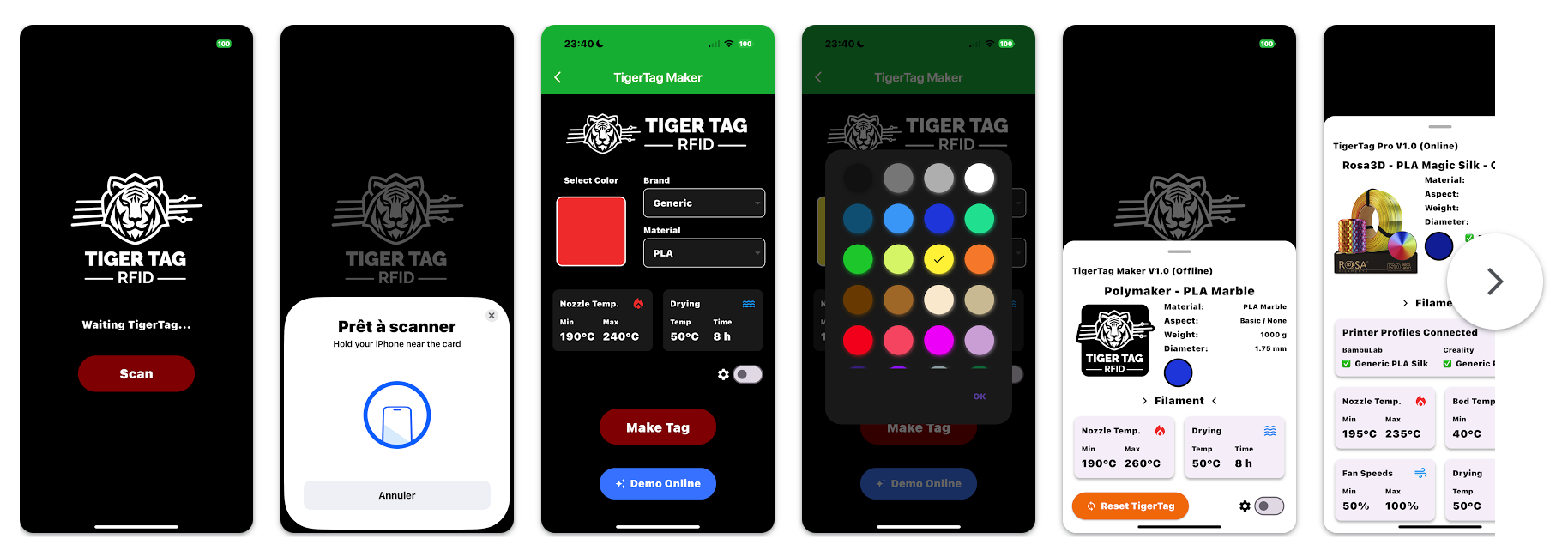
- 🧭 iOS App: https://apps.apple.com/fr/app/tigertag-rfid-connect/id6745437963
- 🤖 Android App: https://play.google.com/store/apps/details?id=com.tigertag.connect
Third-party projects built on the TigerTag protocol or the public API. These are independent community efforts — they are not officially maintained or endorsed by TigerTag Project — and we list them here as a thank-you to their authors for extending the TigerTag ecosystem.
RFID controller and parsing library for common 3D-printing filament tags, with native support for the TigerTag format (alongside OpenSpool, OpenTag3D, and others). Marked by the author as a work in progress.
🔗 suchmememanyskill/OpenRFID — author: @suchmememanyskill. Python.
Custom and repackaged firmware for the Snapmaker U1 3D printer, adding debug features (SSH access) and extended capabilities. RFID filament-tag support is provided via an embedded OpenRFID module, which is what brings TigerTag parsing to the printer.
🔗 paxx12-snapmaker-u1/SnapmakerU1-Extended-Firmware — author: @paxx12. Independent of, and not affiliated with, Snapmaker.
HACS-compatible custom integration that synchronises your TigerTag filament inventory into Home Assistant: sensors and number entities per spool, custom Lovelace card, twin-tag deduplication, rack/level/position assignment, optional integration with ha-bambulab to push filament configuration to a Bambu Lab AMS.
🔗 Kenny3231/TigerTag — author: @Kenny3231. Per its own README, this is a community project not officially affiliated with TigerTag Project.
Logos, banner, app icons, and OS download buttons are gathered in the
brand/ folder of this repository. They are the canonical
official assets for TigerTag and may be used by journalists, partners,
integrators, and slicer / printer projects that ship native TigerTag
support — within the logo usage guidelines
of section 8.

The two SVG variants are designed for different surfaces:
logo_tigertag_contouring.svg— solid#010101, use on light backgrounds (white paper, light websites, the standard GitHub README on light mode).logo_tigertag.svg— solid#ffffff, use on dark backgrounds (dark websites, hero banners, GitHub README on dark mode).
The <picture> block above auto-selects the right variant depending
on the reader's color scheme.
| Asset | Format | Preview | File |
|---|---|---|---|
| TigerTag logo — light surfaces | SVG (black) |  |
brand/logo_tigertag_contouring.svg |
| TigerTag logo — dark surfaces | SVG (white) | |
brand/logo_tigertag.svg |
| TigerTag logo — raster fallback | PNG | |
brand/TigerTag_Logo.png |
| Repository / project banner | PNG |  |
brand/TigerTag_Banner.png |
| App icon — generic | PNG (1024) |  |
brand/icon.png |
| App icon — Windows | ICO | — | brand/icon.ico |
| App icon — macOS | ICNS | — | brand/icon.icns |
| "Download" button — Windows | SVG |  |
brand/download_windows.svg |
| "Download" button — macOS | SVG |  |
brand/download_macos.svg |
| "Download" button — Linux | SVG |  |
brand/download_linux.svg |
| Tiger Scale — hardware photo | PNG | |
brand/TigerScale_Photo.png |

Usage in one line: clone or download the file you need, do not modify the logo, and do not use the TigerTag name or logo inside a product or app name. Full rules are in section 8.C — Logo usage guidelines.
| Version | Date | Description | Author |
|---|---|---|---|
| 1.0 | 2025-06-09 | Initial public format | TigerTag Team |
| 2.0 | 2026-03-11 | Corrected binary memory layout and NTAG21x capacity alignment | TigerTag Team |
| 2.1 | 2026-05-18 | Add UID documentation, system pages layout, fix example hex values | TigerTag Team |
TigerTag™ is a registered trademark of TigerTag Corp.
There is no dual-licensing model, and there is no distinction between commercial and non-commercial use of the protocol. Anyone may implement this specification in any product, at any volume, open source or proprietary, for free, forever. See the implementation grant above.
The authoritative, per-component licensing statement is
LICENSING.md. In summary:
| What | Licence |
|---|---|
This specification, Images/, assets/ |
CC-BY-4.0 |
database/*.json — the reference registry |
CC0-1.0 (public domain) |
Sample code/, SpoolmanDB/ |
Apache-2.0 (express patent grant) |
brand/ — logo, banner, marks |
All rights reserved |
Three things are outside every licence above, and none of them is needed to implement the protocol:
- The TigerTag™ and TigerTag+™ marks. A trademark matter, not a
licensing one. See
TRADEMARK.md. - TigerTag+ signature issuance. TigerTag Corp holds the ECDSA-P256
private key. Anyone may verify a signature offline, free, forever —
the public keys are published in
database/id_version.jsonand are public domain. Only TigerTag Corp can issue one. - Official product-ID allocation. As with a GS1 company prefix, the identity space is administered, not licensed.
Filament and resin manufacturers who want officially supplied TigerTag
media — carriers delivered ready to apply, logo pre-printed, RFID inlays
and 3M adhesive included — together with TigerTag+ signatures,
product-ID allocation, production tooling, and certified partner status,
should read LICENSE_COMMERCIAL.md.
TigerTag Corp acts as a central purchasing party here, aggregating demand so that individual brands need not source, print, and assemble media themselves. Revenue from this funds the specification, the reference database, the public API, and the official tools — all of which remain free.
Contact tigertag@tigertag.io.
The TigerTag logo is a trademark and its artwork is all rights reserved. Usage policy:
- ✅ Permitted, unmodified, in apps or documentation referencing TigerTag compatibility.
- ❌ Not permitted in product or app names (e.g., do not name your app "TigerTag Reader").
- ❌ Not allowed for deceptive marketing or implying affiliation without permission.
- 🔄 Logo must remain unmodified and clearly distinguishable.
This policy applies to everyone, whether or not they have a commercial
agreement. Full terms: TRADEMARK.md and
brand/README.md.
Improvements to the protocol arrive as proposals, not forks. See
CONTRIBUTING.md for the TEP process,
VERSIONING.md for how the spec is versioned, and
SECURITY.md for reporting a vulnerability.
Contact: tigertag@tigertag.io
Want to contribute improvements or integrations? Fork this repository and open a pull request.
For firmware integrations or manufacturer onboarding, contact the TigerTag core team.
{
  "versions":           1763073059935,  // 2025-11-13 22:30:59 UTC
  "types":              1777884684291,  // 2026-05-04 08:51:24 UTC
  "brands":             1777885837902,  // 2026-05-04 09:10:37 UTC
  "filament_diameters": 1777895560487,  // 2026-05-04 11:52:40 UTC
  "filament_materials": 1777972858568,  // 2026-05-05 09:20:58 UTC
  "aspects":            1777894570720,  // 2026-05-04 11:36:10 UTC
  "measure_units":      1777896731691   // 2026-05-04 12:12:11 UTC
}