
Lightweight, self-contained language detection for .NET — no cloud, no Python, no runtime dependencies.




LangDetect is a .NET 8 class library for detecting the language of a given text string. It uses a multi-stage detection pipeline — Unicode script analysis, common word frequency matching, and character trigram profiling — to identify languages accurately across both native scripts and romanized Latin representations.
| Language | Native Script | Unicode Range | Romanized Detection |
|---|---|---|---|
| English | Latin | U+0000–U+007F | Native (Latin) |
| Arabic | Arabic | U+0600–U+06FF | ✓ Word list (Arabizi) |
| Hindi | Devanagari | U+0900–U+097F | ✓ Word list (Hinglish) |
| Mandarin | CJK Ideographs | U+4E00–U+9FFF | ✓ Word list (Pinyin) |
| Japanese | Hiragana + Katakana | U+3040–U+30FF | ✓ Word list (Romaji) |
| Korean | Hangul Syllables | U+AC00–U+D7AF | ✓ Word list (Revised Romanization) |
| Sinhala | Sinhala | U+0D80–U+0DFF | ✓ Word list (Singlish) |
| Tamil | Tamil | U+0B80–U+0BFF | ✓ Word list (Tanglish) |
dotnet add package LangDetect.NetOr via the NuGet Package Manager in Visual Studio — search for LangDetect.Net.
using LangDetect;
using LangDetect.Models;

// create a detector with default options
var factory  = new LanguageDetectorFactory();
var detector = factory.Create();

var result = detector.Detect("The quick brown fox jumps over the lazy dog");

Console.WriteLine(result.Language);    // English
Console.WriteLine(result.IsoCode);     // en
Console.WriteLine(result.Confidence);  // 1.00
Console.WriteLine(result.IsReliable);  // True
Console.WriteLine(result.DetectedBy); // CommonWordDetectionStageEvery call to Detect() returns a DetectionResult record:
public record DetectionResult
{
    public Language Language     { get; init; }  // detected language or Unknown
    public float    Confidence   { get; init; }  // 0.0 – 1.0
    public bool     IsReliable   { get; init; }  // confidence >= configured threshold
    public string   DetectedBy   { get; init; }  // which pipeline stage fired
    public string   IsoCode      { get; init; }  // ISO 639-1 code e.g. "en", "si"
}
When detection fails or input is too short, DetectionResult.Unknown is returned — Detect() never throws for valid string input.
var detector = new LanguageDetectorFactory().Create(new DetectorOptions
{
    ConfidenceThreshold = 0.80f,          // minimum score to be considered reliable
    EnableEarlyExit     = true,           // stop pipeline once confident result found
    WordListSize        = WordListSize.Large, // Small (200) | Medium (500) | Large (1000)
    MinInputLength      = 3,              // inputs shorter than this return Unknown
    MaxTokens           = 500,            // truncate long inputs before analysis
    MinNonLatinRatio    = 0.25f,          // minimum non-Latin ratio to trigger Unicode path
    Logger              = Console.WriteLine, // optional diagnostic logger
});| Size | Words | Use case |
|---|---|---|
WordListSize.Small |
200 | Memory-constrained environments, fast startup |
WordListSize.Medium |
500 | Balanced — recommended default |
WordListSize.Large |
1000 | Best accuracy, especially for short inputs |
LangDetect uses a three-stage pipeline. Each stage runs in priority order and the result is returned as soon as a confident detection is made (early exit).
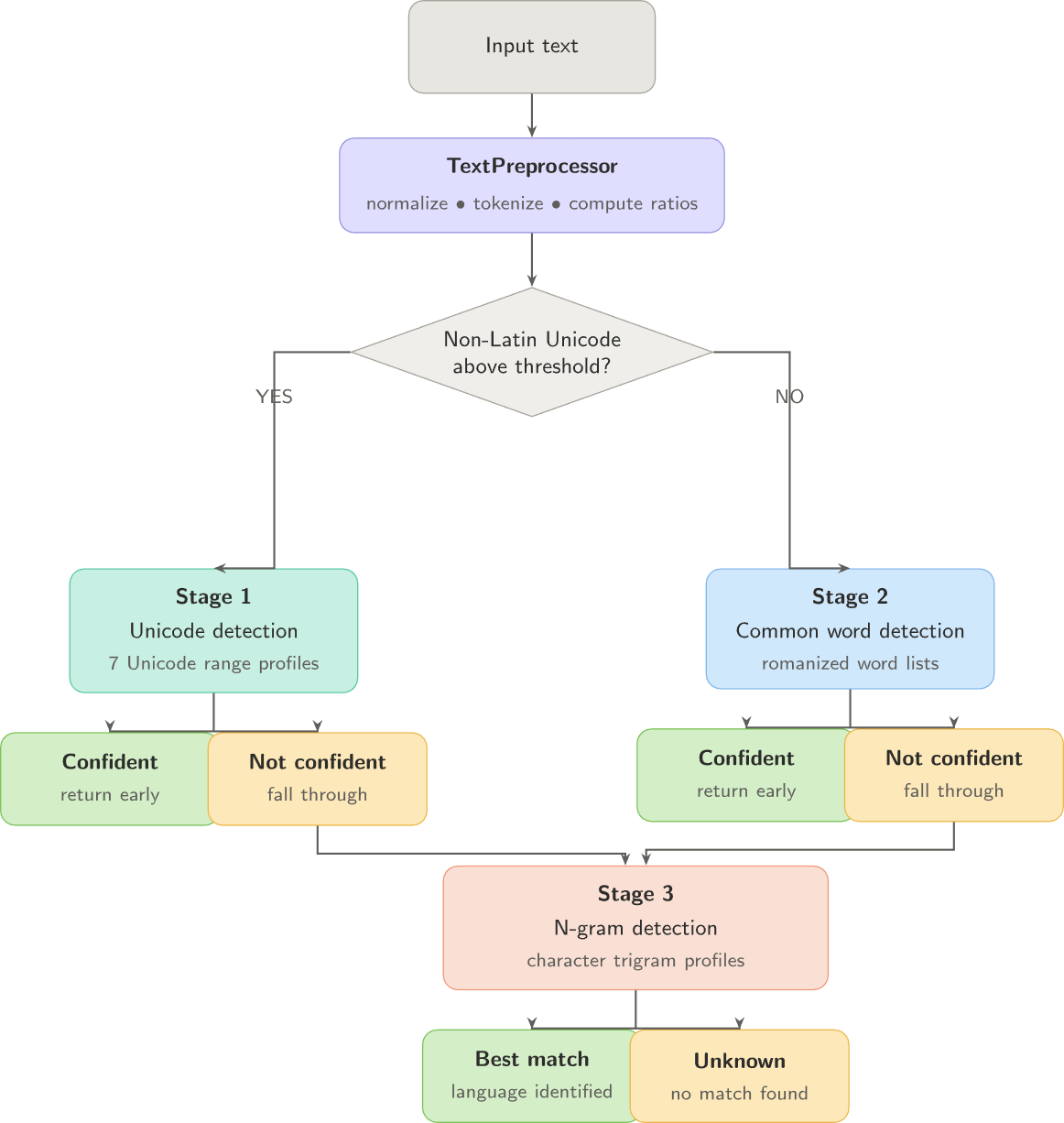
| Stage | Priority | Technique | Best for |
|---|---|---|---|
UnicodeDetectionStage |
1 | Script range coverage ratio | Arabic, Hindi, Mandarin, Japanese, Korean, Sinhala, Tamil in native script |
CommonWordDetectionStage |
2 | Token frequency matching | English, romanized scripts |
NGramDetectionStage |
3 | Character trigram scoring | Short inputs, ambiguous text |
detector.Detect("مرحبا كيف حالك اليوم");
// → { Language: Arabic, Confidence: 1.00, IsReliable: true, IsoCode: "ar" }

detector.Detect("नमस्ते आप कैसे हैं");
// → { Language: Hindi, Confidence: 1.00, IsReliable: true, IsoCode: "hi" }

detector.Detect("こんにちは世界");
// → { Language: Japanese, Confidence: 0.81, IsReliable: true, IsoCode: "ja" }detector.Detect("mama giye koheda kiyala amma");
// → { Language: Sinhala, Confidence: 0.85, IsReliable: true, IsoCode: "si" }
detector.Detect("naan pogiren enna romba thanks");
// → { Language: Tamil, Confidence: 0.80, IsReliable: true, IsoCode: "ta" }detector.Detect(""); // → DetectionResult.Unknown
detector.Detect("123456"); // → DetectionResult.Unknown
detector.Detect(null); // → DetectionResult.Unknown (never throws)var detector = new LanguageDetectorFactory().Create(new DetectorOptions
{
Logger = msg => Debug.WriteLine(msg),
});Output:
[LangDetect] Attempting to load resource: 'LangDetect.Resources.Wordlists.English-1000-Wordlist.txt'
[LangDetect] SUCCESS: Loaded 'LangDetect.Resources.Wordlists.English-1000-Wordlist.txt'
[LangDetect] Loaded 1000 words for 'English'
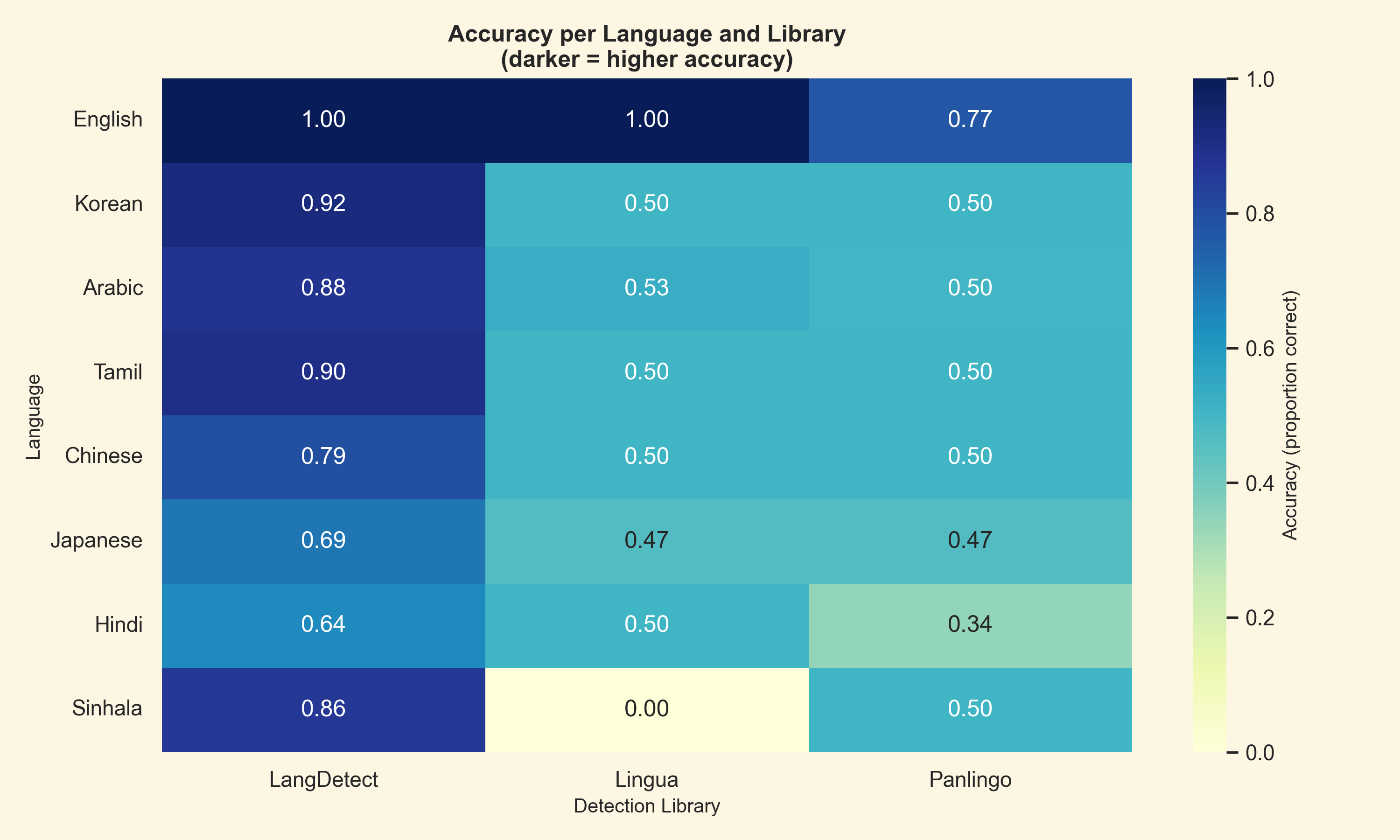
On 2026-05-10, I ran a benchmark suite across all 8 supported languages and compared LangDetect.Net against Lingua and Panlingo using their default configurations, without any fine-tuning.
The benchmark dataset used for these results is available on Kaggle: LangDetect.Net v1 Benchmark Dataset.
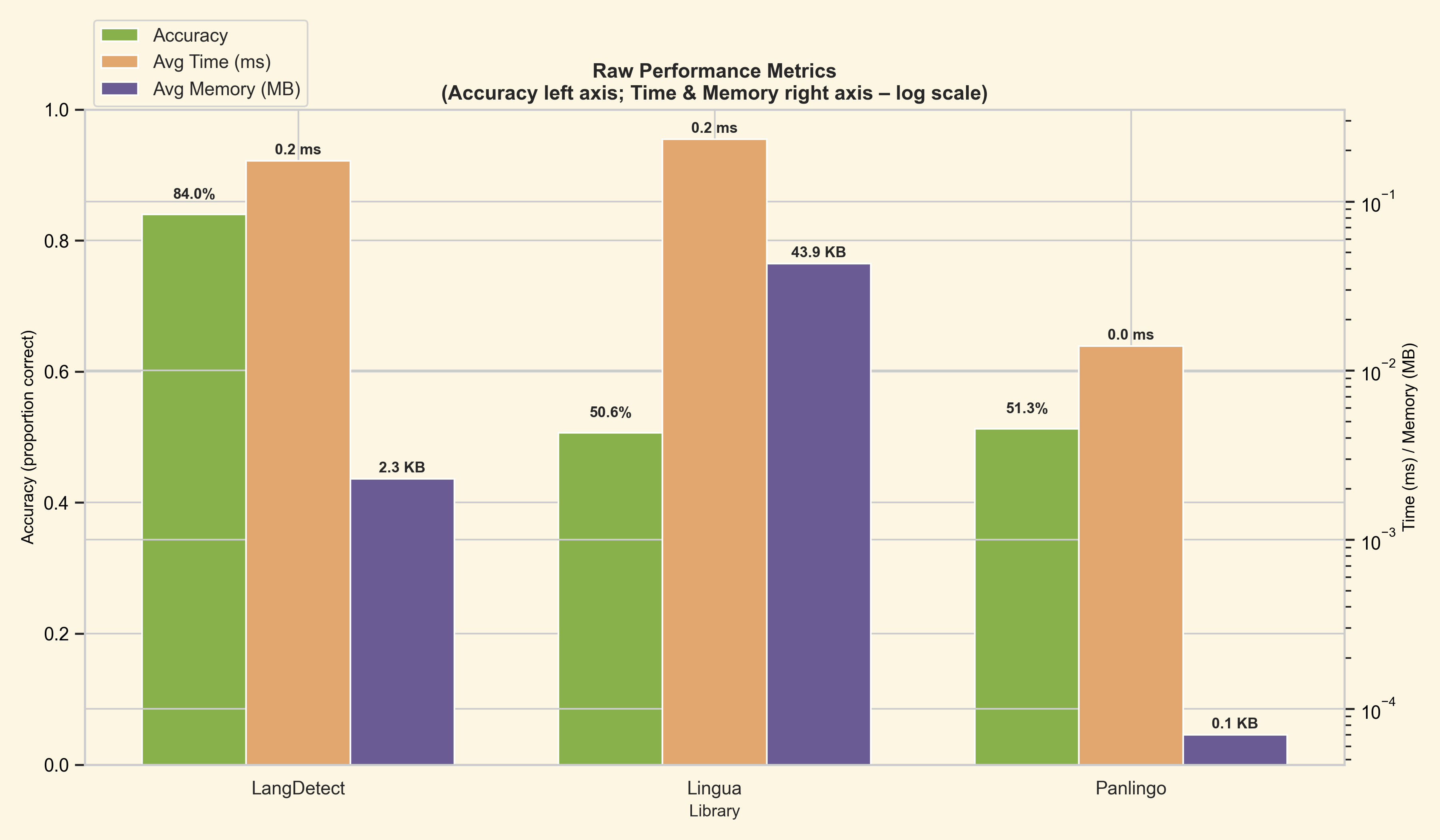
- LangDetect.Net delivered the highest overall accuracy.
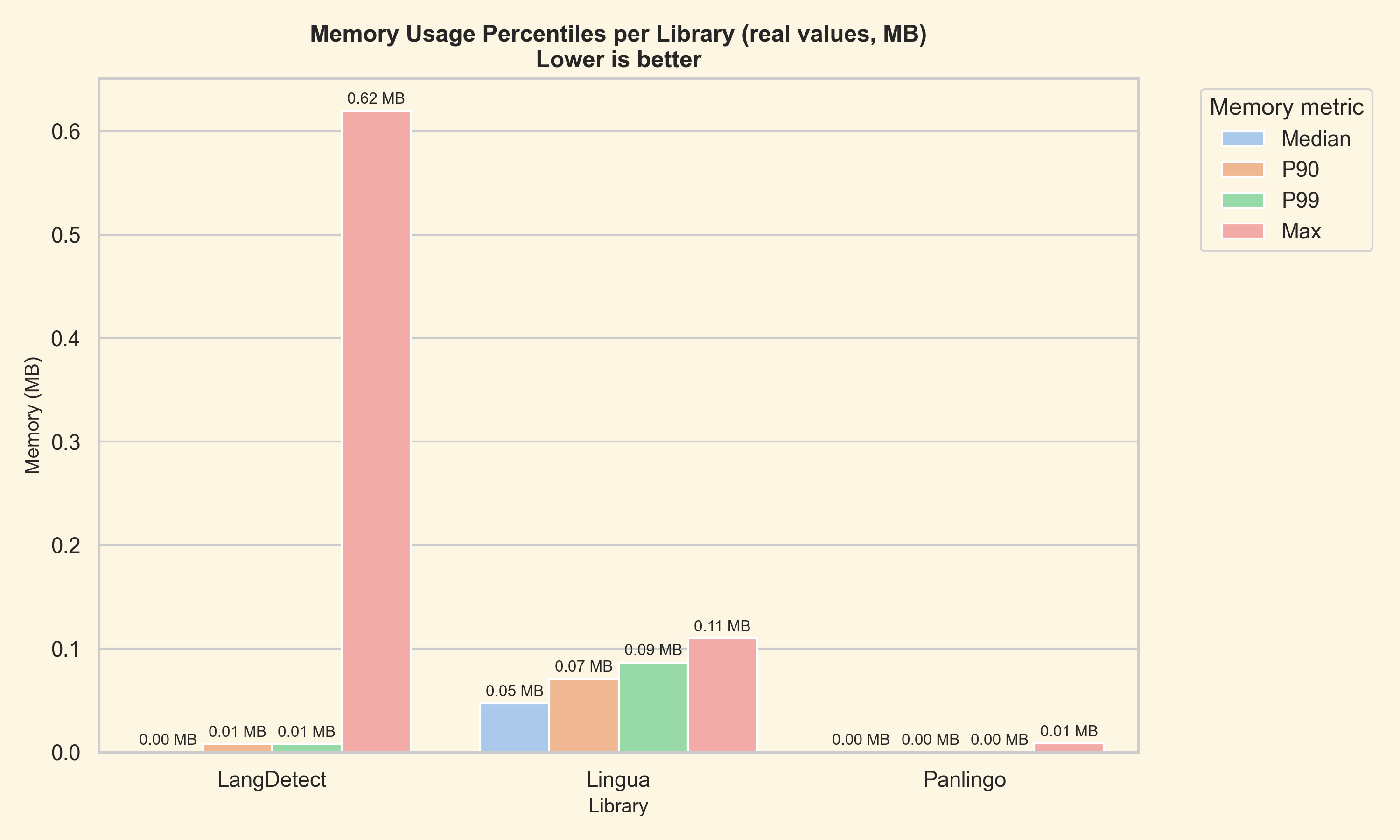
- Lingua reported strong confidence scores, but its accuracy and memory usage were both significantly worse.
- Panlingo was the fastest library in raw per-sample time, but it trailed LangDetect.Net on accuracy.
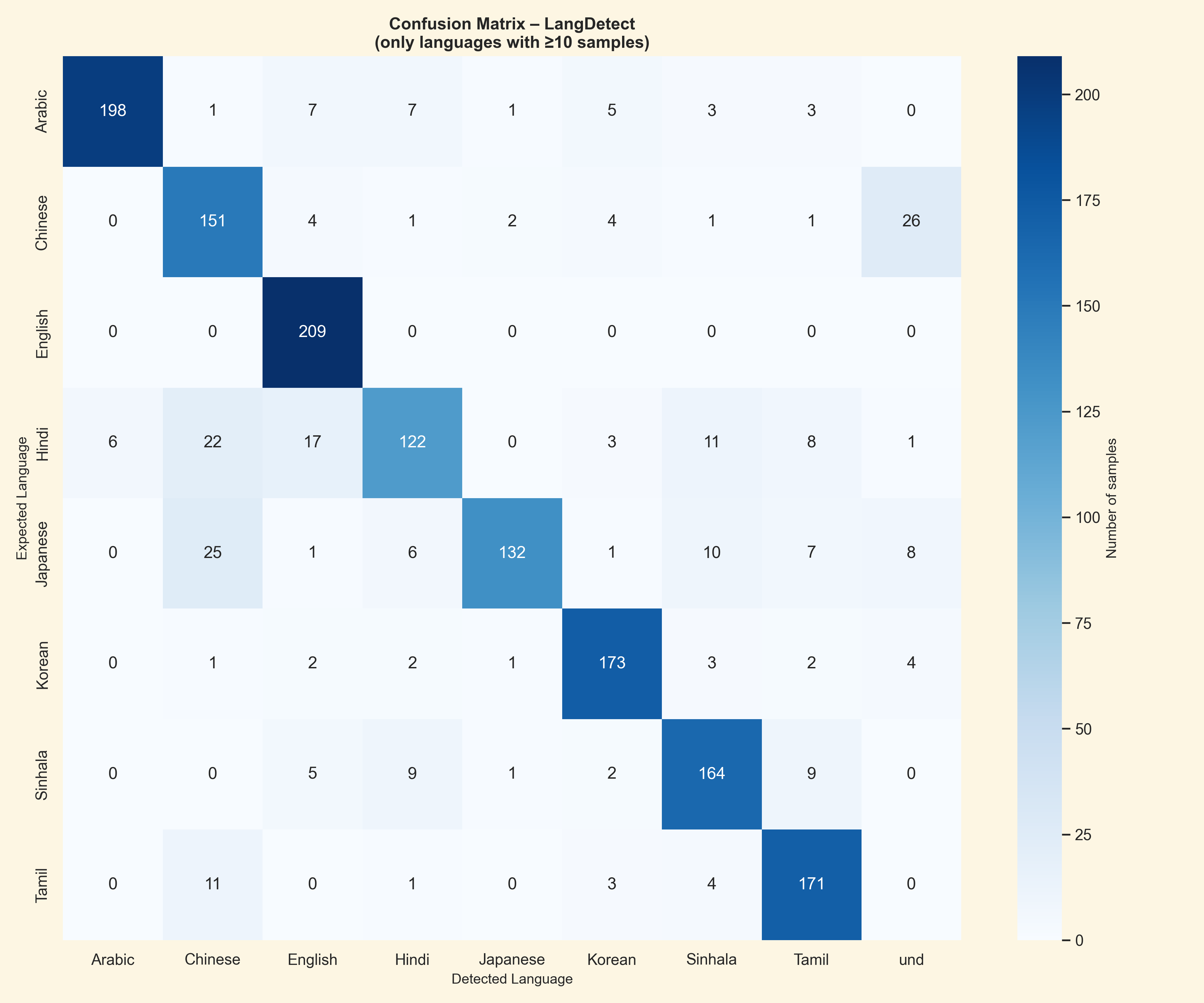
- The confusion matrix shows a strong diagonal with limited cross-language misclassification.
- Hindi and Japanese accounted for the most confusion, mainly because of overlapping romanization patterns.
- The three-stage pipeline - Unicode script analysis, word frequency matching, and trigram profiling - gives LangDetect.Net its best balance of accuracy, speed, and memory use.
- All libraries were tested with their default settings, with no manual tuning.
| Library | Correct / Total | Failures | Accuracy | Avg. confidence | Avg. time / sample | Avg. memory / sample |
|---|---|---|---|---|---|---|
| LangDetect.Net | 1320 / 1572 | 252 | 83.97% | 0.757 | 0.174 ms | 2,404 B |
| Lingua | 796 / 1572 | 776 | 50.64% | 0.940 | 0.233 ms | 44,948 B |
| Panlingo | 806 / 1572 | 766 | 51.27% | 0.439 | 0.014 ms | 74 B |
Note: confidence scores are library-reported values and are not directly normalized across engines.
| Accuracy heatmap | Confusion matrix |
|---|---|
 |
 |
| Raw performance | Memory percentiles |
 |
 |
Additional charts are available in Assets/testBenchmarks/, including per-language radar plots, language winner breakdowns, stacked misclassifications, and top failure summaries.
using LangDetect.Utility;

LanguageCode.ToIso(Language.English);   // "en"
LanguageCode.ToIso(Language.Sinhala);   // "si"
LanguageCode.ToIso(Language.Unknown);   // "und"

LanguageCode.FromIso("ar");             // Language.Arabic
LanguageCode.FromIso("zh");             // Language.Mandarin
LanguageCode.FromIso("xyz"); // Language.Unknown- Mixed-script text
- Very short inputs
- Romanized Mandarin (Pinyin)
- No multi-language detection — a single
Detect()call returns one language. Mixed documents are planned for v2. - N-gram profiles are derived from word lists — trigram quality is directly proportional to word list quality and size.
- Multi-language detection — ranked candidate list with per-language confidence scores
- Code-switching support — detect language changes within a single document
- Expanded language support — French, Spanish, Portuguese, German, Russian
- Compact ONNX model for Latin-script disambiguation
- Dialect identification — Mandarin vs Cantonese, Indian English vs British English
- Streaming / span detection over long documents
- Calibrated confidence scores via isotonic regression
Contributions are welcome. Please open an issue before submitting a pull request for non-trivial changes.
- Fork the repository
- Create a feature branch (
git checkout -b feature/my-feature) - Commit your changes
- Push to the branch and open a Pull Request
If you update the word lists, regenerate the trigram JSON files using the included tool:
cd LangDetect.TrigramGenerator
dotnet run
Then copy the output from Resources/Trigrams/ into LangDetect/Resources/Trigrams/ and rebuild.
This project is licensed under the GNU General Public License v3.0.