Your terminal. Your model. Your code.
An AI coding companion that runs in your terminal — not a chat box ported to the terminal, but a real agent that reads your code, writes your files, and runs your commands, with every step waiting for your approval.
Runs locally. Your data never leaves your machine. Works with OpenAI, Anthropic, Google, Ollama, DeepSeek, or any OpenAI-compatible endpoint — no vendor lock-in.
📚 中文文档 · 🗄️ Storage & Configuration · 🗄️ 存储与配置
Quick Start · Why Adnify-Cli · Tools & Approval · Configuration · Architecture
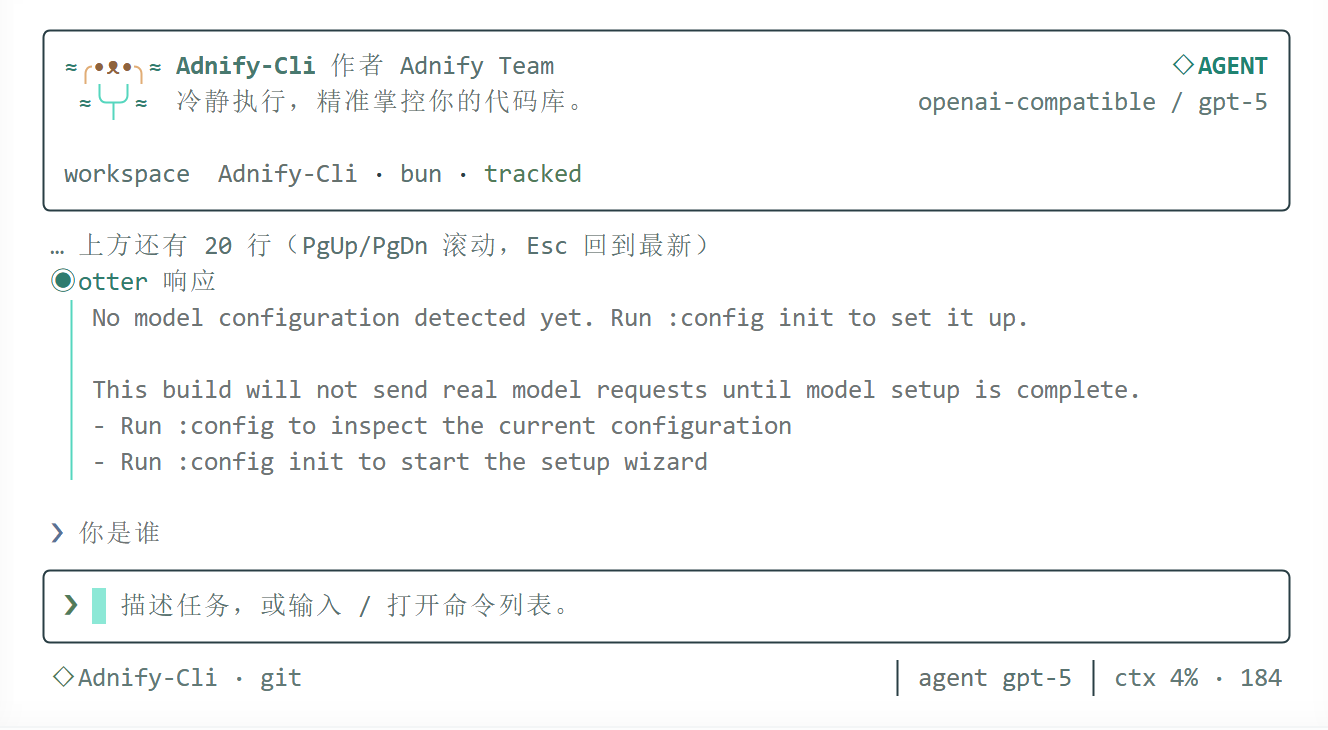
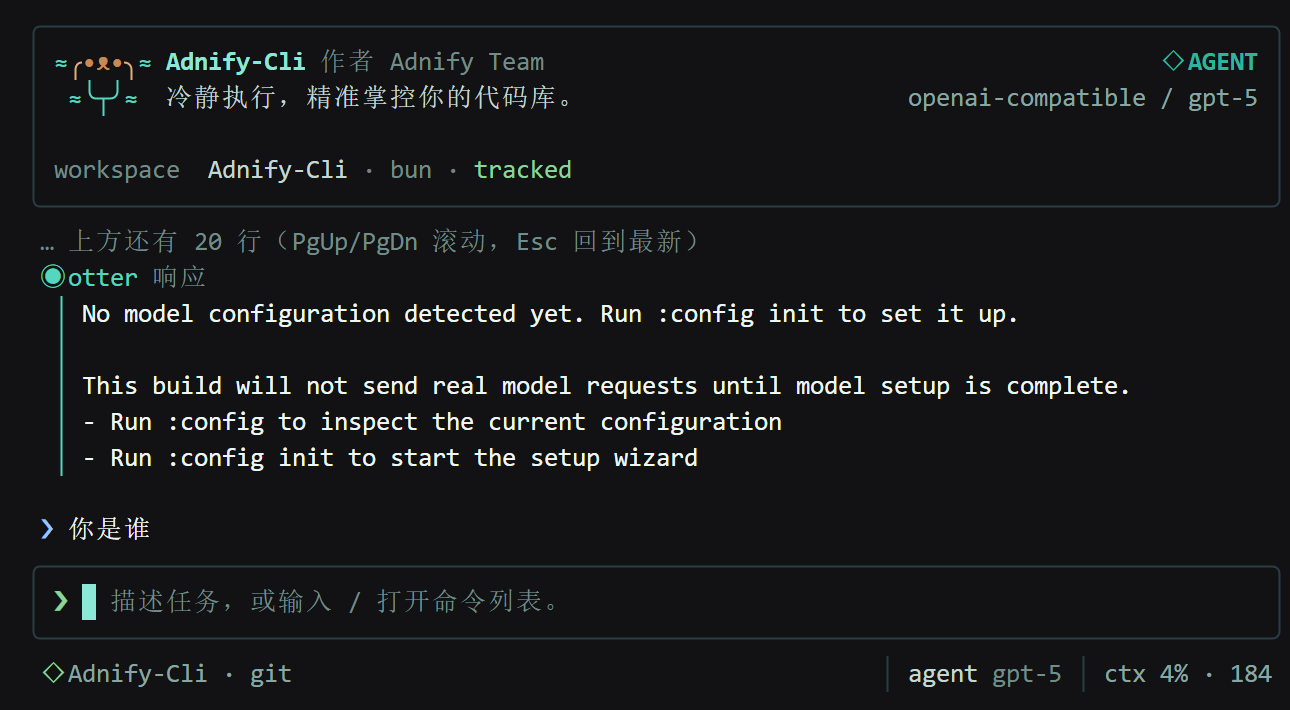
| What you care about | How Adnify-Cli handles it |
|---|---|
| Privacy | Runs locally. Your API key and session data stay on your disk — no intermediate servers, no telemetry |
| No lock-in | OpenAI, Anthropic, Google, Ollama, DeepSeek, Yi… anything with an OpenAI-compatible API works |
| Don't touch my code | Every file write and command execution triggers an approval panel — press y to proceed, n to reject |
| Undo mistakes | :undo rolls back instantly with Git-independent file-level snapshots — works even without a repo |
| Stop re-explaining everything | :memory persists project conventions and decisions across sessions, auto-injected next time |
| Don't silently burn tokens | :context shows real-time message count, token estimates, and health status |
| Need more tools | 8 built-in tools + MCP protocol support — connect your own tool servers for unlimited extensibility |
| Want custom prompts | All system prompts, tool definitions, and commands are Markdown files in prompts/ — edit and customize |
| Non-English experience | Bilingual UI (Chinese/English), Ctrl+O fullscreen audit trail, PgUp/PgDn scrolling |
| Mode | Description |
|---|---|
| Chat | Everyday Q&A and code discussion |
| Agent | Multi-turn tool calling with automatic file I/O, command execution, and code search — up to 20 autonomous rounds |
| Plan | Plan first, execute later — ideal for complex tasks |
- Immediate Activity Feedback — Your message and working indicator render before memory lookup or the first API response
- Streaming Responses — Real-time output with stable, low-jitter terminal rendering
- Session Persistence — Per-workspace session files, auto-restore on startup — never lose context when closing the terminal
- Closed-Loop Tool Calling — 8 built-in tools + dynamic MCP tools, with progress and results streaming back in real time
- Parallel Coding Sub-agents — research roles stay read-only;
implementworkers edit and verify in disposable detached Git worktrees and return reviewable patches - Keyboard Choice Flows — approvals, setup, permission modes, and model questions use reusable arrow-key tabs instead of numeric or y/n input
- Interactive Agent Questions —
ask-usersupports one-to-three-step choice flows and returns structured answers to the tool loop - Adaptive Workflow Phases — the model can enter a host-enforced read-only planning phase for complex work, then resume execution under the user's permission policy
- AI Runtime Control — the agent can inspect and adjust assistant mode, permission mode, language, animation, and configured models; capability increases still require keyboard approval
- Permission Modes —
manual,workspace,auto, andplan, with protected-path and out-of-workspace boundaries - Verified Coding Loop — Successful file edits trigger a required test, typecheck, lint, or build attempt before completion
- Write-After Diagnostics — TypeScript errors are detected the moment a file is written and fed back to the model in the same turn for self-correction
- Tolerant Patch Matching — When exact
oldTextmatching fails, whitespace/indentation-tolerant fallback locates the right spot instead of failing blindly; ambiguous matches are still rejected - Live Todo Dock — The model maintains a persistent progress checklist via
todo-write; the current item, completion state, and remaining steps are always visible - Automatic Project Instructions — Loads
.adnify/instructions.md,AGENTS.md, and ordered.rules/*.md - Risk-Tiered Approval — Pauses before file writes and command execution — the model doesn't decide, you do
- Cross-Session Memory —
:memorystores project knowledge, auto-injected into future sessions - Checkpoints & Undo —
:checkpoint/:undo/:restorewith Git-independent file-level snapshots - Context Window Diagnostics — separates response output limits from the context window, shows
used/window, and rejects summaries that do not create real headroom - Bilingual i18n — Switch between Chinese and English interface
- Prompt Pack — All system prompts, tool definitions, and commands live in
prompts/as editable Markdown - Native Tool Calling — Uses provider-native function calling first, falls back to text parsing automatically
- Fullscreen Audit Trail —
Ctrl+Oexpands complete tool inputs, outputs, and elapsed time; regular view stays clean
| Key | Behavior |
|---|---|
Ctrl+O |
Open / close fullscreen transcript |
Shift+Tab |
Open the bottom-dock Chat / Agent / Plan mode picker |
PgUp / PgDn |
Scroll long conversations one viewport at a time |
Esc |
Abort active work; return to bottom while browsing; exit transcript when at bottom |
Tab / Enter |
Fill in command from the panel without executing |
← / → / ↑ / ↓ |
Move between bottom-dock choice tabs |
- Regular conversations show compact tool summaries; full inputs, outputs, and elapsed time available in fullscreen transcript
- Context compaction never deletes the persisted conversation;
Ctrl+Oopens the full record andPgUp/PgDnbrowses it - Approval and configuration prompts automatically exit transcript mode to keep critical actions visible
| Tool | Capability | Risk |
|---|---|---|
workspace-read |
Read workspace summary | 🟢 safe |
search-index |
ripgrep-based code search (falls back to built-in scanner) | 🟢 safe |
glob-search |
Glob-pattern file matching | 🟢 safe |
file-ops |
read / list / write / update / patch / multi-patch (atomic hunks) |
🟢 read safe · 🟡 write careful |
shell-runner |
Whitelist command execution | 🟢 read-only safe · 🟡 verification careful |
web-search |
DuckDuckGo public web search (no API key needed) | 🟡 careful |
web-fetch |
Fetch and extract text from an HTTP(S) URL | 🟡 careful |
task |
Dispatch up to 8 parallel subtasks with progress streaming | 🟡 careful |
mcp__* |
Invoke tools from connected MCP servers | 🟡 careful |
File writes and verification commands are not decided by the model alone. Execution pauses before actual disk writes / execution, triggering an approval panel displaying the tool name, risk level, operation summary, and target path:
| Key | Behavior |
|---|---|
y |
Approve this instance |
n |
Reject; rejection reason is returned to the model to adjust its approach |
a |
Always allow this tool within the current session |
allowWrite: truein tool descriptions is merely a self-declaration by the model. The real boundary is the host-side policy: scope-aware permission modes, explicit approval for high-risk or out-of-workspace actions, and hard denial in plan mode.
# Install globally via npm
npm install -g adnify-cli

# Update an existing installation
npm install -g adnify-cli@latest

# Run
adnify
Requires Node.js 20 or later. Bun is only required for local development.
# Install dependencies
bun install

# Development mode
bun run dev

# Build
bun run build

# Test
bun test

# Deterministic coding-agent regression baseline
bun run eval:agent

# Verify (tests + type check + build)
bun run verify| Variable | Description |
|---|---|
ADNIFY_PROVIDER |
Model provider |
ADNIFY_API_KEY |
API key |
ADNIFY_BASE_URL |
Custom API endpoint |
ADNIFY_MODEL |
Model name |
ADNIFY_LOCALE |
Interface language — zh-CN or en |
ADNIFY_ANIMATION_LEVEL |
Animation level — off, minimal, or full (default) |
ADNIFY_HOME |
Application data directory (highest priority) |
:config
:config init
:config set provider <value> [model]
:config set model <value>
:config set api-key <value>
:config set base-url <value>
:config clear api-key
:language <zh-CN|en>
:animation <off|minimal|full>
:permissions [manual|workspace|auto|plan]
:config init enters a temporary setup panel. Provider and model choices support Up/Down, Enter, and numeric shortcuts. Setup prompts are not written into the conversation.
All data lives only on your local disk — sessions, config, memory. No cloud sync, no telemetry.
| Platform | Path |
|---|---|
| Windows | %APPDATA%\Adnify-Cli\settings.json · %LOCALAPPDATA%\Adnify-Cli |
| macOS | ~/Library/Application Support/Adnify-Cli |
| Linux | $XDG_CONFIG_HOME/adnify-cli · $XDG_DATA_HOME/adnify-cli |
Adnify-Cli/
├── config.json
├── sessions/
│   └── <sessionId>.json
└── memories/
    └── <workspace>.json
File-level write snapshots are stored in .adnify/checkpoints/ within the workspace and do not require Git. Each snapshot records the originating session, tool, and tool input so recovery points remain traceable to the agent execution that created them.
Don't want it on your C drive? Move it anywhere:
:storage              # View current data directory
:storage set <path>   # Migrate to a new directory (auto-migrates config and sessions)
:storage reset        # Reset to system default path
:session              # Current session info
:sessions             # List all sessions
:resume [index|id]    # Resume a specific session
:memory [content]     # Save project memory
:memory list          # View memories
:memory clear         # Clear memories
:context              # Context window diagnostics
:clear                # Clear current session
:exit                 # Exit
:mode chat | agent | plan
:workspace            # Current workspace info
:status               # Runtime status
:tools                # Available tools
:model [provider] [model]
:checkpoint [message] # Create checkpoint
:undo                 # Undo last checkpoint
:restore [id|index]   # Restore file-level snapshot
:help                 # Help
:doctor               # Environment diagnostics
:diff                 # View changes
:review               # Code review
:mcp                  # MCP server management
:skill [name|list]    # Skill management
| Layer | Choice |
|---|---|
| Runtime | Bun |
| Language | TypeScript |
| Terminal UI | Ink + React |
| AI SDK | Vercel AI SDK |
| Architecture | DDD-style layered architecture |
src/
├── domain/            # Domain models, aggregate roots, value objects, domain behaviors
├── application/       # Use case orchestration, port definitions, DTOs, i18n
├── infrastructure/    # Model gateway, config I/O, storage, prompt loading, tool execution
└── presentation/      # Ink UI, interaction controllers, terminal layout, view components
- High Performance — Stable terminal rendering, minimal jitter and re-renders
- Loose Coupling — Clear responsibilities across domain, application, infrastructure, and presentation layers
- High Cohesion — Sessions, config, storage, prompts, and command systems evolve independently
- High Reusability — Ports, use cases, Prompt Packs, storage parsers, and UI components are all reusable
- Extensibility — Bounded parallel Agent orchestration, multi-turn execution, and clear plugin entry points
The repository includes a .rules/ directory to constrain collaboration methods, architectural boundaries, and delivery quality:
- .rules/README.md
- .rules/00-core.md
- .rules/10-architecture.md
- .rules/20-coding-style.md
- .rules/30-delivery-workflow.md
- .rules/40-ai-collaboration.md
| Code | Goal | Status |
|---|---|---|
| M1 | Session persistence and startup recovery | ✅ Complete |
| M2 | Tool calling and Agent capabilities (8 built-in tools + MCP + 20-round Agent loop) | ✅ Complete |
| M3 | Approval / Permissions / UI polish and productization (atomic multi-patch, write-after diagnostics, todo dock, storage docs) | ✅ Complete |
MIT © 2026 adnaan
Made with 🦦 by adnaan