This project implements a real-time speech-to-text (STT) module using Vosk for Python and a React frontend. The module starts transcription when a wake word ("hi") is spoken, pauses when a sleep word ("bye") is detected, and can resume continuously after repeating the wake word. It is backend-frontend ready and can be integrated into mobile or web applications.
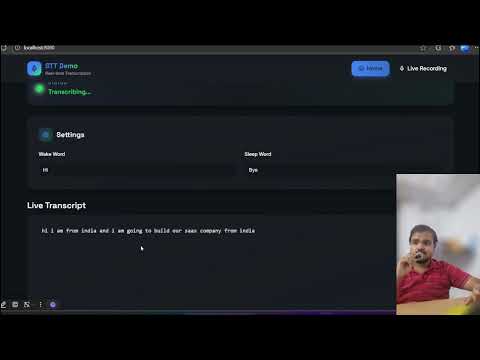
- 🔊 Real-time speech transcription using Vosk.
- 🟢 Wake word detection to start transcription (
hiby default). - 🔴 Sleep word detection to pause transcription (
byeby default). - 🖥️ Frontend display via WebSocket.
- ♻️ Continuous listening even after sleep/pause cycles.
- ⚡ Lightweight and modular backend, easy to integrate into apps.
- 💻 Works locally for demo and development.
vosk-stt-project/
│
├─ backend/
│   ├─ stt_vosk.py          # STT module handling Vosk recognition
│   └─ main_vosk.py         # FastAPI + WebSocket server
│
├─ frontend/
│   ├─ public/
│   ├─ src/
│   │   ├─ hooks/
│   │   │   └─ useWebSocket.ts   # WebSocket hook to connect backend
│   │   ├─ components/
│   │   │   └─ StatusIndicator.tsx
│   │   └─ pages/
│   │       └─ Index.tsx
│   ├─ package.json
│   └─ vite.config.ts
│
├─ vosk-model-en-in-0.5/    # Pretrained Vosk model
├─ README.md
└─ requirements.txt
- Python ≥ 3.10
- Vosk (
pip install vosk) - Sounddevice (
pip install sounddevice) - FastAPI (
pip install fastapi uvicorn websockets) - Optional:
pyaudioif you encounter issues
- Node.js ≥ 18
- npm or bun
- Vite (bundler)
- TailwindCSS (UI)
- Clone this repo and navigate to the backend folder:
cd backend- Install dependencies:
pip install -r requirements.txt- Run the backend server:
python -m uvicorn main_vosk:app --host 0.0.0.0 --port 8000Notes:
- Make sure the Vosk model path is correct in
stt_vosk.py. - The backend will continuously listen to your microphone.
- Wake word
"hi"starts sending transcription to the frontend. - Sleep word
"bye"pauses sending transcription but continues listening.
- Navigate to the frontend folder:
cd frontend- Install packages:
npm install
# or
bun install- Run the development server:
npm run dev
# or
bun run dev- Open your browser:
http://localhost:8080
- Click Connect to Backend to start receiving live transcription.
- Start backend (
uvicorn main_vosk:app --host 0.0.0.0 --port 8000). - Start frontend (
npm run dev). - Click Connect to Backend on frontend UI.
- Speak “hi” → transcription starts.
- Speak normally → transcription appears in frontend & logs in backend.
- Speak “bye” → transcription pauses, but listening continues.
- Speak “hi” again → transcription resumes, appends new text.
-
stt_vosk.py:wake_word = "hi" sleep_word = "bye" model_path = "vosk-model-en-in-0.5"
-
main_vosk.py:WEBSOCKET_PORT = 8000
-
useWebSocket.ts:const ws = new WebSocket("ws://localhost:8000/ws");
- Microphone not working: Ensure your system microphone is accessible. On Windows, check privacy settings.
- Vosk model errors: Verify
vosk-model-en-in-0.5exists and matches the path instt_vosk.py. - Frontend WebSocket errors: Check that backend is running on
ws://localhost:8000/ws. - Continuous listening: Module keeps listening even after sleep. Only sends transcription after wake word.
- Add multiple wake/sleep words.
- Language switching for multilingual transcription.
- Integrate with React Native for mobile apps.
- Use Whisper or Deepgram for higher accuracy.
MIT License — free to use, modify, and distribute.