Deprectated, go check out Immersive Environments - the newer, better, and updated sequel!
Description: This is a powerful ModuleScript that enables developers greater freedom at customizing and designing games with advanced lighting
To view the script click here!
For example places that show the script in action and go through the various features click here!
Table of Contents:
Fundamentally, the Module works by allow you, the developer, to specify different "Lighting Periods" within the ModuleScript. Lighting Periods are simply ranges of time that have specific lighting settings in them.
Here's an example of what this looks like visually (with some example Lighting Periods)
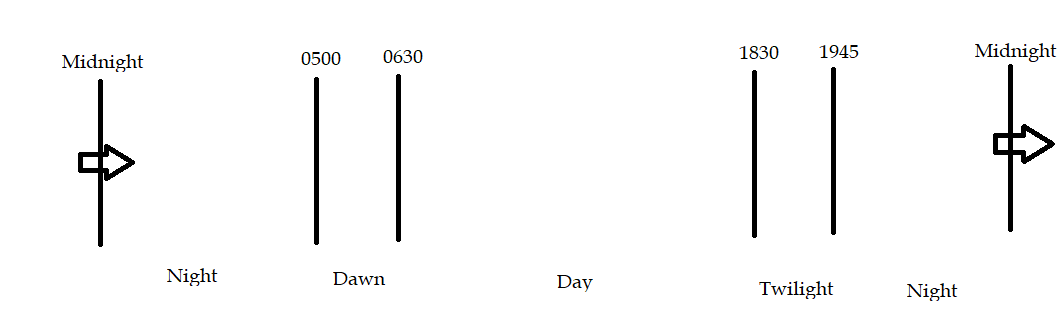
A very basic example of where this would be useful would be making the Ambient and Outdoor Ambient settings darker at night. However, you can create as many Lighting Periods as you like! This allows you to create lighting periods to replicate things like dawn, twilight, night-time (or even different stages of night as well)!
Within your Lighting Periods you can specify a lot of settings. Currently the lighting settings that you can adjust are: Ambient, OutdoorAmbient, and ShadowSoftness. The list can definitely be expanded, I just felt that those were the most relevant to start with.
That is just the basic foundation of the Module, but there are tons of other cool features! Check out the Cool Features section to see more!
It's 2020, tweens are awesome, they look great, this Module absolutely uses tweens to create gradual, smooth, and seamless animations. 'Nuff said.
This is one of my favorite features. I always really like seeing a city come alive when night falls. Lights come on and it just looks spectacular. This Module enables just that! Just name all the lights that you want to be treated the same thing, and you're good to go! There are two ways this works: by modifying light instances (PointLight, SpotLight, SurfaceLight) or part instances (abuse the neon material to create the illusion of light). Randomization is also supported. An example of why this is necessary is that when you go down a neighborhood road, every house does not have every light turned on. Some are on, some are off. This Module enables randomization so that you can determine the percentage chance a instance will have of "turning on" (regardless of whether it is a part of light instance).
Side note: You can specify as many different lights as you want to turn on and assign different behavior to each - just make sure to name them all the same thing. Ex: I can 100 lights named "BlueLight", 200 named "PurpleLight", etc. and assign different lighting settings to each group of lights.
Now, one key problem exists in this? What if I have a multi-instance light - won't that create an error with regards to randomization Yes! If you're not following what this error is, imagine a lantern model. The lantern model has a bunch of wooden structure parts, a glass part, and a PointLight within the glass part. I can set the PointLight to have a 50% chance of turning on, but then my glass part would look unlit. Or I could set the glass part to have a 50% chance of turning on (again, abusing that neon effect and turning it maybe a yellow color) - but then no light would radiate out of it. D: And, if I set them both to turn on (with 50% probability of turning on), there's only a 25% of them both turning on at the same time, and more than likely only one of them will turn on.
The solution to that is a multi-instance light handler. In the same way way as a regular light, specify the properties that you want these multi-instances to have and then determine their relation to a singular reference part. In this case, I might make the glass part my reference part, define the relation of the PointLight to the glass part as a child, specify my randomization chances/lighting properties, and done! Easy as that!
I tried to make this Module as intuitive as possible in my quest to make it both strong, bug resistant (if you find any let me know), and user-friendly. Here are some cool smart features in the Module:
You do not need a certain day/night script for this to work properly (although you obviously do need one of some kind since time has to pass to hit each Lighting Period, right?) The script will automatically detect the rate at which time is passing and make adjustments accordingly? What kind of adjustments? Read on, dear developer!
So early on I realized something key, which was that if tweens start at the beginning of Lighting Periods, there is going to a gap between when the lighting period begins and when the settings are actually in their final positions as determined in each Lighting Period. Here's an example of what I mean if you're having trouble following:
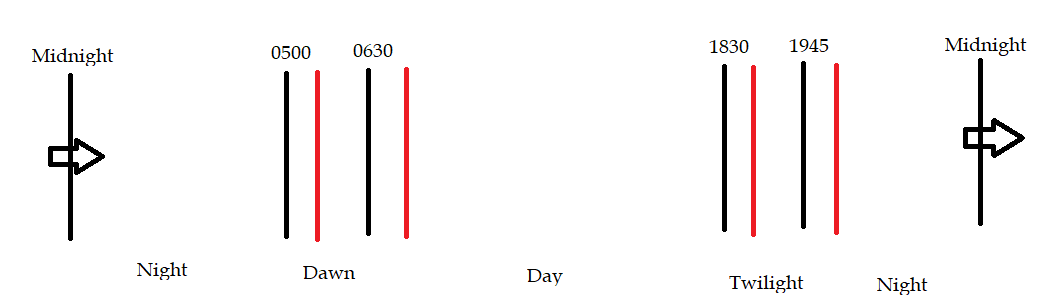
Make the developer eyeball it, trial and error, and take their best guess at times to make the lighting period line up with what they want The solution is to use the auto-syncronization of day/night scripts, calculate the rate at which time passes, and adjust the ranges of lighting periods and create separate ranges so that your lighting period can be fully set up when you want it. In-game example would be specifying my twilight period at 1830-1945. If the tween settings are set up so that changes take 20 seconds to tween all the lighting settings and time passes in my game at a rate of approximately (.05 hours per second, then I would need to start my tween at 1730 in-game time. The Module takes care of all of that for you.
The Module is set up to understand when Lighting Periods cross over days. There will not be an error if you specify Lighting Periods that begin at 2100 and end at 0500 or LightingPeriods that begin at 1200 and end at 1700. The Module is designed to take those into account, so have no fear.
Just set up your lighting periods and weather settings. There are zero other variables you need to define or instances that you have to manually calibrate. An example of this is the BlurEffect. You don't have to go through the tedious process of configuring instances within the Module script to reference your BlurEffect. The module will find it automatically and if it isn't there, it will create one. Easier for everyone, but mostly you : D)
This Module is designed to be compatible with weather scripts! Similarly to Lighting Periods, you can specify different settings for various weather conditions. Once you've done that, just call different weather conditions by running the function
module.TweenWeather(WeatherNameHere)which will tween your current lighting settings to those of the weather. This is useful for creating dark storms, gray/white snow storms, etc. Currently the settings that can be adjusted in weather settings are FogEnd, FogColor, Size of BlurEffects, Intesity of SunRays, Brightness, Ambient, OutdoorAmbient, ShadowSoftness, WaterReflectance, WaterWaveSize, and WaterWaveSpeed. Just like Lighting Settings, this list can definitely be expanded - I just thought these were the most relevant to start with.
Not super surprising, but always nice. This can be run as a nice coroutine if necessary or desired.
This Module should be very easy to use (although I'm certain that it sounds a lot worse than it really is). I'll make sure to provide an example place as well to show what this looks like in action. The module can all be run in one line (instructions on how to do this are at the very top of the Module).
Or, if you want to be adventurous, use all the component functions freely and readily! The Module comes with the following functions:
Core Function
DynamicLightingSystem
This can be the only function you ever need to run. It will set up and run the entire system. Uses an optional (WaitTime) argument to specify how often the Module should check for Lighting Periods. By default set to 1.
Get Functions
GetLightingSettings
Gets the LightingSettings table that holds all the settings for the Lighting Periods.
GetWeatherSettings
Gets the WeatherSettings table that holds all the settings for each Weather type.
GetLightingPeriod
Gets the index name of the current Lighting Period that the ClockTime is within (ex: will return "Day" or "Twilight").
CheckForPeriodChange
Gets the index name of the current Lighting Period. The boundaries for this are the tween adjusted start and end times.
Set Functions
SetLighting
Sets the Lighting properties to the name of the Lighting Period.
SetWeather
Sets the Lighting, Terrain, Blur, and SunRays properties to the name of the Weather type provided as an argument.
Handling Functions
HandleLightsLightingPeriod
Handles decisions of whether lights need to be turned on or off based on Lighting Period. Arguments are the Lighting Period to be evaluated (recommend using GetLightingPeriod) and Type (either "Set" or "Tween" which will call SetLights or TweenLights, respectively).
HandleLightsWeather
Handles decisions of whether lights need to be turned on or off based on weather. Arguments are the weather type to be evaluated and Type (either "Set" or "Tween" which will call SetLights or TweenLights, respectively).
Tween Functions
TweenLightingSettings
Tweens Lighting settings/properties to the Lighting Period name provided as an argument.
TweenWeather
Tweens the Lighting, Terrain, Blur, and SunRays properties to the naem of the designated weather type provided as an argument.
Advanced Functions
SetLights
Immediately sets the lights to an on/off status based on a boolean argument.
TweenLights
Tweens the lights to an on/off status based on a boolean argument.
Mechanical Functions
Gather Instance Table
Creates and returns a table of instances within Workspace that share the name of the string argument.
LightRandomIllumination
Handles randomization and returns true or false based on an argument of (%ChanceOfTrue * 100)
AdjustedStart
Creates the adjusted start ranges. Has an optional argument of WaitTime which will determine how long the process takes to occur. WaitTime will default to 10 if no argument is provided.