Clean SVG diagram renderer — define config, get beautiful diagrams. Works in browser and Node.js.


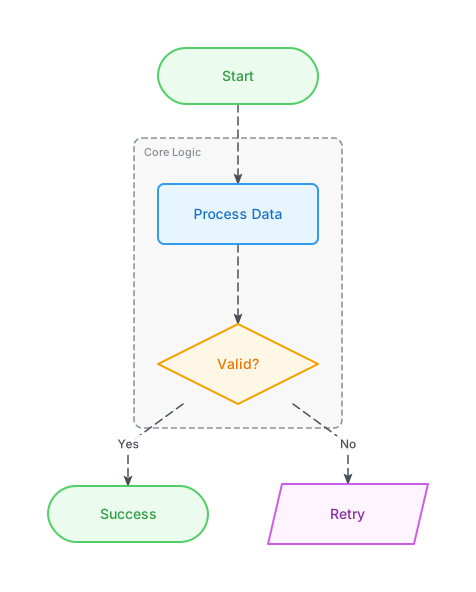
Flowchart |
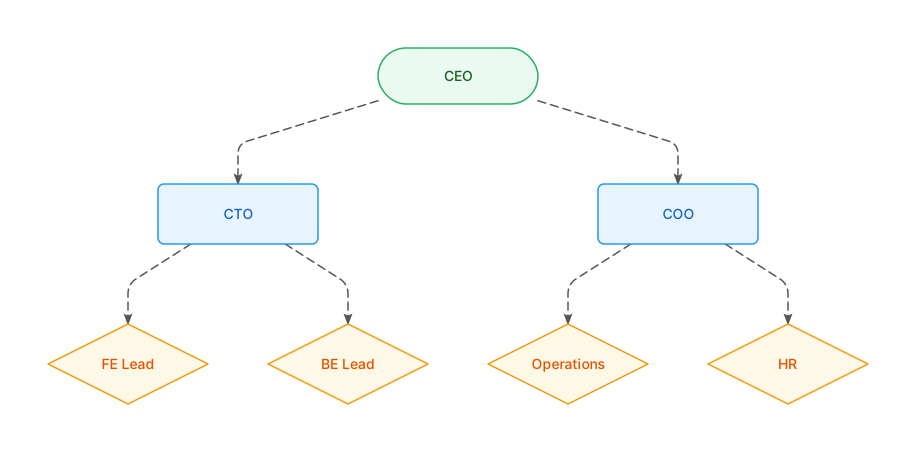
Tree |
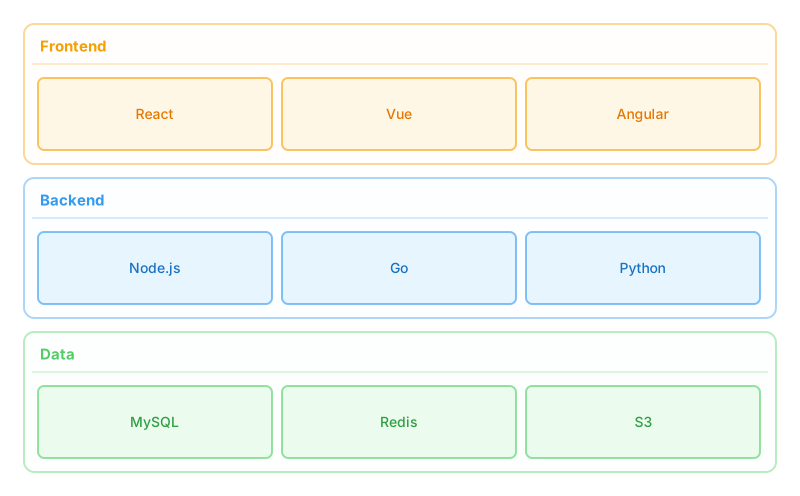
Architecture |
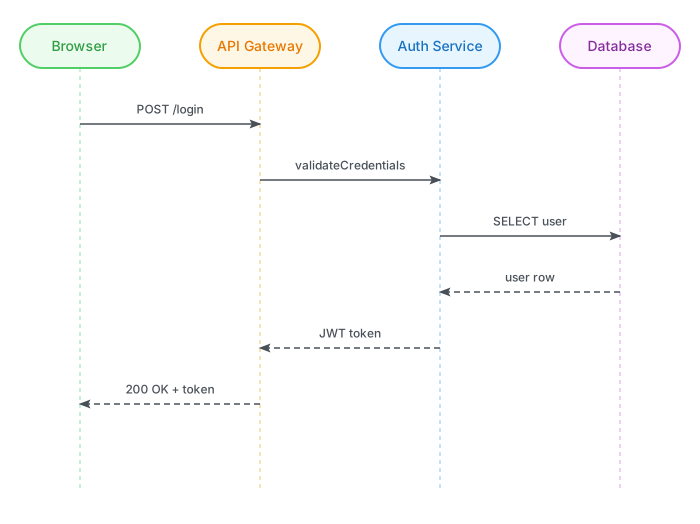
Sequence |
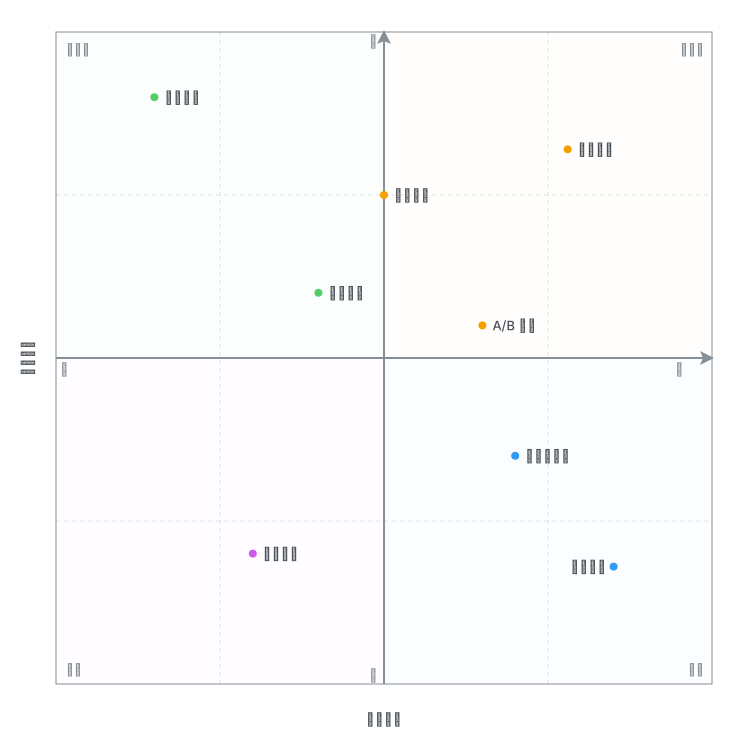
Quadrant |
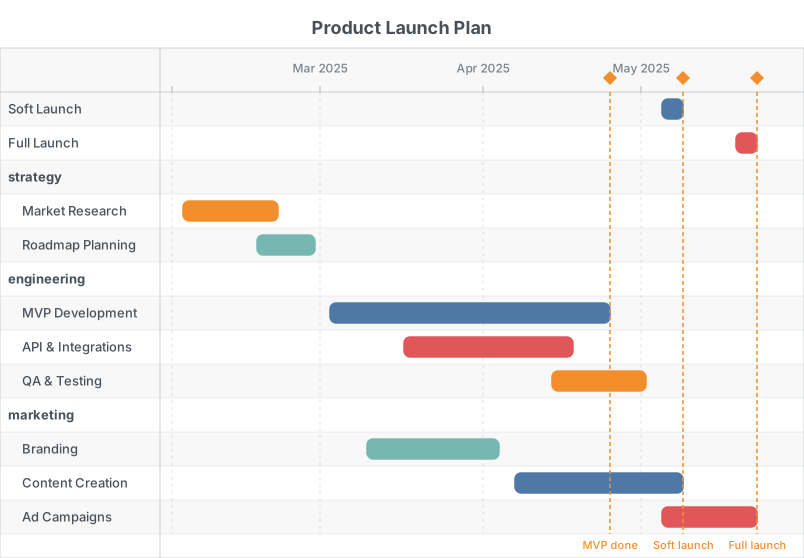
Gantt |
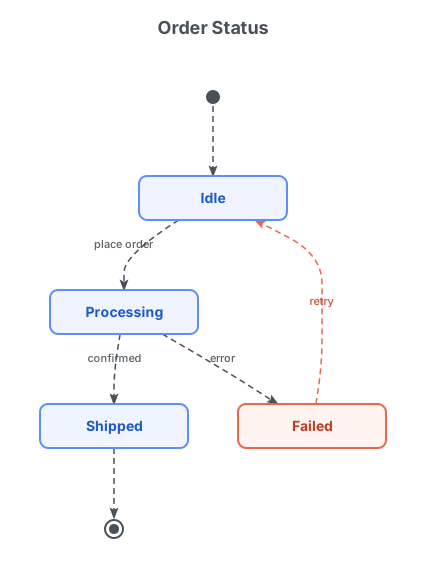
State Machine |
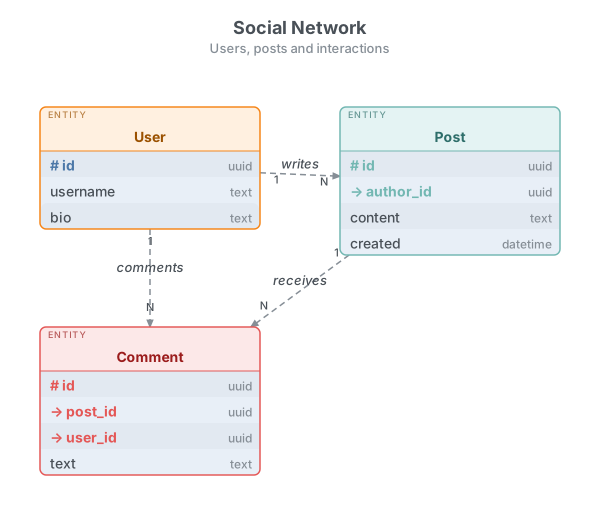
ER Diagram |
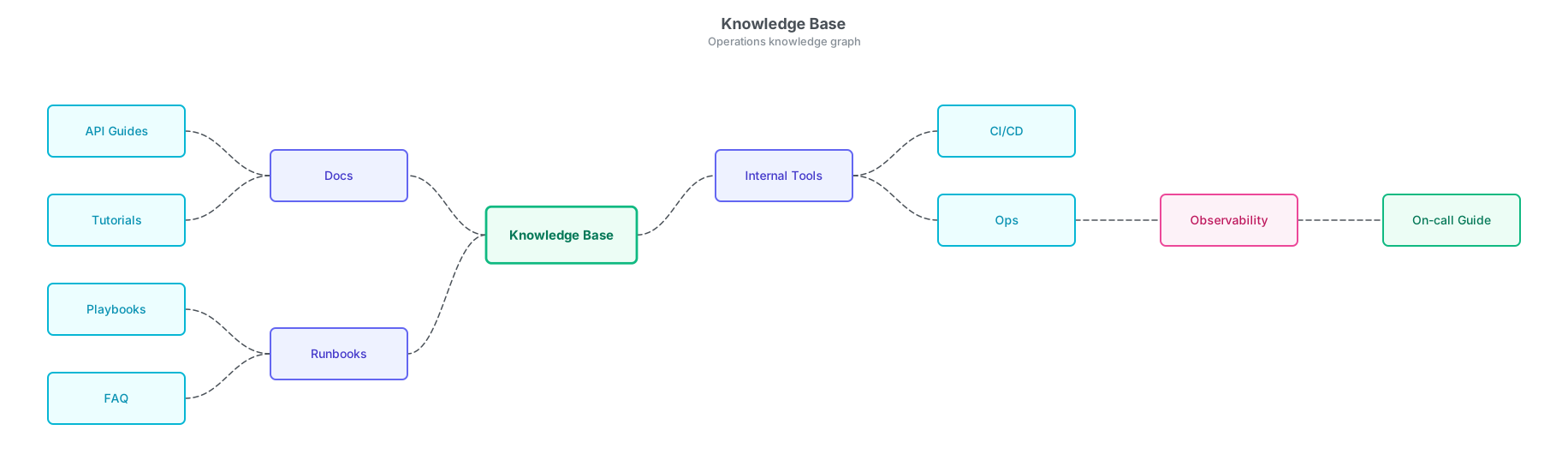
Mindmap 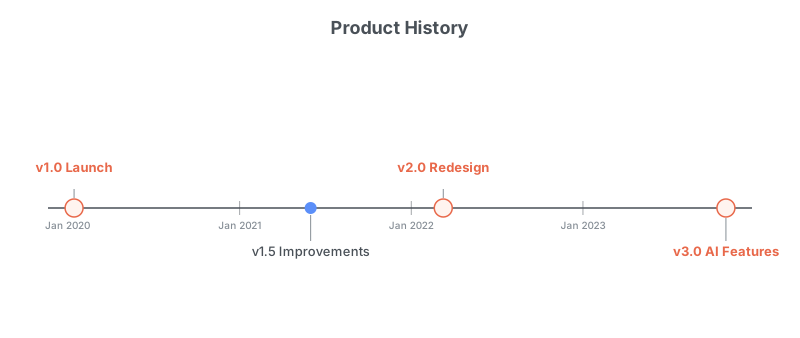
Timeline |
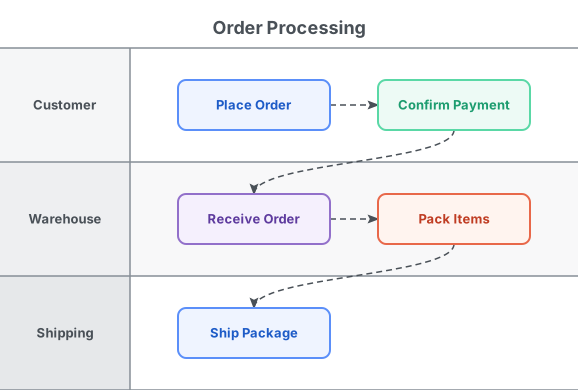
Swimlane |
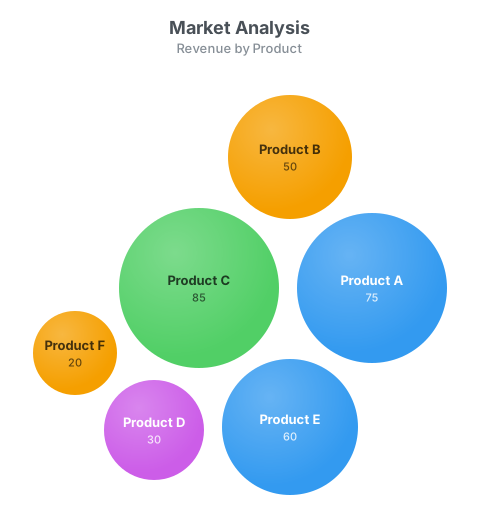
Bubble Chart |
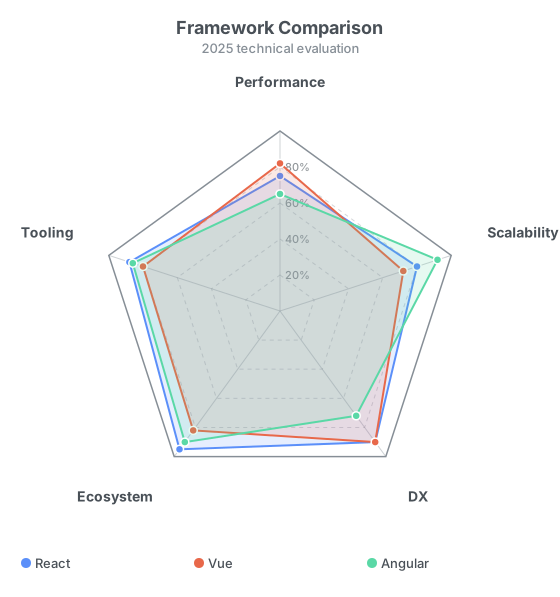
Radar Chart |
- 🎨 Rich visual styles — light/dark mode, nine built-in palettes (
default,antv,drawio,figma,vega,mono-blue,mono-green,mono-purple,mono-orange) plus custom hex arrays; every diagram supports optional title & subtitle, node groups, and color-coded layers - 📐 Auto layout — just describe the graph; x/y coordinates are computed automatically, and diagram dimensions scale to fit the content
- 🤖 AI-friendly — single
fig()entry point accepts a markdown string or a JSON config; streaming-safe (partial input never throws); ships aSKILL.mdthat AI agents (Copilot, Cursor, Claude, etc.) can load as context - 📊 13 diagram types — flowchart, tree, mindmap, architecture, sequence, quadrant, Gantt, state machine, ER data model, timeline, swimlane, bubble chart, and radar chart; pure SVG output with zero DOM dependency, works in browser and Node.js
npm install ai-figureimport { fig } from 'ai-figure';
// ── JSON config object (typed, programmatic) ────────────────────────────────
const svg = fig({
figure: 'flow',
nodes: [
{ id: 'start', label: 'Start', type: 'terminal' },
{ id: 'process1', label: 'Process Data', type: 'process' },
{ id: 'decision', label: 'Is Valid?', type: 'decision' },
{ id: 'end_yes', label: 'Success', type: 'terminal' },
{ id: 'end_no', label: 'Failure', type: 'terminal' },
],
edges: [
{ from: 'start', to: 'process1' },
{ from: 'process1', to: 'decision' },
{ from: 'decision', to: 'end_yes', label: 'Yes' },
{ from: 'decision', to: 'end_no', label: 'No' },
],
theme: 'light',
palette: 'default',
direction: 'TB',
});
// ── Markdown string (compact, AI-friendly) ──────────────────────────────────
const svg2 = fig(`
figure flow
direction: LR
palette: default
title: Auth Flow
start((Start)) --> login[Enter Credentials]
login --> validate{Valid?}
validate --> dashboard((Dashboard)): yes
validate --> error[Show Error]: no
error --> login
`);
// Browser: inject into the DOM
document.body.innerHTML = svg;
// Node.js: write to file
import { writeFileSync } from 'fs';
writeFileSync('diagram.svg', svg);The single entry point. Returns a fully self-contained SVG string.
input is either:
- A JSON config object — typed
FigOptionswith the requiredfigurefield - A markdown string — Mermaid-like syntax, streaming-safe (never throws; partial input returns a valid empty SVG)
import { fig } from 'ai-figure';

// JSON config
fig({ figure: 'flow',     ...flowOptions     }); // flowchart
fig({ figure: 'tree',     ...treeOptions     }); // tree / hierarchy
fig({ figure: 'mindmap',  ...mindmapOptions  }); // root-centered mindmap
fig({ figure: 'arch',     ...archOptions     }); // architecture diagram
fig({ figure: 'sequence', ...sequenceOptions }); // sequence diagram
fig({ figure: 'quadrant', ...quadrantOptions }); // quadrant chart
fig({ figure: 'gantt',    ...ganttOptions    }); // Gantt chart
fig({ figure: 'state',    ...stateOptions    }); // state machine
fig({ figure: 'er',       ...erOptions       }); // ER data model
fig({ figure: 'timeline', ...timelineOptions }); // timeline
fig({ figure: 'swimlane', ...swimlaneOptions }); // swimlane flow
fig({ figure: 'bubble',   ...bubbleOptions   }); // bubble chart
fig({ figure: 'radar',    ...radarOptions    }); // radar / spider chart

// markdown string
fig(`figure flow\na[A] --> b[B]`);
| Field | Type | Default | Description |
|---|---|---|---|
figure |
'flow' |
required | Selects the flowchart renderer |
nodes |
FlowNode[] |
required | List of nodes |
edges |
FlowEdge[] |
required | List of directed edges |
groups |
FlowGroup[] |
[] |
Optional logical groups |
title |
string |
undefined |
Optional centered title above the diagram |
subtitle |
string |
undefined |
Optional centered subtitle below the title |
theme |
ThemeType |
'light' |
Light or dark rendering mode ('light' | 'dark') |
palette |
PaletteType |
'default' |
Color palette — see Palette API below |
direction |
Direction |
'TB' |
Layout direction ('TB' or 'LR') |
| Field | Type | Default | Description |
|---|---|---|---|
id |
string |
required | Unique node identifier |
label |
string |
required | Text displayed in the node |
type |
NodeType |
'process' |
Visual shape |
Node types (NodeType)
| Value | Shape | Use case |
|---|---|---|
process |
Rectangle | Default step / action |
decision |
Diamond | Conditional / branch |
terminal |
Rounded rectangle | Start / End |
io |
Parallelogram | Input / Output |
| Field | Type | Default | Description |
|---|---|---|---|
from |
string |
required | Source node ID |
to |
string |
required | Target node ID |
label |
string |
undefined |
Optional edge label |
| Field | Type | Default | Description |
|---|---|---|---|
id |
string |
required | Unique group identifier |
label |
string |
required | Label shown above the group border |
nodes |
string[] |
required | IDs of nodes inside this group |
Renders a hierarchy from a flat node list with parent references. Uses Dagre for layout.
| Field | Type | Default | Description |
|---|---|---|---|
figure |
'tree' |
required | Selects the tree renderer |
nodes |
TreeNode[] |
required | Flat list with optional parent ref |
title |
string |
undefined |
Optional centered title above the diagram |
subtitle |
string |
undefined |
Optional centered subtitle below the title |
theme |
ThemeType |
'light' |
Light or dark rendering mode ('light' | 'dark') |
palette |
PaletteType |
'default' |
Color palette — see Palette API below |
direction |
Direction |
'TB' |
Layout direction |
fig({
  figure: 'tree',
  nodes: [
    { id: 'ceo', label: 'CEO' },
    { id: 'cto', label: 'CTO', parent: 'ceo' },
    { id: 'coo', label: 'COO', parent: 'ceo' },
  ],
  theme: 'light',
  palette: 'default',
});Renders a root-centered mindmap. First-level branches are auto-balanced across left/right unless explicit side is provided.
| Field | Type | Default | Description |
|---|---|---|---|
figure |
'mindmap' |
required | Selects the mindmap renderer |
nodes |
MindmapNode[] |
required | Flat list with optional parent and side |
title |
string |
undefined |
Optional centered title above the diagram |
subtitle |
string |
undefined |
Optional centered subtitle below the title |
theme |
ThemeType |
'light' |
Light or dark rendering mode ('light' | 'dark') |
palette |
PaletteType |
'default' |
Color palette — see Palette API below |
| Field | Type | Default | Description |
|---|---|---|---|
id |
string |
required | Unique node identifier |
label |
string |
required | Text displayed in the node |
parent |
string |
undefined |
Parent node id (omit for root) |
side |
'left' | 'right' |
auto | Optional preferred branch side (best for root-level children) |
fig({
  figure: 'mindmap',
  title: 'Product Strategy',
  nodes: [
    { id: 'root', label: 'Product Strategy' },
    { id: 'market', label: 'Market', parent: 'root', side: 'left' },
    { id: 'tech', label: 'Technology', parent: 'root', side: 'right' },
    { id: 'smb', label: 'SMB', parent: 'market' },
    { id: 'ai', label: 'AI Features', parent: 'tech' },
  ],
});Renders a tech-stack landscape as layered, color-coded cards — no edges needed.
| Field | Type | Default | Description |
|---|---|---|---|
figure |
'arch' |
required | Selects the architecture renderer |
layers |
ArchLayer[] |
required | Layers from top to bottom (TB) or left to right (LR) |
title |
string |
undefined |
Optional centered title above the diagram |
subtitle |
string |
undefined |
Optional centered subtitle below the title |
theme |
ThemeType |
'light' |
Light or dark rendering mode ('light' | 'dark') |
palette |
PaletteType |
'default' |
Color palette — see Palette API below |
direction |
Direction |
'TB' |
'TB' = layers stacked, 'LR' = layers side-by-side |
fig({
  figure: 'arch',
  layers: [
    { id: 'fe', label: 'Frontend', nodes: [{ id: 'react', label: 'React' }, { id: 'vue', label: 'Vue' }] },
    { id: 'be', label: 'Backend',  nodes: [{ id: 'node', label: 'Node.js' }] },
  ],
});Renders a sequence diagram with vertical lifelines and horizontal message arrows.
| Field | Type | Default | Description |
|---|---|---|---|
figure |
'sequence' |
required | Selects the sequence renderer |
actors |
string[] |
required | Ordered list of participant names |
messages |
SeqMessage[] |
required | Ordered list of message arrows |
title |
string |
undefined |
Optional centered title above the diagram |
subtitle |
string |
undefined |
Optional centered subtitle below the title |
theme |
ThemeType |
'light' |
Light or dark rendering mode ('light' | 'dark') |
palette |
PaletteType |
'default' |
Color palette — see Palette API below |
fig({
  figure: 'sequence',
  actors: ['Browser', 'API', 'DB'],
  messages: [
    { from: 'Browser', to: 'API', label: 'POST /login' },
    { from: 'API',     to: 'DB',  label: 'SELECT user' },
    { from: 'DB',      to: 'API', label: 'user row',  style: 'return' },
    { from: 'API',     to: 'Browser', label: '200 OK', style: 'return' },
  ],
});Renders a 2D quadrant scatter plot. Points are placed by normalized x/y values (0–1) and auto-colored by which quadrant they fall in.
| Field | Type | Default | Description |
|---|---|---|---|
figure |
'quadrant' |
required | Selects the quadrant renderer |
xAxis |
AxisConfig |
required | X-axis label, min and max tick labels |
yAxis |
AxisConfig |
required | Y-axis label, min and max tick labels |
quadrants |
[TL, TR, BL, BR] |
required | Corner labels: top-left, top-right, bottom-left, bottom-right |
points |
QuadrantPoint[] |
required | Data points to plot |
title |
string |
undefined |
Optional centered title above the diagram |
subtitle |
string |
undefined |
Optional centered subtitle below the title |
theme |
ThemeType |
'light' |
Light or dark rendering mode ('light' | 'dark') |
palette |
PaletteType |
'default' |
Color palette — see Palette API below |
| Field | Type | Description |
|---|---|---|
label |
string |
Axis title |
min |
string |
Label at the low end |
max |
string |
Label at the high end |
| Field | Type | Description |
|---|---|---|
id |
string |
Unique identifier |
label |
string |
Text shown next to the point |
x |
number |
Normalized X position (0 = left, 1 = right) |
y |
number |
Normalized Y position (0 = bottom, 1 = top) |
fig({
  figure: 'quadrant',
  xAxis: { label: 'Effort', min: 'Low', max: 'High' },
  yAxis: { label: 'Value',  min: 'Low', max: 'High' },
  quadrants: ['Quick Wins', 'Major Projects', 'Fill-ins', 'Thankless Tasks'],
  points: [
    { id: 'a', label: 'Feature A', x: 0.2,  y: 0.85 },
    { id: 'b', label: 'Feature B', x: 0.75, y: 0.80 },
    { id: 'c', label: 'Feature C', x: 0.5,  y: 0.6  },
    { id: 'd', label: 'Feature D', x: 0.3,  y: 0.2  },
    { id: 'e', label: 'Feature E', x: 0.8,  y: 0.25 },
  ],
  theme: 'light',
  palette: 'default',
});Renders a project timeline with task bars, optional group headers, and milestone markers. Canvas width is fixed at 804 px; height auto-adapts to the number of rows. The time axis ticks adjust automatically to the date range (weekly / monthly / quarterly).
| Field | Type | Default | Description |
|---|---|---|---|
figure |
'gantt' |
required | Selects the Gantt renderer |
tasks |
GanttTask[] |
required | List of task bars |
milestones |
GanttMilestone[] |
[] |
Optional milestone markers |
title |
string |
undefined |
Optional centered title above the diagram |
subtitle |
string |
undefined |
Optional centered subtitle below the title |
theme |
ThemeType |
'light' |
Light or dark rendering mode |
palette |
PaletteType |
'default' |
Color palette — see Palette API below |
| Field | Type | Default | Description |
|---|---|---|---|
id |
string |
required | Unique task identifier |
label |
string |
required | Task name shown in the label column and inside the bar |
start |
string |
required | Start date yyyy-mm-dd |
end |
string |
required | End date yyyy-mm-dd |
groupId |
string |
undefined |
Tasks sharing the same groupId are clustered under a group header |
color |
string |
undefined |
Optional custom bar color (6-digit hex, e.g. '#e64980') |
| Field | Type | Default | Description |
|---|---|---|---|
date |
string |
required | Milestone date yyyy-mm-dd |
label |
string |
required | Short label near the diamond icon |
fig({
  figure: 'gantt',
  title: 'Project Roadmap',
  tasks: [
    { id: 'design', label: 'Design',       start: '2025-01-06', end: '2025-01-24' },
    { id: 'fe',     label: 'Frontend Dev', start: '2025-01-20', end: '2025-02-28', groupId: 'dev' },
    { id: 'be',     label: 'Backend Dev',  start: '2025-01-13', end: '2025-03-07', groupId: 'dev' },
    { id: 'qa',     label: 'QA Testing',   start: '2025-02-24', end: '2025-03-14', groupId: 'qa'  },
    { id: 'deploy', label: 'Deploy',       start: '2025-03-17', end: '2025-03-21' },
  ],
  milestones: [
    { date: '2025-01-24', label: 'Design freeze' },
    { date: '2025-03-21', label: 'Launch' },
  ],
  theme: 'light',
  palette: 'default',
});Renders a UML state machine with dagre layout. Supports start (●) and end (◎) pseudo-states, accent states, self-loops, and labeled transitions.
| Field | Type | Default | Description |
|---|---|---|---|
figure |
'state' |
required | Selects the state machine renderer |
nodes |
StateNode[] |
required | List of states |
transitions |
StateTransition[] |
required | List of directed transitions |
title |
string |
undefined |
Optional centered title above the diagram |
subtitle |
string |
undefined |
Optional centered subtitle below the title |
theme |
ThemeType |
'light' |
Light or dark rendering mode |
palette |
PaletteType |
'default' |
Color palette — see Palette API below |
| Field | Type | Default | Description |
|---|---|---|---|
id |
string |
required | Unique state identifier |
label |
string |
required | Text displayed in the state box |
type |
StateNodeType |
'state' |
'state' | 'start' | 'end' |
accent |
boolean |
false |
Highlight this state with the accent color (max 1–2) |
| Field | Type | Default | Description |
|---|---|---|---|
from |
string |
required | Source state ID |
to |
string |
required | Target state ID |
label |
string |
undefined |
Optional label — typically event [guard] / action |
fig({
  figure: 'state',
  title: 'Order Status',
  nodes: [
    { id: 'start',      label: '',           type: 'start' },
    { id: 'idle',       label: 'Idle' },
    { id: 'processing', label: 'Processing' },
    { id: 'shipped',    label: 'Shipped' },
    { id: 'failed',     label: 'Failed',     accent: true },
    { id: 'end',        label: '',           type: 'end' },
  ],
  transitions: [
    { from: 'start',      to: 'idle' },
    { from: 'idle',       to: 'processing', label: 'place order' },
    { from: 'processing', to: 'shipped',    label: 'confirmed' },
    { from: 'processing', to: 'failed',     label: 'error' },
    { from: 'failed',     to: 'idle',       label: 'retry' },
    { from: 'shipped',    to: 'end' },
  ],
});Renders a database schema with entity boxes (header + field list) and relationship lines with optional cardinality annotations.
| Field | Type | Default | Description |
|---|---|---|---|
figure |
'er' |
required | Selects the ER renderer |
entities |
ErEntity[] |
required | List of entities (tables) |
relations |
ErRelation[] |
required | List of relationship lines |
title |
string |
undefined |
Optional centered title above the diagram |
subtitle |
string |
undefined |
Optional centered subtitle below the title |
theme |
ThemeType |
'light' |
Light or dark rendering mode |
palette |
PaletteType |
'default' |
Color palette — see Palette API below |
| Field | Type | Default | Description |
|---|---|---|---|
id |
string |
required | Unique entity identifier |
label |
string |
required | Entity display name shown in the header |
fields |
ErField[] |
required | Ordered list of fields (columns) |
accent |
boolean |
false |
Highlight as the aggregate root (max 1) |
| Field | Type | Default | Description |
|---|---|---|---|
name |
string |
required | Field name |
type |
string |
undefined |
Data type string (e.g. 'uuid', 'text') |
key |
'pk'|'fk' |
undefined |
'pk' = primary key (#), 'fk' = foreign key (→) |
| Field | Type | Default | Description |
|---|---|---|---|
from |
string |
required | Source entity ID |
to |
string |
required | Target entity ID |
label |
string |
undefined |
Optional label centered on the line |
fromCard |
string |
undefined |
Cardinality at the from end (e.g. '1', 'N') |
toCard |
string |
undefined |
Cardinality at the to end |
fig({
  figure: 'er',
  title: 'Blog Schema',
  entities: [
    { id: 'user', label: 'User',
      fields: [{ name: 'id', type: 'uuid', key: 'pk' }, { name: 'email', type: 'text' }] },
    { id: 'post', label: 'Post',
      fields: [{ name: 'id', type: 'uuid', key: 'pk' }, { name: 'author_id', type: 'uuid', key: 'fk' }] },
  ],
  relations: [
    { from: 'user', to: 'post', label: 'writes', fromCard: '1', toCard: 'N' },
  ],
});Renders a horizontal date axis with events spaced proportionally. Labels alternate above and below the axis to reduce collision. Major milestones are rendered with a larger accent dot.
| Field | Type | Default | Description |
|---|---|---|---|
figure |
'timeline' |
required | Selects the timeline renderer |
events |
TimelineEvent[] |
required | List of events (auto-sorted by date) |
title |
string |
undefined |
Optional centered title above the diagram |
subtitle |
string |
undefined |
Optional centered subtitle below the title |
theme |
ThemeType |
'light' |
Light or dark rendering mode |
palette |
PaletteType |
'default' |
Color palette — see Palette API below |
| Field | Type | Default | Description |
|---|---|---|---|
id |
string |
required | Unique event identifier |
label |
string |
required | Short label displayed near the event dot |
date |
string |
required | Event date in yyyy-mm-dd format |
milestone |
boolean |
false |
Render as a major milestone (larger accent-color dot) |
fig({
  figure: 'timeline',
  title: 'Product History',
  events: [
    { id: 'v1',   label: 'v1.0 Launch',   date: '2020-01-15', milestone: true },
    { id: 'v15',  label: 'v1.5 Patch',    date: '2021-06-01' },
    { id: 'v2',   label: 'v2.0 Redesign', date: '2022-03-10', milestone: true },
    { id: 'v3',   label: 'v3.0 AI',       date: '2023-11-01', milestone: true },
  ],
});Renders a cross-functional flowchart with horizontal lane bands. Nodes are placed in their declared lane; cross-lane edges use S-curve routing.
| Field | Type | Default | Description |
|---|---|---|---|
figure |
'swimlane' |
required | Selects the swimlane renderer |
lanes |
string[] |
required | Lane labels in display order |
nodes |
SwimlaneNode[] |
required | Nodes placed inside their respective lanes |
edges |
SwimlaneEdge[] |
required | Directed edges between nodes |
title |
string |
undefined |
Optional centered title above the diagram |
subtitle |
string |
undefined |
Optional centered subtitle below the title |
theme |
ThemeType |
'light' |
Light or dark rendering mode |
palette |
PaletteType |
'default' |
Color palette — see Palette API below |
| Field | Type | Default | Description |
|---|---|---|---|
id |
string |
required | Unique node identifier |
label |
string |
required | Text displayed in the node |
lane |
string |
required | Lane label this node belongs to |
type |
NodeType |
'process' |
Visual shape (same as flowchart nodes) |
| Field | Type | Default | Description |
|---|---|---|---|
from |
string |
required | Source node ID |
to |
string |
required | Target node ID |
label |
string |
undefined |
Optional edge label |
fig({
  figure: 'swimlane',
  title: 'Order Processing',
  lanes: ['Customer', 'Warehouse', 'Shipping'],
  nodes: [
    { id: 'order',   label: 'Place Order',     lane: 'Customer'  },
    { id: 'pay',     label: 'Confirm Payment', lane: 'Customer'  },
    { id: 'receive', label: 'Receive Order',   lane: 'Warehouse' },
    { id: 'pack',    label: 'Pack Items',      lane: 'Warehouse' },
    { id: 'ship',    label: 'Ship Package',    lane: 'Shipping'  },
  ],
  edges: [
    { from: 'order',   to: 'pay'     },
    { from: 'pay',     to: 'receive' },
    { from: 'receive', to: 'pack'    },
    { from: 'pack',    to: 'ship'    },
  ],
});Renders a packed-bubble chart where each item's area is proportional to its value. Positions are computed automatically by a greedy circle-packing algorithm — no coordinates needed. Bubbles pulse with a subtle SMIL animation for a lively visual effect.
| Field | Type | Default | Description |
|---|---|---|---|
figure |
'bubble' |
required | Selects the bubble chart renderer |
items |
BubbleItem[] |
required | Bubble data items |
title |
string |
undefined |
Optional centered title above the diagram |
subtitle |
string |
undefined |
Optional centered subtitle below the title |
theme |
ThemeType |
'light' |
Light or dark rendering mode |
palette |
PaletteType |
'default' |
Color palette — see Palette API below |
| Field | Type | Default | Description |
|---|---|---|---|
id |
string |
undefined |
Optional unique identifier |
label |
string |
required | Text label displayed inside or below the bubble |
value |
number |
required | Positive number — bubble area is proportional to value |
fig({
  figure: 'bubble',
  title: 'Market Analysis',
  items: [
    { label: 'Product A', value: 75 },
    { label: 'Product B', value: 50 },
    { label: 'Product C', value: 85 },
  ],
  palette: 'default',
});Renders a radar (spider / web) chart with multiple overlaid polygon series. Each axis is a spoke radiating from the centre; values 0–100 map to 0–100% of the axis radius. Multiple series are overlaid with translucent fills so they remain readable when they overlap. A legend below the chart labels each series.
| Field | Type | Default | Description |
|---|---|---|---|
figure |
'radar' |
required | Selects the radar chart renderer |
axes |
string[] |
required | Ordered list of axis labels (3 or more recommended) |
series |
RadarSeries[] |
required | One or more data series to overlay |
title |
string |
undefined |
Optional centered title above the diagram |
subtitle |
string |
undefined |
Optional centered subtitle below the title |
theme |
ThemeType |
'light' |
Light or dark rendering mode |
palette |
PaletteType |
'default' |
Color palette — see Palette API below |
| Field | Type | Default | Description |
|---|---|---|---|
label |
string |
required | Series name shown in the legend |
values |
number[] |
required | One value per axis in the same order as axes (range 0–100) |
fig({
  figure: 'radar',
  title: 'Framework Comparison',
  axes: ['Performance', 'Scalability', 'DX', 'Ecosystem', 'Tooling'],
  series: [
    { label: 'React',   values: [75, 80, 90, 95, 88] },
    { label: 'Vue',     values: [82, 72, 90, 82, 80] },
    { label: 'Angular', values: [65, 92, 72, 90, 86] },
  ],
  palette: 'antv',
});All thirteen diagram types accept two independent styling parameters:
| Field | Type | Default | Description |
|---|---|---|---|
theme |
'light' | 'dark' |
'light' |
Background and text rendering mode |
palette |
string | string[] |
'default' |
Color palette for nodes |
palette values:
| Value | Description |
|---|---|
'default' |
Built-in multi-hue palette — process=blue, decision=amber, terminal=green, io=purple |
'antv' |
AntV G2 categorical palette — cornflower-blue, coral-orange, mint-teal, violet |
'drawio' |
draw.io / diagrams.net shape palette — sky-blue, amber, sage, red |
'figma' |
Figma / design-tool palette — indigo, cyan, emerald, rose-pink |
'vega' |
Vega / Vega-Lite categorical palette — steel-blue, orange, teal, crimson |
'mono-blue' |
Monochrome blue — all four node types use blue-family shades |
'mono-green' |
Monochrome green — all four node types use green-family shades |
'mono-purple' |
Monochrome purple — all four node types use purple-family shades |
'mono-orange' |
Monochrome orange — all four node types use orange-family shades |
string[] |
4-element hex array mapped to [process, decision, terminal, io] |
// Built-in palette, dark mode
fig({ figure: 'flow', nodes, edges, theme: 'dark', palette: 'default' });

// AntV G2 palette
fig({ figure: 'flow', nodes, edges, palette: 'antv' });

// draw.io palette with dark background
fig({ figure: 'flow', nodes, edges, theme: 'dark', palette: 'drawio' });

// Monochrome blue
fig({ figure: 'flow', nodes, edges, palette: 'mono-blue' });

// Custom hex palette
fig({ figure: 'flow', nodes, edges, palette: ['#e64980', '#ae3ec9', '#7048e8', '#1098ad'] });fig() also accepts a plain markdown string as input. The first non-empty line must be figure <type>. Config, data, and comment lines follow.
| Line type | Syntax | Example |
|---|---|---|
| Header | figure <type> |
figure flow |
| Config | key: value |
direction: LR · palette: antv · title: My Chart |
| Comment | %% text |
%% ignored |
| Data | diagram-specific | see per-diagram syntax below |
Config keys available in all diagram types: title, subtitle, theme (light|dark), palette, direction (TB|LR).
| Notation | Shape |
|---|---|
id[label] |
process (rectangle) |
id{label} |
decision (diamond) |
id((label)) |
terminal (pill) |
id[/label/] |
io (parallelogram) |
id |
process (bare id used as label) |
flow
figure flow
direction: LR
title: Optional Title
subtitle: Optional Subtitle
id[Label]                          %% standalone node definition
A[Source] --> B[Target]            %% edge
A --> B[Target]: label             %% labeled edge
group GroupName: id1, id2, id3     %% logical group
tree
figure tree
direction: LR
title: Optional Title
root[Root]                   %% root node (no parent)
root --> child[Child]        %% parent → child relationship
arch
figure arch
direction: TB
title: Optional Title
layer Layer Label            %% layer declaration (label serves as id)
  nodeId[Node Label]         %% node in current layer (indentation optional)
mindmap
figure mindmap
title: Optional Title
subtitle: Optional Subtitle
root[Root Topic]
root --> leftBranch[Left Branch]
root --> rightBranch[Right Branch]
leftBranch --> leaf[Leaf]
sequence
figure sequence
title: Optional Title
actors: Actor1, Actor2, Actor3     %% optional; inferred from messages if omitted
Actor1 -> Actor2: message          %% solid arrow
Actor2 --> Actor1: response        %% dashed return arrow
Actor1 -> Actor2                   %% arrow without label
quadrant
figure quadrant
title: Optional Title
x-axis: min .. max                 %% axis range (label defaults to "")
x-axis Label: min .. max           %% axis range with explicit axis label
y-axis: min .. max
quadrant-1: Top-Left Name          %% 1=TL, 2=TR, 3=BL, 4=BR
quadrant-2: Top-Right Name
quadrant-3: Bottom-Left Name
quadrant-4: Bottom-Right Name
Point Label: 0.3, 0.7             %% data point (x, y in [0, 1])
gantt
figure gantt
title: Optional Title
section Section Name               %% group header (applied to subsequent tasks)
  Task Label: id, start, end       %% task bar (dates: yyyy-mm-dd)
milestone: Label, date             %% milestone diamond
state
figure state
title: Optional Title
idle[Idle]                         %% normal state (rounded rectangle)
accent: failed                     %% highlight as focal/error state
start --> idle                     %% start pseudo-state → first state
idle --> processing: order placed  %% transition with optional label
processing --> end: shipped        %% end pseudo-state
er
figure er
title: Optional Title
entity User                        %% entity declaration (name = id = label)
  id pk: uuid                      %% field: name [pk|fk]: type
  email: text
  name                             %% bare field (no type)
entity Post
  id pk: uuid
  author_id fk: uuid
User --> Post: writes              %% relationship line
accent: User                       %% mark as aggregate root
timeline
figure timeline
title: Optional Title
2020-01-15: v1.0 Launch milestone  %% major milestone (larger accent dot)
2021-06-01: v1.5 Patch
2022-03-10: v2.0 Redesign milestone
swimlane
figure swimlane
title: Optional Title
section Customer                          %% declare lane (subsequent nodes belong here)
  order[Place Order]                      %% node in current lane
  pay[Confirm Payment]
section Warehouse
  pack[Pack Items]
section Shipping
  ship[Ship Package]
order --> pack                            %% edges between nodes
pack --> ship
bubble
figure bubble
title: Optional Title
%% e.g. "Product A: 75"
Label: value
radar
figure radar
title: Optional Title
%% axes: comma-separated axis labels
axes: Axis1, Axis2, Axis3, ...
%% one value (0-100) per axis
Series A: 80, 70, 90, ...
Series B: 60, 85, 75, ...
This library ships a SKILL.md — a machine-readable skill file that AI agents (Copilot, Cursor, Claude, etc.) can load as context.
# Load the skill into your AI context:
@SKILL.md
fig() accepts a plain markdown string, which makes it ideal for AI generation:
- Streaming-safe — partial output never throws; the diagram fills in progressively as more tokens arrive
- Compact — the markdown syntax is ~5× shorter than an equivalent JSON config
Prompt example:
"Draw a flowchart showing the user login process."
AI-generated code:
import { fig } from 'ai-figure';

const svg = fig(`
  figure flow
  direction: TB
  palette: default
  title: User Login
  start((Start)) --> creds[Enter Credentials]
  creds --> validate{Valid?}
  validate --> dashboard((Dashboard)): yes
  validate --> error[Show Error]: no
  error --> creds
  dashboard --> done((End))
`);# Install dependencies
npm install
# Build (ESM + CJS)
npm run build
# Run tests
npm test
# Type check
npm run typecheck
# Start browser demo (after building)
npx serve .
# Then open: http://localhost:3000/index.htmlMIT © hustcc