Add user-defined thread folders to the sidebar#3071
Conversation


|
Important Review skippedAuto reviews are disabled on this repository. Please check the settings in the CodeRabbit UI or the ⚙️ Run configurationConfiguration used: Repository UI Review profile: CHILL Plan: Pro Run ID: You can disable this status message by setting the Use the checkbox below for a quick retry:
✨ Finishing Touches🧪 Generate unit tests (beta)
Thanks for using CodeRabbit! It's free for OSS, and your support helps us grow. If you like it, consider giving us a shout-out. Comment |
 github-actions
Bot
added
vouch:unvouched
github-actions
Bot
added
vouch:unvouched
![cursor[bot]](https://avatars.githubusercontent.com/in/1210556?s=60&v=4)
![macroscopeapp[bot]](https://avatars.githubusercontent.com/in/900172?s=60&v=4)

ApprovabilityVerdict: Needs human review 1 blocking correctness issue found. Introduces a substantial new feature (user-defined thread folders with drag-and-drop organization) including new components, state management, and persistence logic. Additionally, unresolved review comments identify potential bugs in drag state handling. You can customize Macroscope's approvability policy. Learn more. |


Add collapsible, per-project folders to organize sidebar threads, with
drag-and-drop (including multi-select moves), inline rename, and manual
ordering of folders and of threads within a folder. State is client-only
in useUiStateStore (localStorage); a thread belongs to at most one folder;
ungrouped threads render below folders and remain sort-ordered.

- uiStateStore: ThreadGroup model + reducers (create/rename/delete/move/
  reorder/toggle), derived threadKey->groupId index, persistence
  round-trip, and syncThreadGroups orphan GC against the live snapshot.
- sidebarThreadGrouping.ts: pure buildGroupedThreadLayout helper (+ tests).
- SidebarThreadGroupRow.tsx: collapsible folder header that is both a
  sortable item and a drop target, with inline rename.
- Sidebar.tsx: per-project DnD context, sortable thread rows with
  click-vs-drag guards, folder section rendering, pagination of the
  ungrouped list only, and context-menu CRUD (project header, multi-select,
  per-thread "Move to folder").
- service.ts: garbage-collect folder state when threads/projects disappear.

Co-Authored-By: Claude Opus 4.8 <noreply@anthropic.com>
Folder-member rows now render inset with a left vertical guide so the
nesting under a folder header is visually obvious; ungrouped and
collapsed-pinned threads stay flush.

Co-Authored-By: Claude Opus 4.8 <noreply@anthropic.com>
 TheIcarusWings
force-pushed
the
t3code/sidebar-thread-folders
branch
from
TheIcarusWings
force-pushed
the
t3code/sidebar-thread-folders
branch
from
a14b59c to
b7e73e1
Compare
- Keyboard jump labels now mirror the folder layout (expanded sections then
  preview-capped ungrouped), so labels match the rendered rows.
- Drag and the multi-select "Move to folder" menu now act on the same
  project-scoped selection (includes off-screen selected rows; ignores other
  projects' threads), keeping the two paths consistent.
- handleThreadDragEnd no-ops when dropped on itself (no spurious reorder).
- handleThreadDragCancel clears the click-suppression flags so the next click
  after a cancelled drag isn't swallowed.
- Collapsed project exposes only the pinned thread as its selectable order.
- Folder rename: Escape no longer commits via the input's onBlur.

Co-Authored-By: Claude Opus 4.8 <noreply@anthropic.com>
resolveDraggedThreadKeys now orders the dragged selection by the folder-aware
layout (folder members in their in-folder order, ungrouped in sort order)
instead of raw sidebar sort order, so multi-dragging grouped threads keeps
their order. Still includes off-screen selected rows and stays project-scoped.

Co-Authored-By: Claude Opus 4.8 <noreply@anthropic.com>

|
please add screenshots and/or videos |

|
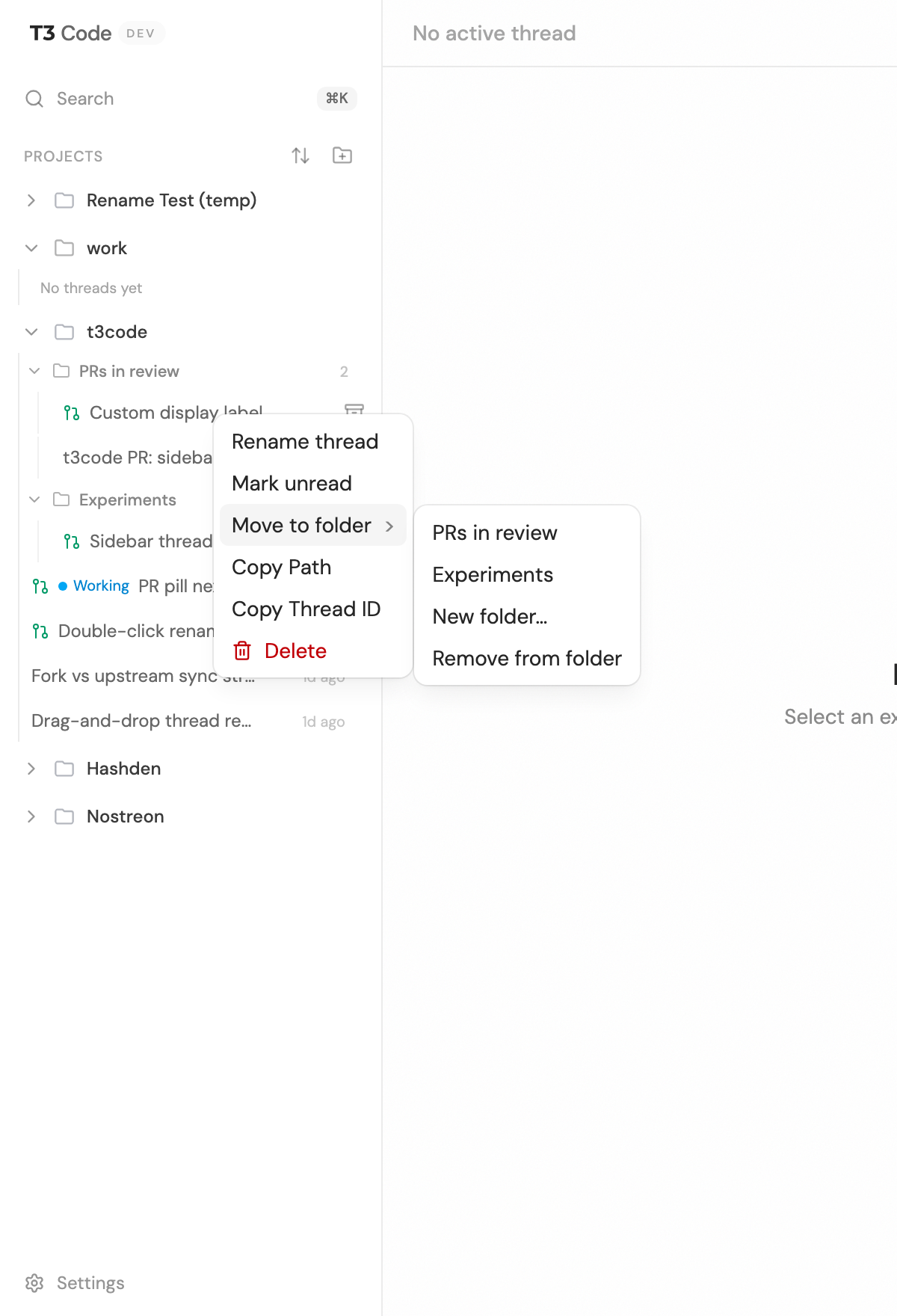
Thanks @juliusmarminge! Here is the feature in action. 1. Folders with threads (expanded). You can create named folders per project from the project header menu. Threads nest under a folder with an indent and a vertical guide line, and each folder shows a member count. Ungrouped threads stay below the folders.
2. Collapsible folders. Click a folder header to collapse/expand; the count stays visible while collapsed. Collapse state (and folder membership/order) persists across reloads.
3. Moving threads. Right-click a thread (or a multi-selection) for a "Move to folder" submenu with existing folders, "New folder…", and "Remove from folder". Drag-and-drop also works: drag threads into/out of folders and reorder within a folder; a multi-selection moves together.
Persistence is client-side (localStorage), scoped per project, mirroring how project order and expand state are already stored. |


|
You think we can have like modes here so users can set some thread grouping strategy: manual, worktree & branch to start with? |
|
Yeah, love that direction. This PR is essentially the I'd add a
To keep this PR focused and mergeable, I'll do the modes as a follow-up PR on top of it. Sound good? |
|
feels like it's rerendering wayyy too often. needs some react optimizations: CleanShot.2026-06-14.at.17.03.21.mp4also not clear where the thread will end up, the draggable thread item covers too much and when you drag it over a folder there's not really any feedback that it will be added to the folder i don't think?? |
…g feedback

Addresses review feedback on the folders PR.

Performance: extract the heavy row into a memoized SidebarThreadRowContent and
wrap it in a thin SidebarThreadRow that owns useSortable + the draggable <li>.
dnd-kit re-renders sortable nodes on every pointer move; now only the thin
wrapper re-renders, the expensive content (git status, selectors, etc.) is
skipped while dragging.

Drag UX: the dragged row dims in place instead of following the cursor and
covering the list; a compact DragOverlay (a grip chip, offset off the cursor)
represents it; the target folder shows a clear highlight while a thread is over
it, so it's obvious where the thread will land.

Also unify drag click-suppression on a single flag cleared on the next frame, so
a real click after a drag is no longer swallowed.
|
Good catches, both fixed in c365e18. Re-renders: the thread row called Drag clarity: the dragged row used to follow the cursor at 80% opacity and cover the list. Now it dims in place as a placeholder, a compact chip (nudged off the cursor) represents what you're dragging, and the folder you're hovering gets a clear highlight so it's obvious where the thread will land:
Also fixed a related bug where the first click right after a drag was getting swallowed. |


There was a problem hiding this comment.
Cursor Bugbot has reviewed your changes and found 1 potential issue.
❌ Bugbot Autofix is OFF. To automatically fix reported issues with cloud agents, enable autofix in the Cursor dashboard.
Reviewed by Cursor Bugbot for commit c365e18. Configure here.
| setActiveDragLabel(null); | ||
| requestAnimationFrame(() => { | ||
| threadDragInProgressRef.current = false; | ||
| }); |
There was a problem hiding this comment.
Stale rAF clears drag guard
Medium Severity
endThreadDrag schedules a requestAnimationFrame that always sets threadDragInProgressRef to false. If the user starts another thread or folder drag before that callback runs, the stale frame clears the flag while the new drag is still active, so row clicks can navigate or select and folder headers can toggle mid-drag.
Additional Locations (1)


Reviewed by Cursor Bugbot for commit c365e18. Configure here.
2 participants


Summary
Adds user-defined folders to organize threads within a project in the sidebar. You can create named folders (e.g. "PRs in review", "experiments"), drag threads into them, reorder threads and folders, and collapse/expand folders — all persisted locally.
What's included
Design decisions
useUiStateStore(localStorage), the same place project order/expand state already live. No server/contracts/decider/projector/DB changes. (Trade-off: does not sync across machines; can be lifted to the server later behind the same UI.)threadKeysarray is the single source of truth for both membership and within-folder order; a derived reverse index gives O(1) lookups).syncThreadGroupsgarbage-collects membership for threads/projects that disappear from the live snapshot.Known v1 limitation
Switching the project grouping mode can change a project's logical key and detach its folders. This is non-destructive — affected threads fall back to ungrouped, and membership (keyed by stable thread key) is never lost.
Files
New:
apps/web/src/sidebarThreadGrouping.ts(+ test),apps/web/src/components/SidebarThreadGroupRow.tsxChanged:
apps/web/src/uiStateStore.ts(+ test),apps/web/src/components/Sidebar.tsx,apps/web/src/environments/runtime/service.tsTesting
pnpm --filter @t3tools/web typecheck— cleancd apps/web && pnpm exec vp test run --project unit— 1063 passed (incl. new reducer, persistence round-trip, and layout-helper tests)pnpm exec vp lint/vp fmt— cleanpnpm --filter @t3tools/web build) — compiles🤖 Generated with Claude Code
Note
Medium Risk
Large sidebar refactor with drag-and-drop and new persisted client state; mistakes could mis-order threads, lose folder membership on sync, or break navigation/selection, but there is no server or auth impact.
Overview
Adds per-project thread folders in the sidebar so users can organize threads locally without server changes.
State & persistence:
uiStateStoregains folder CRUD, membership/order, collapse, andsyncThreadGroupsagainst live threads/projects; folders round-trip through localStorage. Snapshot reconciliation inenvironments/runtime/service.tscalls that sync after project/thread UI sync.Layout: New
buildGroupedThreadLayoutsplits each project’s threads into ordered folder sections plus ungrouped threads. Show more/less only caps the ungrouped list; folder contents always render in full.Sidebar UI: New
SidebarThreadGroupRowfor collapsible folder headers.Sidebarwraps each project list in dnd-kit (thread + folder reorder, drop on headers, “Remove from folder” zone, multi-select moves, drag overlay). Context menus add New thread folder, Move to folder, and folder rename/delete. Thread rows split into a sortable wrapper and memoized content to limit drag-frame re-renders; selection and keyboard jump indices follow the folder-aware visible order.Reviewed by Cursor Bugbot for commit c365e18. Bugbot is set up for automated code reviews on this repo. Configure here.
Note
Add user-defined thread folders to the sidebar
@dnd-kitwith a live drag overlay and anUngroupedDropZonedrop target.sanitizePersistedThreadGroupsinuiStateStore.ts.sidebarThreadGrouping.tsprovides a purebuildGroupedThreadLayoututility that drives visible thread ordering for both the sidebar list and keyboard jump labels.reconcileSnapshotDerivedStatenow callssyncThreadGroupsto prune stale thread memberships and drop empty folders for removed projects.Macroscope summarized c365e18.