
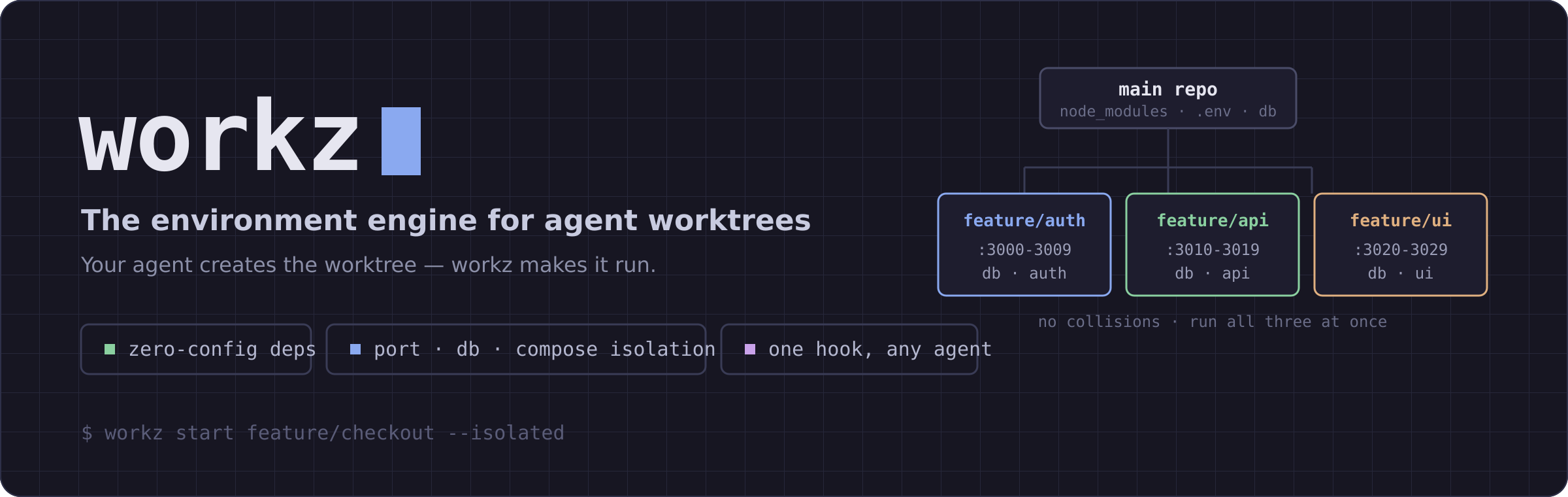




Your agent creates the worktree — workz makes it run.
Dependencies linked, .env copied, a unique port range, its own database and compose project. Zero config.

Claude Code, Cursor, and Codex all create git worktrees for parallel work now. But a fresh worktree is inert:
git worktree add ../feature-x feature/x && cd ../feature-x
# .env? gone.   node_modules? gone — reinstall and wait.
# dev-server port? same as every other worktree.   database? shared.
Every one of those tools ships a worktree-create hook and tells you to write the setup command yourself. workz is that command — and it's the only tool that also gives each worktree its own ports, database, and compose project.
# 1. install
cargo install workz          # or: brew install rohansx/tap/workz

# 2. in your repo — guided setup (detects your stack, writes .workz.toml)
workz init

# 3. spin up an isolated worktree that's ready to run
workz start feature/checkout --isolated
That's it: node_modules symlinked, .env copied, PORT=3000-3009, DB_NAME and COMPOSE_PROJECT_NAME set — you're dropped into a worktree you can dev immediately, with no collisions against your other worktrees.

Let your editor/agent create worktrees natively; point its setup hook at workz sync. workz hook <host> prints the exact recipe (and --install writes it):
| Host | Recipe |
|---|---|
| Cursor | .cursor/worktrees.json → { "setup-worktree": ["workz","sync","--isolated","--quiet"] } |
| worktrunk | .config/wt.toml → pre-start = "workz sync --isolated --quiet" |
| Claude Code | WorktreeCreate hook → workz claude-hook --isolated (run workz hook claude for the settings.json block) |
| anything else | workz sync --isolated --quiet <path> |
workz hook cursor --install     # writes .cursor/worktrees.json
workz hook claude               # prints the Claude Code hook to paste
--json makes sync output machine-readable; --quiet stays silent on success (warnings to stderr).
worktrunk dispatches wt <name> to a wt-<name> executable on your PATH (git-style). Drop examples/wt-workz somewhere on your PATH and you get:
install -m 0755 examples/wt-workz ~/.local/bin/wt-workz   # once

wt workz            # provision the current worktree: ports, DB, compose isolation
wt workz status     # any workz command, under the wt namespace
wt workz complements worktrunk's stateless hash_port: it adds registry-backed (collision-proof) port ranges plus per-worktree Postgres and COMPOSE_PROJECT_NAME isolation, all opt-in.
| Command | Does |
|---|---|
workz init |
Guided setup: detect the stack, write .workz.toml, install a hook (-y for defaults) |
workz start <branch> |
Create a worktree + sync (--isolated, --create-db, --docker, --ai, --base, --carry-from <branch|main>) |
workz sync [path] |
Make a worktree runnable — the hook command (--isolated, --json, --quiet, --no-install) |
workz / workz status |
Every worktree at a glance: branch, dirty state, size, port range, service map |
workz switch [query] |
Fuzzy-jump between worktrees |
workz list |
List worktrees (ls) |
workz run [branch] |
Start the worktree's dev server on its allocated port (--stop, --logs, --all) |
workz preview |
Which worktrees are live, and at which URL (--json) |
workz done [branch] |
Remove a worktree — auto-reaps allocated-port processes, compose down, optional DB drop (--force, --delete-branch, --cleanup-db, --no-reap, --no-compose-down, --compose-volumes) |
workz reap [branch] |
Kill processes bound to ports workz allocated (--all, --yes, --dry-run, --force, --json) |
workz clean |
Prune stale worktrees (--merged removes merged branches) |
workz conflicts |
Files modified in more than one worktree — catch clashes before merge |
workz env-diff |
Show drift between .env.local managed blocks across worktrees |
workz doctor |
Diagnose broken symlinks, orphaned ports, stale .git/index.lock files, live processes on orphaned ports, stale config (--fix repairs) |
workz hook <host> |
Print/install the worktree-hook recipe for a host |
workz mcp |
Run the MCP server (below) |
workz shell-init <shell> |
Shell integration for zsh/bash/fish |
--isolated gives each worktree its own port range, database, and compose project:
workz start feat/auth --isolated   # PORT 3000-3009  DB_NAME=feat_auth  COMPOSE_PROJECT_NAME=feat_auth
workz start feat/api  --isolated   # PORT 3010-3019  DB_NAME=feat_api   COMPOSE_PROJECT_NAME=feat_api
Values land in a managed block in .env.local, so they sit alongside — and never overwrite — your own secrets:
STRIPE_SECRET_KEY=sk_live_…            # your line, preserved

# >>> workz managed — do not edit between these markers >>>
PORT=3010
DB_NAME=feat_api
DATABASE_URL=postgres://admin:…@localhost:5432/feat_api   # derived from yours, db name swapped
COMPOSE_PROJECT_NAME=feat_api
# <<< workz managed <<<- If your
.env.localalready has aDATABASE_URL, workz keeps its driver/host/port/credentials and only swaps the database name. - Add
--create-dbto actually create the Postgres database (createdb), or--create-db --from-db devto clone it from a template.workz done --cleanup-dbdrops it. Ifcreatedbisn't onPATH, workz falls back to a per-worktreepostgres:16-alpinedocker container namedworkz-pg-<slug>, torn down byworkz done --cleanup-db. - Port ranges are tracked in
~/.config/workz/ports.json, keyed per repo, and released onworkz done.workz doctor --fixreclaims orphans. - Using the same branch name across repos? Set a name template so their databases and compose projects don't collide:
[isolation]
db_name         = "{repo}_{slug}"   # placeholders: {slug}, {repo}, {branch}; default "{slug}"
compose_project = "{repo}_{slug}"
- Dev servers left bound to allocated ports are reaped automatically — by
workz done(skip with--no-reap), byworkz reap [branch](with--allfor global cleanup,--dry-runto preview), and byworkz doctor --fixwhen the worktree is already gone. Backed bylsof; the registry makes it precise — only ports workz owns are ever touched.
Isolation gives each worktree a port — workz run actually starts the app on it, and workz preview tells you which agents' work you can click:
workz run feat-auth          # starts the dev server on this worktree's port
workz run --all              # every worktree that has an allocation
workz preview
live feat-auth 3000-3009 http://localhost:3000 node (pid 6153)
live feat-api 3010-3019 http://localhost:3010 node (pid 6198)
down feat-docs 3020-3029 http://localhost:3020
○ 2 of 3 worktree(s) live
- The dev command is auto-detected (
package.jsondevscript with your lockfile's package manager,cargo run,bin/rails server,manage.py runserver,go run .). Override it with[run] cmd = "..."in.workz.toml. - The worktree's managed vars (
PORT,DATABASE_URL,COMPOSE_PROJECT_NAME,PORT_<SERVICE>) are injected into the process, so it binds its port and talks to its database. - Runs detached with logs captured —
workz run <branch> --logstails them,--stopstops it. previewobserves liveness (what's actually listening on the ports workz allocated), so there's no stale state to clean up.--jsonfor cockpits and agents.
A monorepo with multiple services per worktree (web + api + worker) needs
a port per service, not a single port. Configure them in .workz.toml:
[isolation]
services = ["web", "api", "worker"]
Each named service gets one port from the range, in the order listed.
The first doubles as PORT for back-compat; the rest are exposed as
PORT_<UPPERCASE_NAME>:
PORT=3010
PORT_WEB=3010
PORT_API=3011
PORT_WORKER=3012
workz status shows the map alongside the range. workz reap and
workz done kill every process listening on any of these — same precision
guarantee as the single-port path.
workz start feat/new-ui --carry-from main       # snapshot main's uncommitted
workz start feat/iter-2 --carry-from feat/ui   # snapshot another worktree's
Snapshots use git stash create (read-only) plus a manual untracked-file
copy — safe to use while an agent is still running in the source. The
result is identical to having typed it yourself in the new worktree.
Symlinked (project-aware — only what's relevant):
| Project | Directories |
|---|---|
| Node.js | node_modules, .next, .nuxt, .svelte-kit, .turbo, .parcel-cache, .angular |
| Rust | target |
| Python | .venv, venv, __pycache__, .mypy_cache, .pytest_cache, .ruff_cache |
| Go | vendor |
| Java/Kotlin | .gradle, build |
| IDE | .vscode, .idea, .cursor, .claude, .zed |
Copied: .env, .env.*, .envrc, .tool-versions, .npmrc, .yarnrc.yml, .secrets*, and more.
Auto-installed from the lockfile: bun / pnpm / yarn / npm ci / uv / poetry / pipenv / pip (skip with --no-install).
Symlinked node_modules breaks a Vite/Vitest/pnpm setup? Override per directory:
[sync.overrides]
node_modules = "copy"     # full copy instead of symlink (Vite / Vitest / pnpm escape hatch)
node_modules = "clone"    # CoW reflink (v0.13) — instant isolated copy, shares storage with main until first write
".vscode"    = "ignore"   # skip entirely
clone is auto-detected and auto-recommended by workz init on filesystems
that support reflink (btrfs / XFS / APFS). Where the FS doesn't support it,
sync falls back to a full copy and prints a one-line warning so you can
choose copy or symlink explicitly.
Project .workz.toml overrides global ~/.config/workz/config.toml:
[sync]
symlink_add = ["my-large-cache"]   # extend the built-in defaults
copy_add    = ["config/local.json"]
ignore_add  = ["logs"]

[sync.overrides]
node_modules = "copy"

[worktree]
dir = ".worktrees"                 # where worktrees are created (see below)

[hooks]
post_start = "pnpm install --frozen-lockfile"
pre_done   = "docker compose down"

[isolation]
base_port       = 3000
port_range_size = 10
Zero config works out of the box for Node, Rust, Python, Go, and Java. Run workz doctor if anything looks off.
By default worktrees are created next to the main checkout as ../<repo>--<branch>. Set [worktree] dir to place them somewhere else:
- A relative path resolves against the repo root —
dir = ".worktrees"nests them inside the project (Claude Code–style), keeping your parent directory uncluttered. Add the directory to.gitignoreso git doesn't see the nested worktrees as untracked files. - An absolute path is used verbatim —
dir = "/tmp/wt"puts every worktree under/tmp/wt/<branch>.
The leaf directory is the branch name with / and \ replaced by -.
The post_start and pre_done hooks receive the worktree context as environment variables, so a hook doesn't have to re-derive it. post_start runs after the worktree is fully provisioned — dependencies synced and, with --isolated, .env.local written — so it can read the managed vars. pre_done runs before the worktree is removed and receives the same variables (except WORKZ_FRAMEWORK, which is only known after a sync step).
| Variable | Meaning |
|---|---|
WORKZ_BRANCH |
Branch name |
WORKZ_SLUG |
Slugified branch (e.g. feature/add-auth → feature_add_auth) |
WORKZ_WORKTREE |
Absolute path of the worktree |
WORKZ_REPO |
Repository name |
WORKZ_ROOT |
Absolute path of the main checkout |
WORKZ_FRAMEWORK |
Detected framework (vite, flask, unknown, …) — post_start only |
WORKZ_PORT, WORKZ_PORT_END, WORKZ_DB_NAME, WORKZ_COMPOSE_PROJECT |
Allocated values — only when the worktree is isolated |
For example, a per-worktree test database created on start and dropped on teardown:
[hooks]
post_start = 'createdb -T myapp_test "myapp_test_$WORKZ_SLUG"'
pre_done = 'dropdb --if-exists "myapp_test_$WORKZ_SLUG"'An MCP server so agents can manage — and provision — worktrees themselves:
claude mcp add workz -- workz mcpTools: workz_start, workz_sync (deps + env + isolation, returns JSON), workz_list, workz_status, workz_done, workz_conflicts, workz_doctor, workz_reap (kill processes on allocated ports).
eval "$(workz shell-init zsh)"        # zsh / bash
workz shell-init fish | source        # fish
Adds cd-on-switch and tab completions.
MIT OR Apache-2.0 · Where workz is headed: V2.md