


An intelligent graph-based algorithm for automated directional path labelling in hospital floor plans to enforce one-way traffic flow and ensure COVID-19 safety protocols. This system transforms hospital layout maps into directed graphs and applies modified graph algorithms to create safe, efficient navigation paths.
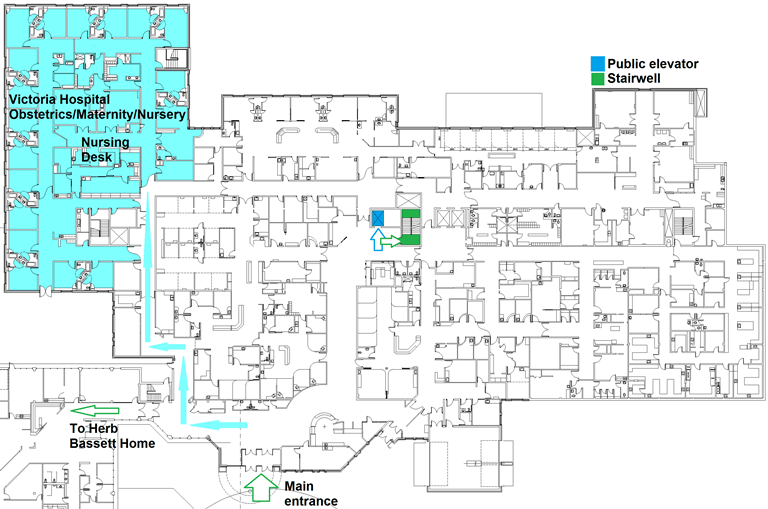
Victoria's Hospital Floor Plan - Graph Representation
- Overview
- Problem Statement
- Algorithm Design
- Features
- Project Structure
- Requirements
- Installation
- Usage
- How It Works
- Algorithm Details
- Example Output
- Future Enhancements
- Contributing
- Author
This project implements an automated path labelling algorithm designed for Victoria's Hospital floor plan to maintain COVID-19 safety protocols. The algorithm converts the hospital's physical layout into a graph representation and applies directional constraints to create one-way pathways, minimizing the risk of close contact between individuals.
- Graph-Based Solution: Hospital floor plans modeled as undirected graphs
- COVID-19 Compliance: Automated one-way path creation
- Theoretical Foundation: Based on Robbins' Theorem for graph orientation
- Efficient Pathfinding: Modified Depth-First Search (DFS) implementation
- Scalable Design: Supports multiple floor levels and complex layouts
During the COVID-19 pandemic, hospitals needed to enforce one-way traffic patterns to reduce transmission risk. The challenge was to:
- Convert complex hospital floor plans into graph representations
- Automatically label paths (hallways/corridors) with directional flow
- Ensure all rooms remain accessible while maintaining one-way restrictions
- Find optimal paths between any two locations following directional constraints
- Handle disconnected components and multiple floor levels
This problem is analogous to the One-Way Street Problem in graph theory, where an undirected graph must be oriented such that the resulting directed graph maintains strong connectivity.
The solution employs a multi-phase approach:
- Nodes represent rooms, junctions, and key locations
- Edges represent hallways and corridors
- Graph constructed from text files defining floor layouts
- Detection of connected components using DFS
- Identification of bridges and articulation points
- Validation of graph connectivity
Robbins' Theorem states: An undirected graph has a strongly connected orientation if and only if it is bridgeless (2-edge-connected).
The algorithm:
- Checks if the graph is bridgeless
- Applies orientation rules to create directed edges
- Ensures strong connectivity in the resulting directed graph
- Modified DFS to find paths respecting directional constraints
- Backtracking when paths violate one-way restrictions
- Multiple path discovery between source and destination
- ✅ Automatic Graph Construction from text-based floor plan data
- ✅ Multi-Floor Support with separate data files per floor
- ✅ Connected Component Detection for disconnected areas
- ✅ Bridge Detection to identify critical connections
- ✅ Directional Path Labelling following Robbins' Theorem
- ✅ Pathfinding Algorithm with directional constraints
- ✅ Room-to-Room Navigation with optimal route calculation
- ✅ COVID-19 Protocol Enforcement through one-way flows
Automated-Hospital-Path-Labelling/
├── src/
│   └── MAIN/
│       ├── Graph.java                  # Core graph implementation
│       ├── Edge.java                   # Edge class with direction
│       ├── AugmentedPair.java          # Helper data structure
│       ├── Contents.txt                # Main floor layout data
│       ├── Contents19.txt              # Floor 19 layout
│       ├── Contents20.txt              # Floor 20 layout
│       ├── Contents25.txt              # Floor 25 layout
│       ├── Contents34.txt              # Floor 34 layout
│       ├── Contents5.txt               # Floor 5 layout
│       └── Contents88.txt              # Floor 88 layout
├── out/                                # Compiled output
├── .idea/                              # IntelliJ IDEA configuration
├── HospitalPathLabelling.iml           # IntelliJ module file
└── README.md
- Java Development Kit (JDK): Version 8 or higher
- Java IDE: IntelliJ IDEA, Eclipse, or any Java IDE (optional but recommended)
- Operating System: Windows, macOS, or Linux
- Memory: 512 MB RAM minimum
- Storage: 50 MB free space
-
Clone the repository:
git clone https://github.com/sareenv/Automated-Hospital-Path-Labelling.git cd Automated-Hospital-Path-Labelling -
Open in IntelliJ IDEA:
- Open IntelliJ IDEA
- Select
File > Open - Navigate to the cloned directory
- Click
OK
-
Build the project:
- IntelliJ will automatically detect the project structure
- Wait for indexing to complete
- Build:
Build > Build Project
-
Clone the repository:
git clone https://github.com/sareenv/Automated-Hospital-Path-Labelling.git cd Automated-Hospital-Path-Labelling -
Compile the Java files:
javac -d out src/MAIN/*.java -
Run the main program:
java -cp out MAIN.Graph
-
Prepare floor plan data:
- Create or modify text files in
src/MAIN/(e.g.,Contents.txt) - Format: Each line represents a room and its connections
RoomNumber ConnectedRoom1 ConnectedRoom2 ... - Create or modify text files in
-
Run the algorithm:
java -cp out MAIN.Graph
-
Input parameters:
- Source room number
- Destination room number
- Floor level (if applicable)
1 2 5
2 1 3 6
3 2 4 7
4 3 8
5 1 6 9
...
Each line represents:
- First number: Room ID
- Following numbers: Adjacent rooms connected by hallways
-
Graph Construction
Graph g = new Graph();
g.readFromFile("Contents.txt");
- Reads room connectivity data from text files
- Creates nodes for each room
- Establishes edges for hallway connections
-
Connected Component Detection
g.findConnectedComponents();
- Identifies isolated sections of the hospital
- Ensures all rooms within a component are accessible
-
Bridge Detection
g.findBridges();
- Locates critical hallways that cannot be made one-way
- Essential for maintaining strong connectivity
-
Directional Labelling
g.orientGraph();
- Applies Robbins' Theorem
- Assigns directions to edges (hallways)
- Creates valid one-way path system
-
Pathfinding
List<List<Integer>> paths = g.findAllPaths(source, destination);
- Uses modified DFS respecting edge directions
- Finds all valid paths between rooms
- Returns optimal routes
The algorithm extends classical DFS with directional constraints:
void modifiedDFS(Node current, Node destination,
                Set<Node> visited, List<Node> path) {
    visited.add(current);
    path.add(current);

    if (current.equals(destination)) {
        // Found a valid path
        savePath(path);
        return;
    }

    for (Edge edge : current.getEdges()) {
        if (edge.isDirectedFrom(current) &&
            !visited.contains(edge.getDestination())) {
            // Only traverse if edge allows this direction
            modifiedDFS(edge.getDestination(), destination,
                       visited, path);
        }
    }

    // Backtrack
    path.remove(path.size() - 1);
    visited.remove(current);
}-
Check if graph is bridgeless:
- Run bridge-finding algorithm (Tarjan's algorithm variant)
- If bridges exist, mark them as bidirectional corridors
-
Orient edges:
- Start DFS from an arbitrary node
- Orient edges away from parent in DFS tree
- Back edges create cycles ensuring strong connectivity
-
Validate strong connectivity:
- Ensure every node is reachable from every other node
- Adjust orientations if necessary
=== Hospital Path Labelling System ===

Loading floor plan from Contents20.txt...
✓ Graph constructed: 47 rooms, 89 corridors

Analyzing connectivity...
✓ Connected components: 1
✓ All rooms are accessible

Detecting critical paths...
✓ Bridges found: 3
  - Corridor 12-15 (Emergency Exit)
  - Corridor 28-31 (ICU Connection)
  - Corridor 40-42 (Surgery Wing)

Applying directional labelling...
✓ Robbins' Theorem applied
✓ One-way paths configured: 86 corridors
✓ Bidirectional paths retained: 3 corridors

Enter source room: 5
Enter destination room: 42

Finding paths from Room 5 to Room 42...

Path 1: 5 → 7 → 12 → 15 → 20 → 28 → 31 → 38 → 40 → 42
Distance: 9 corridors

Path 2: 5 → 8 → 14 → 18 → 25 → 32 → 38 → 40 → 42
Distance: 8 corridors (Optimal)

✓ 2 valid paths found
Potential improvements for the algorithm:
- Visual Interface: GUI for displaying floor plans and paths
- Real-time Updates: Dynamic reconfiguration based on room closures
- Capacity Constraints: Limiting traffic on narrow corridors
- Multi-floor Navigation: Elevators and stairwell integration
- Distance Optimization: Shortest path with directional constraints
- Emergency Routing: Alternative paths for evacuations
- Analytics Dashboard: Traffic flow analysis and bottleneck detection
- Mobile App Integration: Real-time navigation for hospital staff
- 3D Visualization: Interactive 3D floor plan rendering
Contributions are welcome! If you'd like to improve the algorithm or add features:
- Fork the repository
- Create a feature branch (
git checkout -b feature/AmazingFeature) - Commit your changes (
git commit -m 'Add some AmazingFeature') - Push to the branch (
git push origin feature/AmazingFeature) - Open a Pull Request
- Algorithm optimization
- Additional floor plan examples
- Unit tests
- Documentation improvements
- GUI development
- Performance benchmarking
Vinayak Sareen
- GitHub: @sareenv
- Website: sareenv.com
- LinkedIn: Vinayak Sareen
- Email: sareenv026@outlook.com
Computer Science Project - Victoria's Hospital Path Optimization
- Robbins' Theorem: Foundational mathematical concept for graph orientation
- Victoria's Hospital: Floor plan data and real-world use case
- Graph Theory Community: Resources and research papers
- COVID-19 Research: Motivating the need for automated safety protocols
- Robbins, H. E. (1939). "A theorem on graphs, with an application to a problem of traffic control"
- Cormen, T. H., et al. (2009). "Introduction to Algorithms" - DFS and Graph Algorithms
- Tarjan, R. E. (1972). "Depth-first search and linear graph algorithms"
⭐ If you find this project useful, please consider giving it a star!
Note: This algorithm was designed as an academic project to demonstrate practical applications of graph theory in healthcare settings. For production deployment, additional safety validations and hospital regulations must be considered.