
Aivo /ˈeɪ.voʊ/ is a lightweight CLI that runs coding agents — Claude Code, Codex, Gemini,
OpenCode, Pi, and more — keeps your keys encrypted, and ships starter models that need no API key.




Docs · Install · Quick Start · Coding agents · Commands
Install script (macOS, Linux):
curl -fsSL https://getaivo.dev/install.sh | bashHomebrew:
brew install yuanchuan/tap/aivoPowerShell (Windows):
irm https://getaivo.dev/install.ps1 | iexThe built-in aivo/starter provider activates on first run, so no key is required to try it:
aivo "tell me a short story"
aivo claude
Add a key to access more models:
aivo keys add                                # interactive picker
aivo claude
aivo claude --model moonshotai/kimi-k2.5 # pin a model| Command | Agent | Type |
|---|---|---|
claude |
Claude Code | built-in |
codex |
Codex | built-in |
codex-app |
Codex.app desktop (macOS only, experimental) | built-in |
gemini |
Gemini CLI | built-in |
opencode |
OpenCode | built-in |
pi |
Pi Coding Agent | built-in |
amp |
Amp | plugin |
omp |
oh-my-pi | plugin |
copilot |
GitHub Copilot CLI | plugin |
grok |
Grok CLI | plugin |
aivo claude                                  # launch with active key
aivo claude "fix the login bug"              # pass-through args
aivo claude -m moonshotai/kimi-k2.5          # pin a model (bare -m opens picker)
aivo codex -k openrouter                     # use a specific saved key
aivo pi --dry-run                            # preview command + env, don't launch
aivo opencode --debug                        # JSONL log of upstream HTTP traffic
Without a tool name, aivo run opens the tool picker — native agents and installed coding-agent plugins.
| Command | What it does |
|---|---|
keys |
Manage saved API keys (encrypted) |
account |
Link a device, check plan & usage |
models |
List models from the active provider |
code |
Built-in terminal coding agent |
hf |
Run open-weight GGUF models locally |
serve |
Local OpenAI-compatible endpoint |
alias |
Shortcuts for models and launch presets |
logs |
Unified activity feed across tools |
stats |
Token usage across every tool |
update |
Update aivo to the latest version |
plugins |
Add custom aivo-<name> commands |
Manage saved API keys. Stored AES-256-GCM encrypted in the user config directory.
aivo keys                                    # list
aivo keys add                                # interactive picker
aivo keys use openrouter                     # switch active key
aivo keys cat | edit | rm <name>
One-liner.
aivo keys add --base-url https://api.groq.com/openai/v1 --api-key sk-xxxMove keys between machines via a password-encrypted file:
aivo keys export ~/bak.keys     # prompts for password
aivo keys import ~/bak.keys     # same password on the other machine
aivo keys import https://example.com/bak.keys   # or from a URL

# non-interactive with password on stdin
aivo keys export ~/bak.keys --password-stdin <<< "my secret password"Link this device to your getaivo.dev account to unlock higher
aivo/starter limits, then check your plan and usage.
aivo account login/logout
aivo account usage                           # requests/tokens, daily caps, per-model
aivo account usage --json                    # machine-readable usage
aivo account login --label "work laptop"     # name this device in your account
aivo account open # open your dashboard in the browserList models from the active provider. Cached for one hour.
aivo models
aivo models --refresh                        # bypass cache
aivo models -s sonnet                        # filter by substring
aivo models --json | jq '.models[].id'aivo code is the built-in coding agent in your terminal.
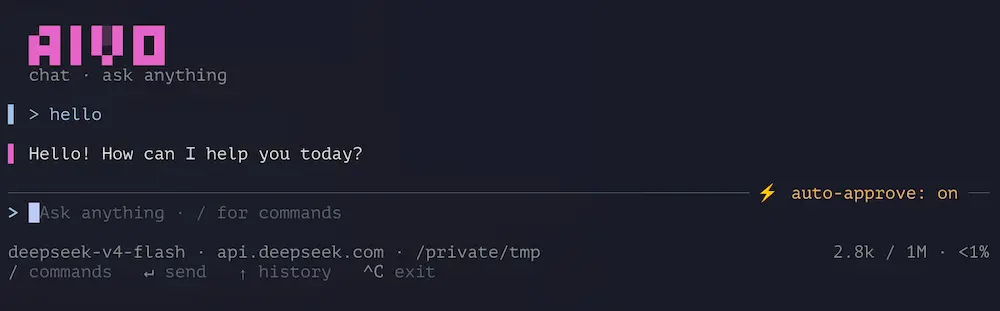
aivo code                                    # full-screen agent TUI
aivo code -m gpt-4o                          # pick a model (remembered per key)
aivo code --attach README.md                 # attach a file for the agent to read
One-shot mode with -p:
aivo -p "Summarize this repo"                # same, via the explicit flag
git diff | aivo -p "Write a commit message"  # piped stdin appended as context
cat error.log | aivo -p                      # stdin alone becomes the prompt
Headless agent mode with -e/--exec runs tools and exits. Limit long unattended
runs with --max-steps <N> or --max-output-tokens <N> (0 disables each limit).
aivo code -e "make the failing test pass"
aivo code -e "fix lint" --max-steps 50 --max-output-tokens 20000Run open-weight GGUF models locally, it fetches and caches them from HuggingFace repositories.
aivo code hf:Qwen/Qwen2.5-0.5B-Instruct-GGUF
aivo https://huggingface.co/allenai/Olmo-3-1025-7B              # full URL also works
aivo code hf:bartowski/Llama-3.2-3B-Instruct-GGUF:Q5_K_M        # pin a specific quant
aivo pi -m hf:Qwen/Qwen2.5-0.5B-Instruct-GGUF                   # any tool that accepts -m
The hf: form is accepted anywhere a model is — -m, code's positional REF, and as a bare top-level arg (which rewrites to aivo code hf:...). Full HuggingFace URLs (https://huggingface.co/...) work the same way.
The local llama-server is configured from the model, no setup required: it runs at the model's real context window (capped at 65536), and if the repo ships an mmproj-*.gguf projector or a *-MTP.gguf draft model, those are pulled and wired up automatically — enabling image input and speculative decoding respectively. Tune or opt out with environment variables:
AIVO_LLAMA_CTX=16384      # override the context size (e.g. on a low-RAM machine)
AIVO_LLAMA_ARGS='--temp 0.1'  # pass extra llama-server flags (override aivo's)
AIVO_LLAMA_MMPROJ=off     # skip the auto-detected vision projector
AIVO_LLAMA_DRAFT=off      # skip the auto-detected speculative-decoding draft model
AIVO_LLAMA_NGL=20         # GPU layers to offload (AIVO_GPU=cpu disables GPU)
Manage the cached GGUF files (under ~/.config/aivo/cache/huggingface):
aivo hf                                       # list cached repos
aivo hf list --verbose                        # show individual files
aivo hf pull hf:Qwen/Qwen2.5-0.5B-Instruct-GGUF
aivo hf rm <repo> --quant Q5_K_M              # delete one quant
aivo hf rm <repo> --all -y                    # delete whole repo
aivo hf clean -y # wipe everythingExpose the active provider as a local OpenAI-compatible endpoint.
aivo serve                                   # http://127.0.0.1:24860
aivo serve -p 8080 --host 0.0.0.0
aivo serve --failover                        # retry across keys on 429/5xx
aivo serve --cors                            # enable CORS for browser clients
aivo serve --auth-token                      # require bearer token (auto-generated)
aivo serve --log /tmp/requests.jsonlShort names for models or launch presets. Both share one namespace.
aivo alias                                   # list
aivo alias fast=claude-haiku-4-5             # model alias
aivo alias quick claude --key work -m fast   # launch alias

aivo claude -m fast                          # use anywhere `-m` is accepted
aivo quick                                   # invoke launch alias directly
aivo quick -k personal                       # explicit flags override the preset

aivo alias rm fast                           # remove (works for both kinds)
Names that collide with built-in subcommands or tool names are rejected.
Unified activity feed across aivo's own events (code, run, serve) and native CLI sessions (claude, codex, gemini, pi, opencode). Defaults to the current project's cwd; use -a for every project.
aivo logs                                    # current cwd, newest first
aivo logs -a                                 # all projects
aivo logs show <id>                          # logs.db id or native session id

aivo logs --by claude -n 5                   # claude run-events + native sessions
aivo logs --by native                        # only native CLI sessions
aivo logs -s "rate limit" --since 7d --errors
aivo logs --watch --jsonl                    # live tail as JSONL
Share a session via a tunneled viewer URL:
aivo logs share                              # interactive picker
aivo logs share <id> # share by id prefixAggregates token counts from aivo code, Claude Code, Codex, Gemini, OpenCode, and Pi by reading each tool's native data files.
aivo stats
aivo stats --by claude --since 7d            # one tool, recent window
aivo stats --by omp                          # a coding-agent plugin
aivo stats -s openrouter -n                  # filter, exact numbers
aivo stats --json | jq '.totals.tokens'Update to the latest version. Delegates to Homebrew or npm when installed by those package managers.
aivo update
aivo update --force                          # force even if pkg-managed
aivo update --rollback                       # restore previous backup
aivo update --sync-model-data # sync model metadataAdd a top-level command — a standalone aivo-<name> executable, in any language, that aivo runs
as aivo <name>. Plugins run with your privileges; install only ones you trust. Full contract:
docs/PLUGIN-PROTOCOL.md.
aivo plugins install ./aivo-amp              # local file or http(s) URL
aivo plugins install github:owner/aivo-amp   # GitHub release (OS/arch asset)
aivo plugins install npm:aivo-foo            # npm package (node shim)
aivo plugins install cargo:aivo-bar          # cargo install from crates.io
aivo amp --help                              # runs the sibling aivo-amp
aivo plugins list                            # installed, with version/roles/caps
aivo plugins update amp                      # re-fetch / re-resolve the recorded source
aivo plugins rm amp